Every few months Slack ships something that changes what’s actually possible in the app.
In June, Slackbot learned who you are and connected to your systems. In July, it put that knowledge to work, giving everyday users AI superpowers to move work forward, inside the conversation.
In August, Slackbot starts scaling with your team, not just answering one person at a time.
Skills, work together as a team
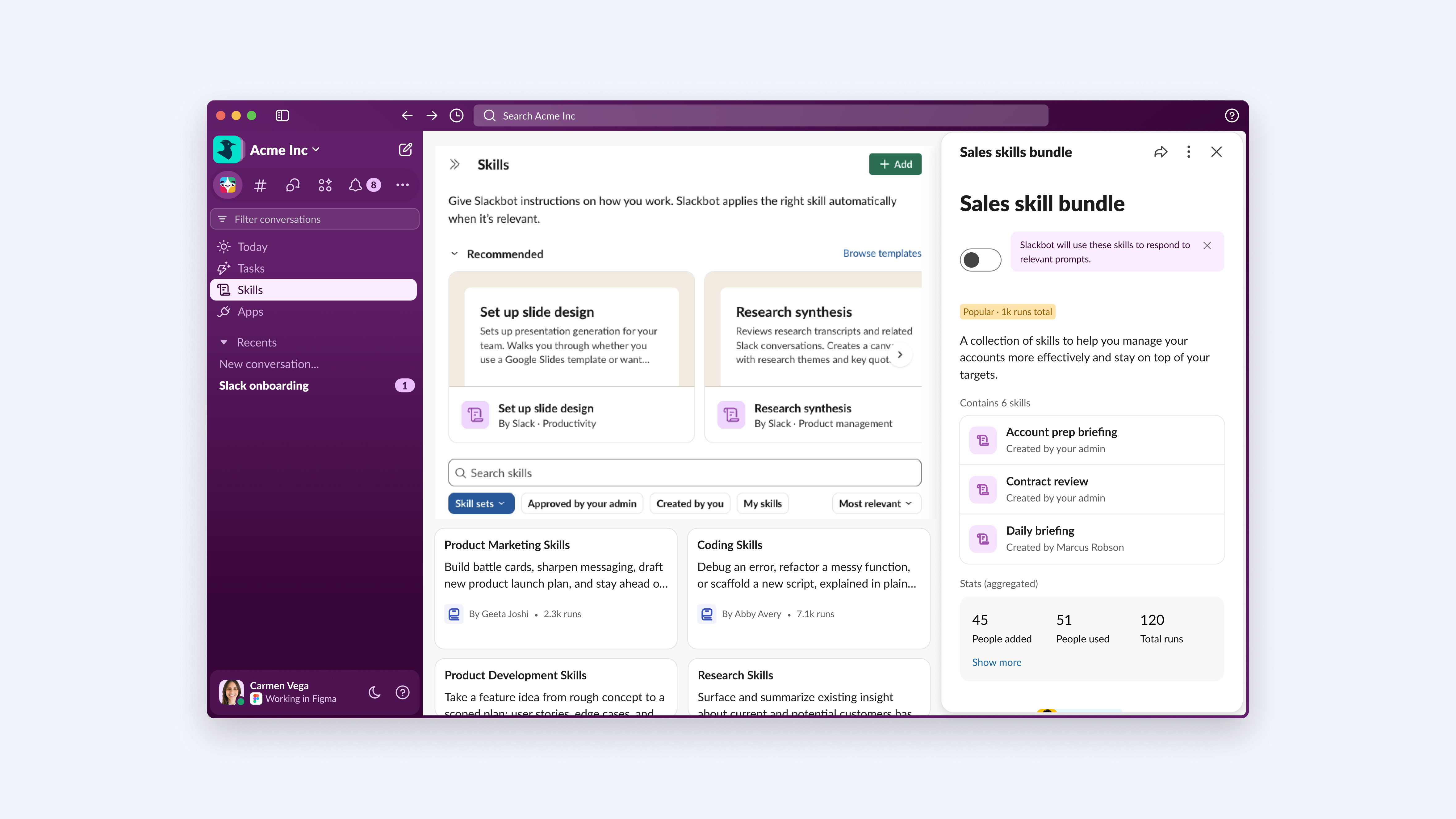
A single Skill already saves time. The catch is sharing it: today, that’s a one-at-a-time drag, sending each skill and asking each person to accept it. Skill Sets fixes that. Bundle related skills into one collection and share the whole thing in a single click.
An IT admin building a “Helpdesk AI Kit”, a triage skill, a ticket-creation skill, an escalation skill, shares it org-wide once. Every new hire gets the whole kit on day one, and when the admin adds a new skill to the set, it shows up for everyone automatically. A sales leader can do the same with an “Account Research Kit”: brief, competitive intel, and call prep skills, so the whole team runs the same playbook instead of everyone reinventing their own. And once a team builds something that works, they can share it with a team in another Slack org, without that team having to rebuild it.
It reasons, instead of just retrieving
Deep Research dives into insights across your org’s data and the public web, following the thread wherever it leads, then reasons through what it finds to provide a synthesized report. It’s built for the questions that don’t have a clean answer sitting in one document and that require actually thinking through, not just retrieval.
An account exec prepping for a competitive deal can ask Slackbot for a brief on a prospect’s tech stack. Deep Research pulls from Slack account channels, Salesforce opportunity history, and web research on the prospect’s vendors, and returns a cited report in minutes instead of the hours it usually takes to piece that together by hand.
A workspace built for the deep work
Big Mode turns Slackbot into a full-screen, agentic workspace. Built for long-form research, multi-step analysis, file generation, and drafts that need iteration. You get the space of a dedicated tool with none of the tab-switching, because it’s still the same conversation, just with more room to work.
An account executive planning a trip to meet clients can open Big Mode, run the Account Roadshow skill, and see a Geographical Pipeline surface ranking open deals by state, stage, and account, so they know exactly which meetings to prioritize before they ever leave for the airport.
Ready to see it in action?
Start with Skill Sets, bundle up the skills your team uses most, and deploy them together instead of piecing them together one at a time.
What shipped on August 26
- Big Mode. A full-screen Slackbot workspace built for deeper, longer-form work like research, writing, and analysis, without leaving the conversation. Draft a multi-page strategy brief or post-mortem, then push the finished doc straight into a Surface and pin to a channel for the team to react to in real time.
- Skill Sets. Bundle a related set of skills the whole team can run on, so teams get a coordinated set of capabilities from day one. Assign a “Sales Enablement” or “Incident Response” Skill Set straight to a user group or channel, and everyone gets the same workflows from day one.
- Deep Research. Ask a complex or open-ended question and Slackbot digs across your org’s internal data and the web, reasoning through what it finds instead of just returning an answer. Before a client pitch or exec review, turn years of history from Slack Search, files, and live web data into an executive summary attached right to the thread.
- Tasks Tab Enhancements A dedicated tab to view, run, and manage all your scheduled Slackbot tasks in one place. Project managers can track, edit, and trigger recurring routines, like daily async standups or weekly status pulls, without cluttering team threads.
- Skills Admin Dashboard An admin view showing which Slackbot skills are being used across your org, with usage stats and management controls. Enterprise admins can audit Slackbot Skills usage and permissions, then roll out top performers org-wide to boost adoption and stay compliant.
- Slackbot External Skills Share Skill authors can generate a link so someone in a different Slack org can copy the skill into their own library. For example, agency partners working with vendors in a Slack Connect channel can share a proprietary skill by link, letting the other side clone and adapt it locally without live access to internal systems.
Availability of Advanced Features
Slackbot continues to deliver what we’re calling Advanced Features: capabilities that do more and need more compute to run. Advanced Features will keep showing up wherever Slackbot does.
Quick note on availability: there are no limits to Advanced Features at launch for Enterprise+ customers. Down the road, we may introduce limits given their higher compute costs, but we’ll give customers 30 days notice before that happens. Standard Slackbot messaging use outside of these new Advanced Features remains unlimited for Enterprise+ customers.
For more on Slackbot availability, check out our help center.
 Ótimo!
Agradecemos seu feedback!
Entendi!
Agradecemos seu feedback.
Estamos com problemas. Tente novamente mais tarde.