
As recentes atualizações têm como objetivo suavizar as arestas do trabalho real. De fluxos de trabalho e automações mais intuitivos a uma colaboração mais rica em canvas, além de análises, acessibilidade e integrações mais detalhadas com o Salesforce, esses recursos ajudam as equipes a gastar menos tempo gerenciando o trabalho e mais tempo fazendo-o avançar. Um Slackbot atualizado adiciona inteligência contextual, com as proteções de IA integradas que priorizam a segurança e a confiança.
O Slackbot ganhou um upgrade de estilo e um grande reforço de inteligência.
Este mês, apresentamos a nova versão do Slackbot, que deixa de ser apenas um assistente de notificações para se tornar seu agente de IA pessoal para o trabalho. Integrado nativamente ao Slack e sem necessidade de nenhuma configuração, o Slackbot está sempre por dentro de tudo, porque funciona exatamente onde seu trabalho acontece. Ele assume as tarefas mais pesadas para que você possa se concentrar no que realmente importa.
Mas, na prática, o que isso muda no seu dia a dia? O Slackbot transforma a confusão de dados, mensagens e arquivos espalhados em ações claras, pois:
- Gera resumos instantâneos: pare de pesquisar em longas conversas e ache o que você necessita instantaneamente. O Slackbot cria destaques de canais de projetos movimentados, resume conversas extensas e destaca os principais pontos de um círculo que você não conseguiu acompanhar.
- Encontra arquivos, conversas e todo o contexto por trás deles: além de localizar exatamente os arquivos e as conversas de que você precisa, o Slackbot explica o que está por trás de cada informação. Ele mostra quem tomou determinada decisão, o que foi discutido na conversa e o que isso significa, na prática, para o seu trabalho neste momento.
- Cria rascunhos no seu tom de voz: chega de encarar a tela em branco. Seja para um esboço de blog, um e-mail delicado ou um briefing de projeto, o Slackbot cria um primeiro rascunho refinado já alinhado ao seu tom e ao seu contexto.
- Analisa os arquivos de forma aprofundada: chega de forçar a vista em PDFs no fim do dia. Você pode pedir ao Slackbot para extrair dados específicos de uma apresentação de 40 páginas, identificar tendências em uma planilha ou fazer a referência cruzada de um relatório com uma conversa.
O que realmente diferencia o Slackbot em meio a tantos chatbots genéricos é algo simples: o contexto. Enquanto a maioria das ferramentas de IA funciona como um estagiário que não leu o briefing (e faz você perder tempo explicando todo o contexto), o Slackbot é aquele colega que estava na reunião com você. Como ele entende seus projetos, as pessoas com quem você trabalha e a forma como as decisões são tomadas, dá respostas confiáveis, sempre seguindo padrões de segurança empresarial e respeitando as permissões que você já tem. Na prática, isso significa menos tempo “caçando” informações e mais tempo agindo, sem interromper seu ritmo de trabalho. Disponível para clientes Business+ V2, Enterprise+ (administradores podem precisar ativar o recurso no workspace) e para clientes Grid e Select (com complemento de IA).
O Slackbot impulsiona o trabalho. O Slack cuida do resto.
O Slackbot ajuda você a decidir o próximo passo, e o Slack executa tudo depois disso. Assim que você define o que precisa acontecer, o Slack transforma essa orientação em ações entre agentes, fluxos de trabalho, documentos e sistemas que já fazem parte do seu dia a dia. Os agentes ficam mais fáceis de encontrar e gerenciar, os fluxos são acionados naturalmente pelas conversas e as tarefas de configuração passam quase despercebidas. Com elementos visuais mais claros, pré-visualizações mais ricas e dados ao vivo do Salesforce sempre no contexto, essas atualizações reduzem atritos em cada etapa, para que o trabalho avance com menos cliques, menos configurações e menos momentos “depois eu vejo isso”.
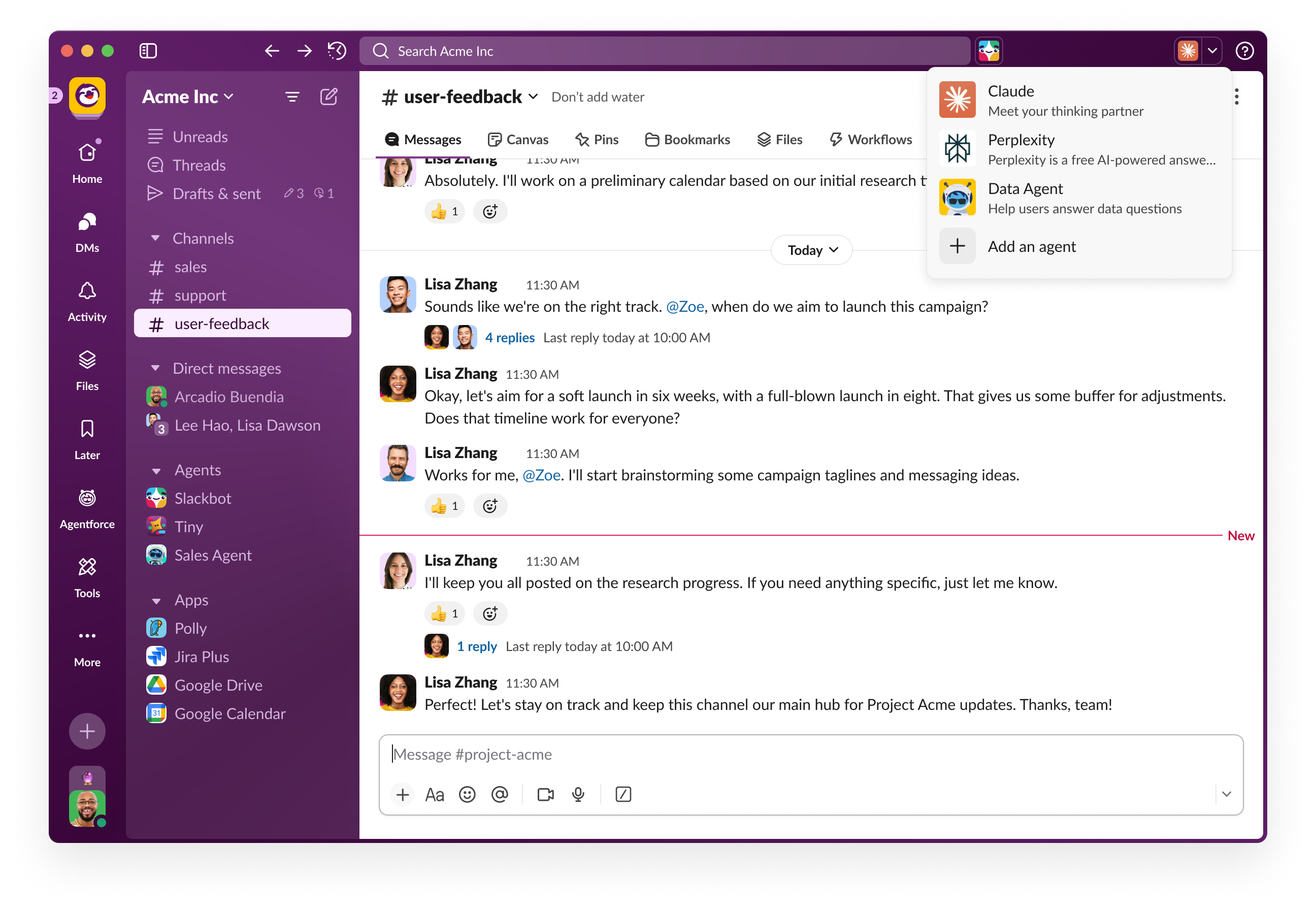
- Nova experiência de Agent Sunroof: o Agent Sunroof foi totalmente remodelado para tornar a descoberta e o gerenciamento de agentes de IA no Slack mais simples do que nunca. A nova experiência traz uma lista mais intuitiva e bonita, que permite adicionar e remover agentes diretamente pela barra superior, sem precisar procurar nas configurações. Para quem está começando, um estado inicial orienta a adicionar o primeiro agente com apenas um clique. O novo design também traz itens maiores e com maior apelo visual, pesquisa aprimorada para encontrar os agentes ideais para cada necessidade e integração fluida com a experiência unificada de MDs. Disponível para todos os planos, com implementação completa até fevereiro.
- Upgrades dos objetos de trabalho: as atualizações mais recentes tornam a visualização e a interação com documentos muito mais simples: agora as pré-visualizações de arquivos abrem em largura total, com a barra lateral oculta para evitar distrações; o modo de edição está mais acessível, com indicadores de campos mais claros; e mensagens publicadas por fluxos de trabalho agora são compatíveis com prévias de links de apps. Entre as melhorias de navegação estão uma barra de guias fixa no painel flexível, a possibilidade de encaminhar anexos de objetos de trabalho de canais privados e ações rápidas para abrir conversas diretamente dos cartões de prévia. Vários links externos passam a ser exibidos automaticamente em prévias compactas, melhorias visuais aumentam a legibilidade dos cartões, e novas mensagens de confirmação e guias contextuais ajudam a orientar o uso de recursos como copiar links e atualizar pré-visualizações de arquivos. Disponível em todos os planos (o acesso a licenças de terceiros pode se aplicar).
- Postagens de mensagens automáticas: este acionador permite criar fluxos de trabalho que são acionados automaticamente quando determinadas palavras-chave são postadas em canais públicos. Entre os principais usos estão reduzir o ruído em canais de monitoramento com alto volume de mensagens, acompanhar termos como “sev” ou “incidente” e seguir conversas sobre temas relevantes para você em canais específicos. Principais recursos:
- Criar até cinco condições de palavras-chave por fluxo de trabalho
- Combinar palavras-chave incluídas e excluídas
- Escolher até 20 canais públicos para observar
- Definir filtros adicionais para conversas, automações e agentes do Agentforce
- Incluir o texto da mensagem nas etapas seguintes do fluxo de trabalho
- (Disponível para clientes dos planos Pro, Business+ e Enterprise+)
- Lembretes de texto alternativo para acessibilidade: o texto alternativo (descrição de imagens) ajuda pessoas com deficiência visual a participar plenamente de conversas que incluem imagens. O Slack já oferece suporte a texto alternativo há bastante tempo, mas ele podia passar despercebido durante o envio de imagens. Esta atualização deixa o recurso mais simples e visível, além de adicionar lembretes opcionais que os próprios usuários podem ativar, ou que os administradores podem habilitar para todo o workspace. Quando ativados, os lembretes aparecem no momento do envio na web e no computador, e como um selo nas miniaturas das imagens no iOS e no Android, ajudando as equipes a adotar, por padrão, práticas mais acessíveis. Disponível em todos os planos.
- Automações de canais do Salesforce: novos recursos aprimoram as automações de canais do Salesforce no Slack com duas melhorias principais. Primeiro, um novo acionador “Quando um canal do Salesforce é criado”, que aciona automaticamente fluxos de trabalho quando canais são criados manualmente (por meio do componente LEX ou das exibições de listas do Slack), permitindo automatizar a adição de usuários e a configuração de canais. Segundo, a possibilidade de adicionar usuários de objetos subordinados aos canais, trazendo participantes de registros relacionados do Salesforce que não têm relacionamento direto com o registro principal, garantindo assim uma colaboração mais completa. Ambos os recursos estão disponíveis para administradores de vendas e funcionam dentro da estrutura do Criador de fluxo de trabalho existente. Clientes que usam a nova conexão de autenticação integrada entre Salesforce e Slack podem acessar as funcionalidades.
- Campos de dados do Salesforce no canvas: os campos de dados são campos sincronizados em dois sentidos que permitem trazer dados do Salesforce para qualquer seção de um canvas, mantendo sempre a fonte de informação atualizada. Pense nos campos de dados como um novo e poderoso bloco de construção para casos de uso entre Slack e Salesforce, como planos de conta, planos de fechamento de oportunidades, briefings executivos, pesquisas de contas e muito mais. Disponível agora para a maioria dos clientes Business+ e Enterprise+ (implementação completa até o final de fevereiro).
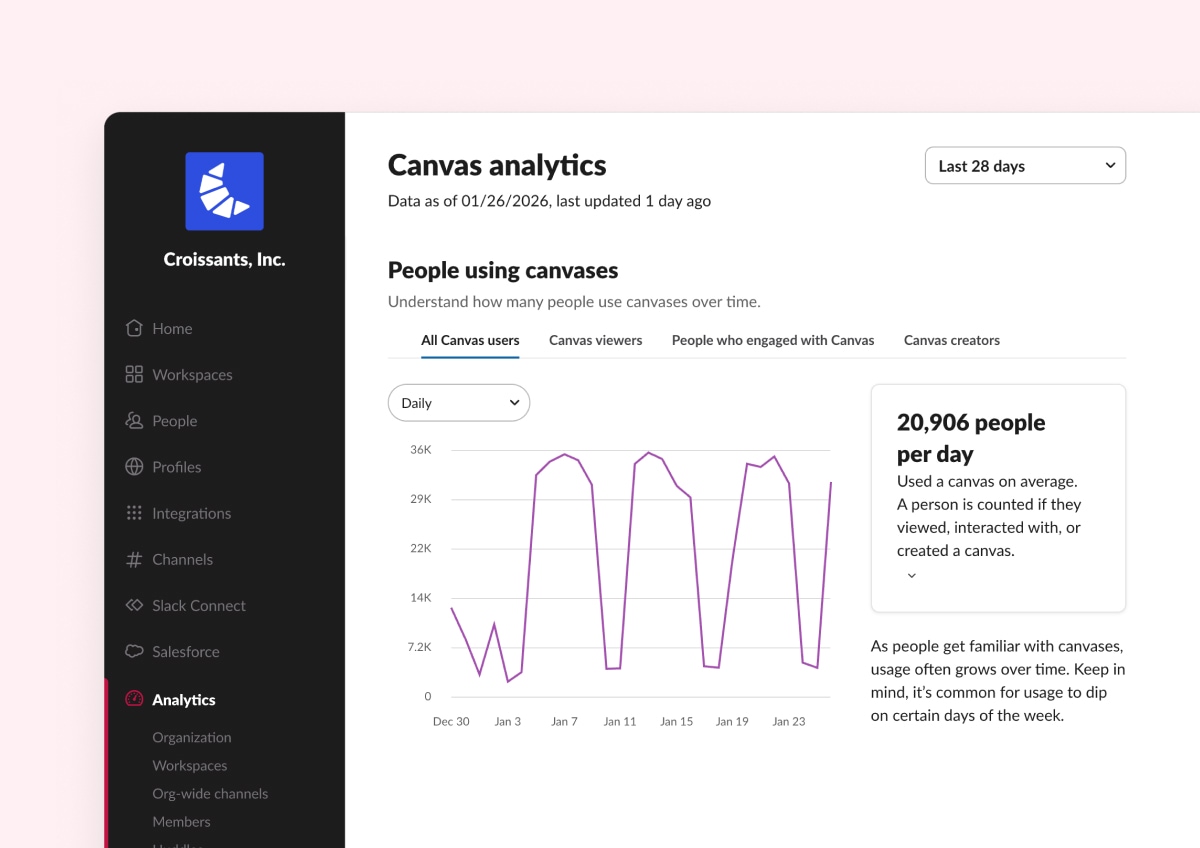
- Análise de canvas: agora, os administradores têm uma visão muito mais completa de como as equipes usam os canvas. Além de visualizações, edições, comentários e criações, os relatórios passam a incluir também compartilhamentos e reações, além de uma nova guia de uso geral que reúne todas as interações em um único lugar. Isso permite entender melhor o engajamento e como as equipes realmente colaboram em torno dos conteúdos nos canvas. Disponível para os planos Enterprise+ e Grid.
Proteções integradas para IA no trabalho.
Com tanta coisa acontecendo nos bastidores, confiança e controle se tornam ainda mais importantes. No Slack, acreditamos que a IA deve tornar o trabalho mais simples e produtivo, sem jamais comprometer a confiança. Por isso, nossos recursos de IA são incorporados diretamente ao Slack, com controles claros e camadas robustas de proteção. São os administradores que decidem se a IA estará ativada, e todas as interações com IA contam com as Proteções de IA do Slack, nossa estrutura de segurança em múltiplas camadas, criada para garantir que a IA seja confiável, adequada e segura em ambientes reais de trabalho.
- Os recursos de IA são opcionais e controlados pelos administradores do workspace
- As Proteções de IA do Slack ajudam a reduzir alucinações e respostas inseguras
- A filtragem de conteúdo em tempo real ajuda a bloquear respostas prejudiciais ou inadequadas
- As proteções foram desenvolvidas especificamente para cenários de uso no ambiente de trabalho
No Slack, a IA também é desenvolvida com privacidade e proteção de dados como prioridade. Dados de clientes, mensagens, arquivos e conversas nunca são usados para treinar modelos de linguagem. A IA trabalha apenas com informações às quais o usuário já tem permissão de acesso, e essas permissões são sempre respeitadas. Além disso, nossos modelos operam dentro da estrutura de nuvem segura do Slack, garantindo que os dados dos clientes não saiam do ambiente de confiança nem fiquem acessíveis a provedores de terceiros.
- Os dados dos clientes nunca são usados para treinar LLMs
- A IA respeita as permissões e os controles de acesso já existentes no Slack
- A IA só exibe informações que os usuários já têm permissão para ver
- Os modelos operam dentro da infraestrutura segura do Slack, e não em sistemas externos
No Slack, também lançamos recentemente o novo recurso de Exclusões de IA, que adiciona uma camada extra de controle ao restringir o acesso a determinados canais, canvas e listas pelos recursos de IA. Agora, administradores e proprietários (da organização e do workspace) podem marcar canais específicos, além de canvas e listas, como excluídos do uso da IA no Slack. Quando um desses espaços é marcado como excluído, seu conteúdo não é usado para resumos, pesquisas, recomendações ou contexto de dados em recursos de IA do Slack. Especificamente as Respostas de IA e a IA do Slackbot. Esse controle está disponível apenas para clientes Enterprise+. A novidade ajuda as equipes a ter mais controle sobre quais dados contribuem para as respostas da IA, aumentando a confiança nos produtos de IA do Slack e facilitando a adoção desses recursos na organização. As mudanças incluem:
- Controles de exclusão no nível do canal
- Controles de exclusão no nível de canvas e listas (apenas no computador)
- Atualizações no painel da organização para gerenciamento de canais
Essas atualizações reduzem atritos em toda a experiência no Slack, de um Slackbot mais inteligente a fluxos de trabalho mais fluidos e proteções de IA integradas. Ative os recursos e veja como fica mais fácil fazer o trabalho avançar, exatamente onde ele acontece.
Confira nossa página da Web de Inovações para ver lançamentos anteriores.
Observe que alguns recursos podem não estar disponíveis imediatamente no seu workspace, dependendo do cronograma de implementação, do seu plano de licenciamento do Slack ou de requisitos de licenças adicionais. Para saber mais sobre a disponibilidade dos recursos, consulte seu administrador sobre os planos de licenciamento do seu workspace.
Quer saber mais? Fale conosco.
 Ótimo!
Agradecemos seu feedback!
Entendi!
Agradecemos seu feedback.
Estamos com problemas. Tente novamente mais tarde.