Dirigir una pequeña empresa implica administrarlo todo, y tu tiempo es demasiado valioso para gastarlo en el ingreso de datos. Para los equipos reducidos, la información más importante de los clientes no está en una base de datos, sino en las decisiones veloces, los seguimientos ágiles y las conversaciones cotidianas que ya suceden en Slack. Ahora, esas conversaciones tienen otro propósito.
Por eso, presentamos la CRM de Slack, que está integrada de forma nativa en Slack y usa la tecnología de Salesforce. Es administración de clientes diseñada para la forma real de trabajo de los equipos pequeños, ya que es rápida, flexible, conversacional e inteligente. No es necesario «ir a la plataforma de CRM» o rastrear una hoja de cálculo para registrar el trabajo, ya que los datos de los clientes están en Slack, el mismo lugar donde colabora tu equipo.
Es una forma completamente nueva de mantener el orden y administrar las relaciones con los clientes mediante simples conversaciones. Puedes rastrear prospectos, administrar negociaciones y ocuparte del soporte desde la primera interacción hasta el cierre, y todo sin abrir otra pestaña ni aprender cómo usar una herramienta nueva. Solo tienes que hablar con Slackbot, tu agente de IA personal para el trabajo, para que se encargue del resto. Por fin llegó la CRM que habla tu idioma.
Descubramos cómo la CRM de Slack mantiene a tu equipo sincronizado, cómo Slackbot se encarga del trabajo improductivo para que te concentres en las relaciones y por qué una base en Salesforce te brinda la oportunidad de ampliar tus capacidades en el momento en que lo necesites.
Contexto del cliente disponible donde trabajas
Si tú fundaste la empresa, te encargas de las ventas, de administrar las cuentas y de dirigir el soporte al cliente, probablemente no tengas tiempo para buscar información en hilos antiguos o buscar una llamada crítica en tu bandeja de entrada. Necesitas acceder rápido a un panorama completo de una relación con el cliente. La CRM de Slack incorpora ese historial directamente en la barra lateral de Slack en la pestaña nueva de Salesforce, por lo que todos tienen una vista compartida y en tiempo real de todas las cuentas.
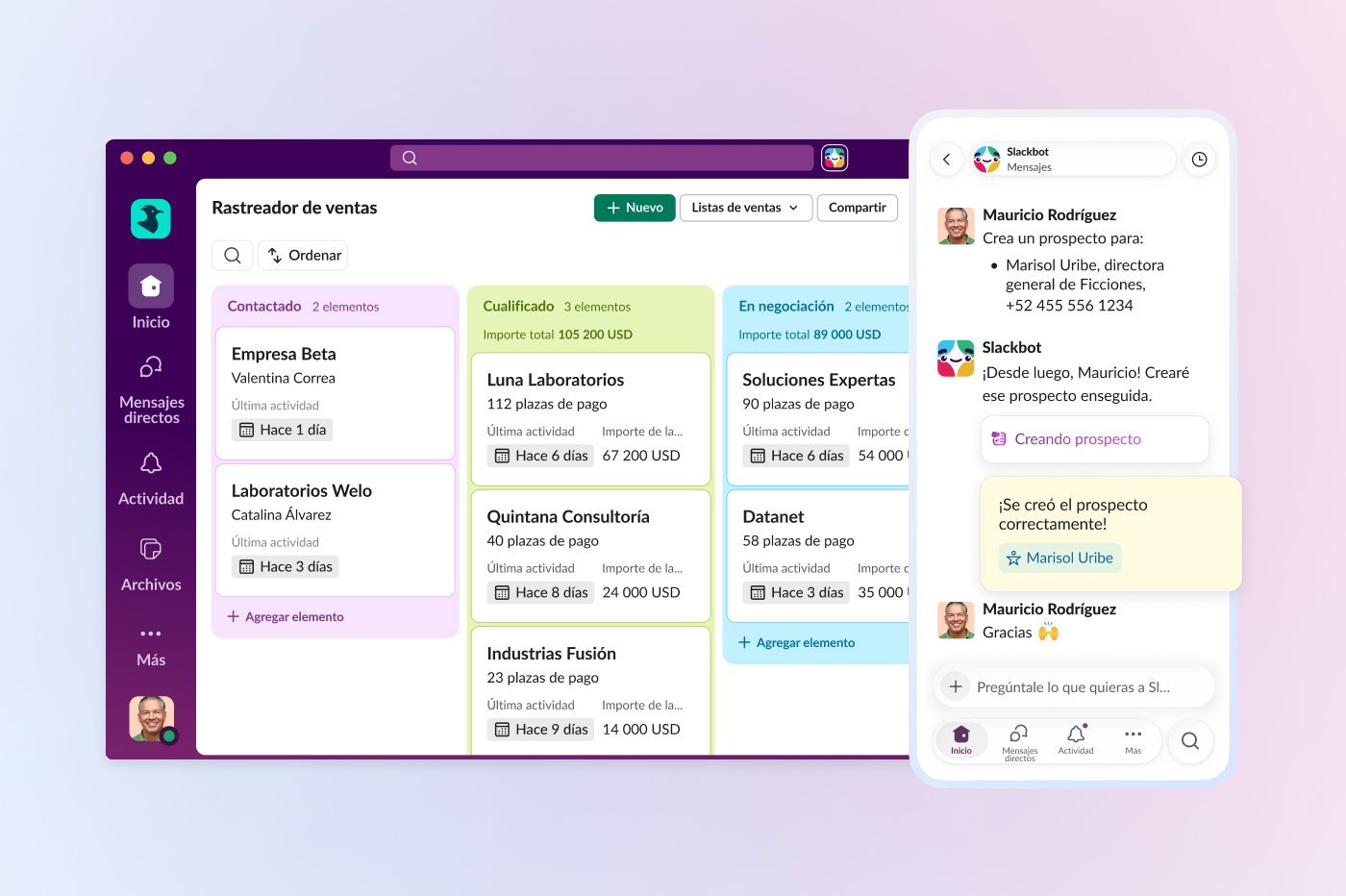
Debido a que los datos de tus clientes se encuentran directamente en Slack, puedes acceder a vistas completas de todas tus cuentas, prospectos y negociaciones en cualquier momento. El rastreador de ventas ofrece un proceso visual con etapas, y te permite administrar todo el proceso de ventas mediante una sencilla función de arrastrar y soltar. Los equipos pequeños pueden ver exactamente en qué etapa se encuentra cada negociación, hacer seguimiento de los importes de las negociaciones y avanzar rápido sin cambiar entre herramientas. Este panel compartido y dinámico se mantiene actualizado a medida que tu equipo trabaja, para brindarte una vista rápida e inmediata del estado del proceso.
Como tus correos electrónicos y eventos de calendario se sincronizan automáticamente con los registros, el historial de las cuentas se mantiene siempre al día. Puedes actualizar los detalles de una negociación directamente en el panel o, aún mejor, pedirle a Slackbot que lo haga por ti. Al hacer clic en un registro, se abre una vista detallada que muestra un resumen completo de la cuenta, incluidas todas las notas internas, las actualizaciones de etapa de la negociación y las interacciones del equipo en un solo lugar. Cuando un compañero continúa una conversación ya iniciada, no necesita preguntar cuáles son las últimas novedades: la historia completa ya está en Slack.
Con la incorporación de la CRM de Slack:
- Mantén sincronizado a todo el equipo: todos verán las mismas actualizaciones, seguimientos y estados de negociaciones en tiempo real para que no sea necesario preguntar quién fue el último en hablar con el cliente.
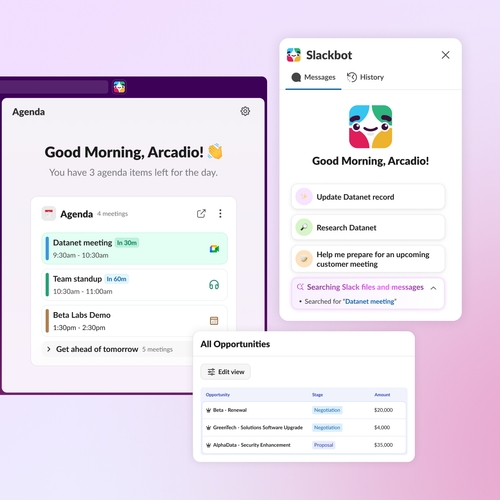
- Explora tu día desde una ubicación: tus reuniones se muestran en una única vista de agenda, lo que te permite administrar tu programa y acceder a detalles de cuentas sin tener que ir de un lado a otro.
- Captura prospectos y casos nuevos apenas ingresen: las solicitudes de formularios web o correos electrónicos entrantes van directamente a los canales de Slack, lo que te permite reenviarlos y resolverlos en segundos.
- Actualiza tus procesos al instante: administra todas tus cuentas, prospectos y oportunidades en una única lista o, simplemente, dile a Slackbot que actualice por ti la información de las negociaciones sin abandonar la conversación.
- Actualiza registros sin clics: ahora, tus correos electrónicos y eventos de calendario se sincronizan con tus registros automáticamente, por lo que se agrega información al historial compartido del equipo mientras trabajas.
«Tener todo en un solo lugar es revolucionario. Puedo prepararme y navegar mi día con la vista de agenda y las áreas de enfoque sugeridas por Slackbot sin tener que salir nunca de Slack».
Enfócate en los clientes, no en la base de datos
El crecimiento no debería detenerse por la lentitud administrativa de las actualizaciones manuales. Ahora, Slackbot se encarga del trabajo pesado y convierte tus conversaciones en registros organizados realmente útiles.
Como Slackbot está donde trabajas, organiza los datos y conecta toda la información. Slackbot conoce tus canales, conversaciones y clientes, y reúne el contexto apropiado en segundos, ya que actúa como un compañero inteligente que siempre está al tanto de todo. En lugar de perder el tiempo con preparaciones y papeleo, puedes estar al día con tus relaciones mediante conversaciones sencillas.
Antes de una reunión, basta con pedirle a Slackbot: «Investiga esta cuenta» o «Prepárame para mi reunión de las dos». Se encargará de reunir datos de todas tus conversaciones de Slack y conectarlos, además de resumir todo en un resumen de la cuenta que todo el equipo pueda ver y editar dentro de Slack.
«Antes de una llamada con un cliente, puedo preguntarle a Slackbot “¿Qué le garanticé a este cliente?”, y extrae todas las promesas que hice en nuestras conversaciones. No es necesario navegar por hilos, y no se pierden comunicaciones de seguimiento».
Cuando avanza una negociación, no es necesario detener una conversación para registrar el cambio. Simplemente, dile a Slackbot lo que pasó («Cerramos el acuerdo con Ficciones. Registra mis notas»), y el registro se actualizará al instante. Slackbot incluso puede crear un borrador de un correo electrónico o mensaje de seguimiento sobre la base de los elementos de acción específicos que se discutieron en el hilo, lo que garantiza que el trabajo improductivo se haga mientras tú te enfocas en la relación con el cliente.
«Solía pasar horas cada semana lidiando con hojas de cálculo. Ahora, solo le digo a Slackbot lo que pasó cuando termina una llamada, y se encarga de actualizar todo. Ahorro 90 minutos por día en trabajo administrativo y los uso para comunicarme con los clientes».
Usa Slackbot para asistir con la administración de clientes de las siguientes maneras:
- Transforma cualquier conversación en un registro de cliente: solo tienes que decirle a Slackbot que cree un contacto, actualice una cuenta o registre una llamada o nota, y extraerá toda la información relevante para completar los datos en el registro automáticamente.
- Prepárate por completo para cualquier llamada: Slackbot busca conversaciones pasadas y contexto del cliente para darte un resumen de panorama completo de una cuenta y su historial antes de entrar a una llamada.
- Envía correos electrónicos directamente desde Slack: crea borradores y envíalos. Slackbot usa el contexto del cliente y las notas del equipo existentes para ayudarte a comunicarte con prospectos o responder incidencias de soporte sin tener que cambiar de bandeja de entrada.
- Mantén el ritmo: dile a Slackbot que actualice una etapa de negociación o crea una tarea de seguimiento para garantizar que la CRM esté siempre actualizada con el mensaje más reciente.
Comienza de a poco y amplía tu escala cuando lo necesites
Para la mayoría de los equipos pequeños, el obstáculo más grande para mejorar la administración de clientes no es la falta de voluntad, sino la configuración de una implementación que lleva meses y nunca termina de encajar con la manera de trabajar del equipo. La CRM de Slack se adapta a ti. La experiencia está integrada en la interfaz de Slack que tú y tu equipo usan a diario, por lo que se siente familiar desde el inicio. Puedes comenzar en minutos al agregar contactos o pedirle a Slackbot que cree un nuevo registro de cuenta.
Lo mejor es que obtienes la confiabilidad de grado profesional de la CRM número uno del mundo sin abandonar la tan querida interfaz de Slack. Mientras trabajas en Slack, se ejecuta en segundo plano un motor seguro de Salesforce que garantiza la estructura, protección y escalabilidad de los datos. De esta manera, obtienes los mismos controles rigurosos de seguridad y privacidad que potencian a las empresas más grandes del mundo desde el primer día.
Y, lo que es más importante, puedes crecer con confianza y sin límites para lo que puedes hacer. Cuando tu negocio esté listo para la potencia completa de la plataforma de Salesforce, tu historial ya está allí, listo para adaptarse, ya sea que debas administrar 20 clientes o 2000. Como no debes hacer migraciones ni comenzar de cero, tienes un camino sencillo desde la primera conversación hasta una empresa global. Nosotros nos ocupamos de la infraestructura mientras tú te encargas de mantener las relaciones con los clientes.
«Cuando recién comenzamos, no podíamos permitirnos un software de CRM costoso. Con la CRM de Slack, nuestros pequeños equipos tienen lo que necesitan en el mismo espacio donde trabajan, sin cambiar de pestaña ni tener que aprender a usar otra plataforma».
Disponibilidad y cómo comenzar
Si puedes enviar un mensaje en Slack, ya sabes cómo usar la CRM de Slack. Para la mayoría de los equipos, la configuración completa lleva menos tiempo que una reunión de sincronización. La CRM de Slack ahora está disponible para los clientes de Business+ de Slack sin costo adicional. Ya sea que debas rastrear a tus primeros 10 clientes o administrar un proceso completo, esta es la manera más rápida de reunir a tu equipo, conversaciones y clientes en donde ya trabajas: Slack.
Mira el video de demostración para obtener más información acerca de la CRM de Slack.
 ¡Genial!
¡Muchísimas gracias por tus comentarios!
¡Entendido!
Gracias por tus comentarios.
¡Uy! Estamos teniendo dificultades. Por favor, inténtalo de nuevo más tarde.