You know those tiny tasks that eat half your day? Sending the same reminders. Posting the same updates. Following up again on something you already followed up on. It adds up fast, and it’s not why you were hired.
Automation takes those recurring chores off your plate. Instead of spending time chasing approvals or typing out the same messages, you can build simple workflows that handle them automatically. It’s an easy way to get hours back, reduce errors, and keep projects moving without all the nudging.
In this guide, you’ll learn what repetitive tasks are, why automation matters, and four simple steps for how to automate repetitive tasks in Slack using built-in features like Workflow Builder, Slack AI, and scheduled messages.
What are repetitive tasks?
Repetitive tasks are the small, recurring actions that keep work running but rarely move it forward. They follow predictable patterns, take up valuable time, and don’t require much creativity or judgment.
The best automations are short, clear, and easy for anyone to understand at a glance.
Think about the steps you repeat every week: sending deadline reminders, updating a tracker, or following up on a status report. Each task might take only a few minutes, but multiplied across a team, those minutes quickly become hours of lost focus.
You can’t completely eliminate repetitive tasks, and you don’t want to completely remove the human element, either. But you can give teams more space for the work that actually needs it. When Slack handles the routine parts, people can focus on strategizing and problem-solving instead of copy-pasting all day.
Repetitive tasks you might be dealing with
If a task happens often and feels more mechanical than meaningful, it’s probably a good candidate for automation. Common examples include:
- Sending reminders for meetings, deadlines, or project updates.
- Routing IT or HR requests to the right person or team for follow-up.
- Updating spreadsheets or project trackers when milestones change.
- Posting daily stand-up prompts or status check-ins for your team.
- Sharing onboarding materials every time a new hire joins.
Each of these tasks keeps work moving but rarely needs a human touch. Automating them in Slack helps teams save time and keep communication running smoothly without all the manual effort.
Why automate repetitive tasks in Slack
Every team has that point in the week where progress stalls — not because the work is hard, but because everyone’s waiting. Someone’s chasing a sign-off. Someone else is reposting the same reminder in three different channels. A few hours later, those small delays turn into missed deadlines.
Automation in Slack clears those blockages before they form. Instead of pinging a manager for approval, a workflow routes the request instantly and alerts the next person in line. Daily check-ins can post themselves, collecting replies in one thread that anyone can scan later. Updates reach the right people the first time, so no one has to dig through messages to figure out what’s changed.
You’ve got total visibility and full context when automations are centralized in Slack. This means that when Slack runs your repetitive tasks, people spend less of their day managing the process and more of it moving projects forward.
Four steps to automate repetitive tasks using Slack
The most useful automations usually come from solving one small frustration at a time, like the daily reminder you always forget to post or the approval that clogs your inbox every week. Here’s how to automate repetitive tasks without overhauling your current processes.
1. Identify what to automate
Start by listing the tasks that repeat often and rarely require creative judgment. Ask yourself: Would anyone notice if this ran on its own? You want to evaluate if the task is rule-based or if it slows people down. These factors are a good sign that it’s worth automating.
Common candidates include routine updates, deadline reminders, and requests that follow the same approval path every time. You can even ask your team what they find repetitive — chances are, everyone’s been trying to quietly fix the same problems on their own.
2. Create workflows in Slack
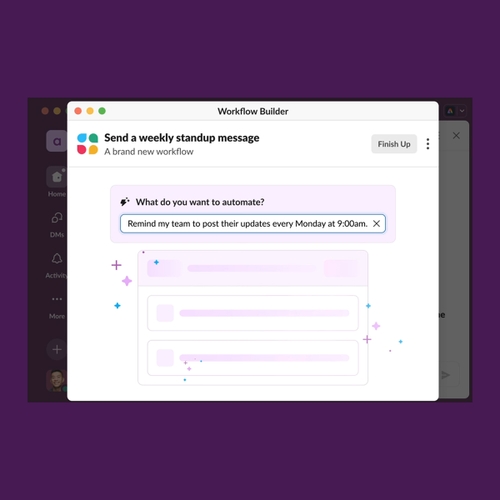
Workflow Builder makes it easy to automate multi-step processes without code. You can use it to send reminders, gather form responses, or post updates automatically. Slack’s workflow builder templates and examples show how to map out steps. You can also create event triggers that let workflows run the moment someone joins a channel, reacts with an emoji, or submits a form.
For example, a marketing team learning how to use Workflow Builder could collect campaign feedback through a form that posts results directly to a shared channel. Or, a manager could schedule recurring messages for daily check-ins so the team always starts the day aligned.
3. Test and refine your setup
The whole point of automation is to become more efficient, so it’s a bit counterproductive to bog down your entire workforce with your testing. Run your new workflow with a small group first. See if the timing feels natural and whether the notifications land in the right place.
If people start ignoring alerts, they may be too frequent or off-topic. Adjust triggers or add filters to make them more useful. Slack’s analytics tools can help you see how often a workflow runs, who interacts with it, and whether it’s saving time or just adding noise. Small tweaks early make the difference between something people love and something they mute.
4. Track and improve results
Once the automation is live, measure what’s actually changing. Are tasks closing faster? Are fewer follow-ups needed? Those are the signals that show automation is working.
You can document what you’ve built in Slack Canvas, noting which workflows exist, how they’re used, and what feedback comes in. As you expand automations to new teams, connect them with other tools like Google Sheets or Asana to handle more complex workflows. Keep refining until your repetitive tasks run quietly in the background, which can save you hours without anyone noticing.
Tips for first-time automation
Learning how to automate repetitive tasks can start to feel like you have to automate everything, and that gets overwhelming fast. There are so many possibilities, but not always a clear direction. Here are some ways to make your automation efforts actually stick and benefit your processes.
- Start small, but think repeatable. Begin with one low-stakes process you can test quickly, like collecting team feedback or tracking simple approvals. Once it works, you can duplicate the setup for other teams without rebuilding from scratch.
- Design for handoff. The real power of automation is that it outlives the person who built it. Keep workflows simple enough that someone new can understand and update them later. The best automations are short, clear, and easy for anyone to understand at a glance.
- Make workflows visible. Store automations in a shared Canvas or a pinned post so teammates can discover and use them, not just the person who built them.
- Name things clearly. Use consistent names for workflows and triggers so people know what they’re for. “Weekly Design Sync Reminder” is better than “Automation #3.”
- Pair with Slack AI. Use Slack AI to summarize long threads or highlight next steps that your workflows create. AI and automation work best together — one saves time, the other saves thinking space.
- Check in regularly. Revisit automations every few months. As your team grows or priorities shift, small adjustments keep things useful instead of outdated.
Don’t let automation become a burden instead of a solution — the right tool will do the heavy lifting and guide you to the most helpful features. When your workflows feel invisible but the work keeps moving, you’ve found the right balance between input and output.
Keep work flowing with Slack
Automation is literally the gift that keeps on giving, especially when your tool makes automation easy to implement. Slack is built to handle the headache so that you can focus on quality and connection in your communications.
Workflow Builder handles the routine. Scheduled messages keep reminders and updates running on time. Slack AI keeps you up to speed without the scroll. Canvas and lists keep documentation, requests, and progress visible for everyone. And with integrations that connect to the tools you already use, Slack becomes the single space where work actually happens.
If this sounds like a lot, it is! There is so much potential in one app, but it’s easy to set up and use so that you aren’t pulled from your most important work. When automation lives where conversations already happen, work moves faster, context stays clear, and people actually get time back. That’s how teams stop managing the process and start moving projects forward.
Try Slack for free and see how effortless work can feel when everything and everyone stays in sync.
Automating repetitive tasks FAQs
 |
Try Slack for free todayWhatever work you do, you can do it in Slack. Get the power and alignment you need to do your best work. |
 Awesome!
Thanks so much for your feedback!
Got it!
Thanks for your feedback.
Oops! We're having trouble. Please try again later!