Small business owners usually have to balance more work than their workforce can realistically perform. A small team wears many hats, between customer questions, marketing campaigns, finance planning, and the general operations of the business.
The good news is that AI is no longer a tool reserved for enterprises with big data science teams. AI is more accessible than ever, and even smaller businesses can automate processes and use intelligent assistance to get tasks done.
This article breaks down four high-impact ways to apply AI in small businesses and shows which tools support each function, which you can use regardless of your current tech stack.
What is AI for small business?
AI for a small business refers to tools that automate routine work, generate content, and provide insights without requiring constant manual input. These systems handle tasks like responding to customer inquiries, summarizing conversations, and analyzing business data as part of day-to-day operations.
There are two main approaches. Some businesses adopt standalone AI tools for specific functions, while others use AI built directly into the platforms they already rely on. Embedded AI tends to reduce setup time and adoption challenges because it operates within existing workflows.
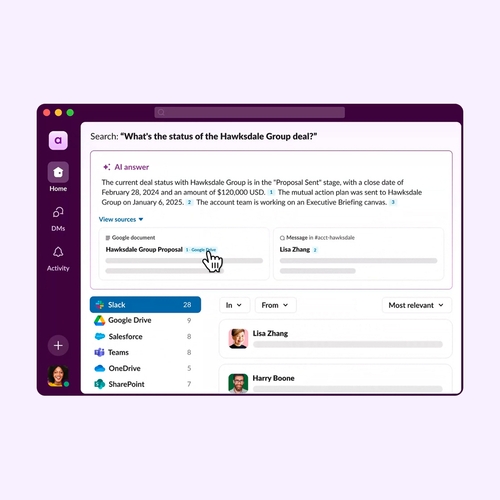
For example, tools like Slackbot act inside the work environment, pulling from live conversations and activity rather than requiring teams to switch between apps. This model extends further with a context-aware AI agent for work and broader AI agents that assist with tasks based on what’s already happening across the business.
Four uses of AI for small business
Small businesses see the fastest return from AI when it targets work that already happens every day and takes up the most time. These four use cases are some of the highest ROI starting points, tied to core but time-consuming business functions that you can optimize.
1. Customer service automation and AI receptionist
Customer service AI routes requests and responds to common inquiries without requiring a team member to step in every time. An AI receptionist for a small business extends that coverage by responding instantly, even outside business hours, and passing more complex issues to the right person when needed.
That 24/7 support team affects how many opportunities a business captures. Missed messages, delayed replies, or unanswered inquiries often mean lost leads or frustrated customers. AI can respond consistently and immediately, regardless of time of day.
In practice, small businesses can use conversational tools to answer FAQs, qualify inbound leads, and direct requests to the right channel. These systems can also summarize interactions, so the next person who engages already has context. Work like this often runs through existing systems tied to customer conversations, such as customer service software and tools built around conversational AI.
2. Marketing, content creation, and sales
AI in marketing and sales focuses on producing content, managing outreach, and identifying which prospects are most likely to convert. For small businesses, this replaces a large portion of the work required to follow up on campaigns and keep them active.
The constraint is usually capacity. One or two people are responsible for writing emails, posting content, tracking leads, and staying on top of conversations. When that workload becomes too much, pipeline momentum suffers. AI helps maintain whatever pace you need by generating first drafts, tracking engagement signals, and prompting follow-up at the right time.
Content-wise, many small businesses use AI to draft email sequences, social posts, and landing page copy, then refine rather than start from scratch. On the sales side, AI highlights which leads are active based on behavior, so outreach focuses on the right opportunities. It can also capture meeting notes and suggest next steps automatically, keeping deals moving without relying on memory or manual tracking.
This typically connects into systems already managing outreach and pipeline activity, including marketing automation software, sales management software, and CRM workflows like those supported through Slack’s CRM.
3. Operations, productivity, and workflow automation
Every business tries to figure out how to be more productive. For small businesses, AI in operations focuses on reducing the coordination work that builds as business grows, which can detract from productivity. This includes summarizing meetings, managing task lists, routing requests, and handling repeatable internal processes that don’t require judgment every time.
The time drain here is fairly constant, even if it doesn’t seem like a huge load. However, approvals, status updates, follow-ups, and internal questions can take up a large share of the day. When that work is all done manually, it pulls attention away from other tasks that require more focus and decision-making. Business workflow automation gives you that time back by handling the repeatable parts in the background.
Small businesses can use workflow automation tools to generate meeting summaries and action items, route requests to the right person, and keep project tasks updated across tools. AI also plays a role in capturing and organizing information. Tools like AI transcription software turn conversations into searchable records, while shared task tracking through a task list keeps work visible without constant manual updates.
4. Finance, accounting, and business data insights
AI in finance focuses on turning raw financial activity into usable information without manual sorting or analysis. This includes categorizing transactions, generating summaries, and flagging changes in cash flow that need attention.
The challenge is timing. Financial data is often reviewed after the fact, which delays decisions around hiring, inventory, or spending. AI helps by organizing data as it comes in and showing you patterns earlier.
You can connect your accounting tools so that activity flows into a central workspace. AI can then categorize expenses automatically, generate monthly summaries, and highlight unusual transactions that warrant a closer look. Instead of digging through reports, you’re reacting to signals as they appear.
This typically runs through connected systems, using integrations to bring financial data into the same place as day-to-day work through financial service apps and the ability to connect apps. When that data is accessible within a broader work operating system, it becomes easier to act on it quickly while still maintaining strong data privacy practices.
Get the best AI for small business with Slack
Slack brings AI directly into the conversations and workflows where work is already happening, so updates, follow-ups, and next steps don’t need to be re-created somewhere else.
Slackbot acts as a context-aware assistant, using what’s happening across channels and messages to summarize discussions, pull out action items, and draft replies that reflect the actual state of the work. That keeps information current, and you don’t have to worry about making updates after the fact.
This setup works the same way for teams of 2 or 200. You can start with simple automations like summaries and reminders, then expand into more advanced workflows as the business grows.
You can see how this plays out in the Slackbot demo or explore how the all-new Slackbot fits into day-to-day work.
FAQs about AI for small business
 Nice one!
Thanks a lot for your feedback!
Got it!
Thanks for your feedback.
Whoops! We’re having some problems. Please try again later.