Every few months, something shifts. What you’re doing in Slack today wasn’t possible three months ago.
In April, Slackbot learned to act. In May, it learned to see. In June, it learned you and your systems. And it listens.
In July, Slackbot moves work forward, in the conversation.
More everyday users can become AI power users.
The people who knew how to prompt, how to connect tools, how to build workflows, got real value. Everyone else got a chatbot they opened twice and forgot about. In most organizations, that’s the majority of the workforce.
That’s a design problem. Most AI was built around documents and portals. You go there, do something, bring the output back to where your team lives. But the conversation is where knowledge actually lives. It’s where decisions get made, context gets built, and alignment happens. Building AI somewhere else and asking people to shuttle results back isn’t where work is going.
The people who figured it out had an advantage because getting AI to do useful things required expertise. Building a workflow, connecting your tools, standing up a dashboard, that’s specialist territory. Slackbot’s answer is a different kind of AI. One where one person figures something out and everyone benefits, through skills they can share across the team. One where the output lives where the team already works. One that acts before you think to ask.
A sales rep asks for a competitive brief and gets a finished deck. A team lead asks for a customer summary and gets a live dashboard pinned to the channel. A new hire asks what happened in a project and gets a full briefing from months of context. None of it required a prompt engineer, a data analyst, or an IT ticket. July is where that changes.
The work happens here now
Most AI takes you out of the conversation to do something, then asks you to bring it back. July flips that. The output lives where the work is already happening, with your context as its guide. Here’s what that looks like across four capabilities shipping in July.
Code Execution runs real Python in a secure sandbox and hands you the file. Slackbot writes and runs the code so you don’t have to leave, open another tool, clean the data yourself, or know how to code. A sales rep uploads a messy pipeline tracker and gets back a clean file, a chart by stage, and a list of at-risk deals. A marketer drops in NPS verbatims and gets a ranked theme breakdown by keyword. A finance lead sends a headcount sheet full of inconsistencies and gets back the corrected version with a summary. None of it required a BI tool, a separate tab, or an IT ticket.
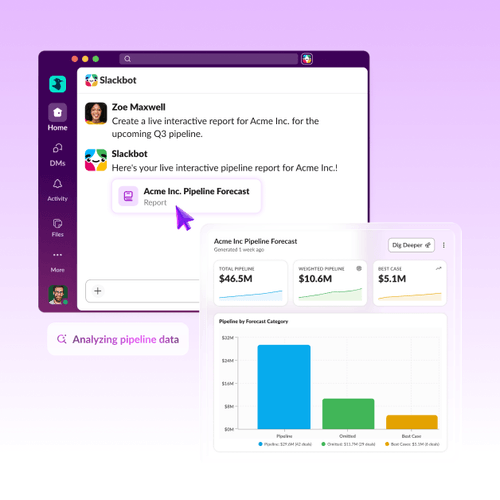
Ask Slackbot for a dashboard, a report, a comparison, and it builds a Surface: live, pinned, and connected to real data. Comment on a report. Sort and drill into a dashboard. Vote on a poll. Comment on any of it, right where it lives. Pair it with a skill and it updates the data on its own. The whole team works from it, together, in the channel.
Slide Creation means the deck that used to take an afternoon, and a designer, lives where the brief was given. A built-in Deck Design skill applies structure and visual guidelines automatically, so the first draft is already presentable. Share your source material, drop in a template, and tell Slackbot what you’re presenting and who it’s for. It pulls from your templates and hands you a shareable PowerPoint or Google Slides. And Image Generation capabilities mean it’s easier to mock up and visualize what used to require a design request, creative brief, or separate subscription.
See for yourself
The deck that used to take an afternoon now takes one ask. Share your source material, drop in a template, and tell Slackbot what you’re presenting and who it’s for. See what comes back.
What shipped on July 29
- Surfaces: live, pinned objects connected to real data. Reports, dashboards, polls, calculators, and more. Comment on it, pair it with a skill, and it updates on its own.
- Code Execution: answer questions that need real computation, not a guess. Slackbot runs actual Python in a secure sandbox and hands you the file.
- Slide Creation: the deck that used to take an afternoon takes one conversation. Slackbot builds it, right in Slack.
- Image Generation: describe what you need, get the image. No tab-switching, no separate tool.
- Skills Detail View: a clear description of what each skill does, who made it, and a suggested prompt to try it right away.
 Awesome!
Thanks so much for your feedback!
Got it!
Thanks for your feedback.
Oops! We're having trouble. Please try again later!