About this use case
Effective project management goes beyond task tracking. It's a system that keeps work moving, prevents assignments from being missed, and maximizes the time your team spends on high-value work. When done right, project management helps employees maintain focus and easily delegate assignments so you can see progress happening in real time.
Slack is a centralized work operating system that makes project management both easier and more efficient. Teams can use these actionable tips to get the most out of the platform.
How to manage projects with Slack
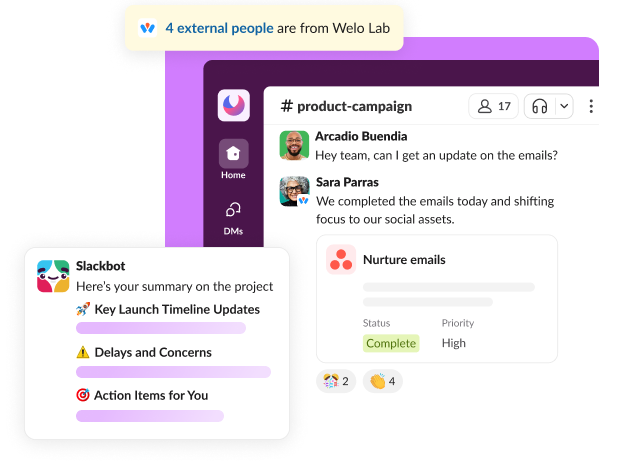
Project management in Slack helps you bring the different aspects of your process — conversations, documents, meeting notes, and task trackers — into the workspace where your team is already collaborating. Slack's tools and integrations let colleagues coordinate and communicate without having to switch to other apps, and Slack's AI makes it easy to search all your resources at once and automate workflows.
These are some of the Slack features that support effective project management:
Use channels to keep conversations in one place
Bring all communication together in channels. Every project or workstream can have its own channel, helping to keep conversations intentional and searchable. You can also create separate channels for each project phase, such as #project-kickoff and #project-review, helping teams track progress and stay focused on timely, relevant tasks.
Connect your tech stack with integrations
Efficient project management relies on a seamless flow of information across a team's entire toolkit. Slack natively connects with many apps and software commonly used for project work:
- Task managers like Asana and Monday
- Design suites like Miro and Figma
- Cloud storage like Google Drive and Dropbox
- Meeting assistants like Zoom and Gong
- Customer platforms like Salesforce and Zendesk
- Automation engines like Zapier and Workato
Integrations like these can push real-time notifications into Slack channels so that teams know when a task is completed or a file is updated. This increased visibility eliminates the need to bounce between tools, saving time and keeping teams focused on productive work.
Put Slackbot to work as your personal assistant
Slackbot is your personal AI assistant in Slack. Use it to automate project management tasks such as scheduling standups, reminding task owners of approaching deadlines, and delivering milestone-related updates. It's also useful for automating other tasks like approvals, check-ins, and reminders.
Streamline operations with AI workflow automation
Use AI-powered workflow automation within Slack to create standardized processes for your project. Automate tasks like approval routing, gathering status updates, and onboarding. When repetitive tasks happen automatically, projects get going faster and run more smoothly.
Resolve issues fast with Huddles
Need to resolve an issue quickly? Grab a coworker for a real-time video or audio conversation without leaving Slack. Huddles are also a great way to facilitate standups without the need to send calendar invitations to a formal meeting.
Chat with partners and clients via Slack Connect
With Slack Connect, you can bring external vendors or partners into a channel conversation. Avoid email delays and keep communication centralized — even when you have external players in your project.
Track every project with templates
Especially useful for project kickoffs, templates help teams build a project management workflow without starting from scratch. Automations, task trackers, and channel structures are pre-built for use in Slack and can be adjusted to fit your needs. You can get up and running quickly with Slack's project management template.
Benefits of managing projects in Slack
Managing projects in Slack keeps all your data in the same place and your team on the same page. Some of the benefits of coordinating project work in Slack include:
- Faster decision-making. With conversations and documents centralized, teams can gather the information and approvals to make decisions more quickly. Teams using Slack for project management report being 47% more productive.
- Fewer (and more efficient) status meetings. Use tools like asynchronous channel updates, automated workflows, and threads to reduce the need for frequent meetings. According to Slack research, teams report needing 39% fewer meetings when project work takes place within Slack.
- Better accountability. Clarify task ownership, track progress without the need to produce external project reports, and keep conversations and decision-making within designated channels. Better communication and visibility from the beginning mean better accountability for all team members.
- Searchable knowledge. Find what you need within channels with AI-powered search, whether it's a shared doc, a decision, or a status update. Seeing the conversational context helps improve continuity between project phases.
- Reduced tool switching. Integrate Slack with other project tools to pull data into a central place and keep work moving without constant platform switching.
Slack is central to how our company collaborates, for increasing velocity, and is integral to building with our customers. We use Slack every day.
What are the main phases of project management?
Project management is shepherding a project from initial planning through final closeout. While project types can differ widely, most progress through five distinct stages. Through each phase, a project manager's job is to keep teams aligned, track measurable progress toward milestones, and delegate work as needed to move assignments forward. The five stages include:
1. Initiation
To get the project off the ground, the project manager must define the scope, goals, and purpose. They should also identify project stakeholders and metrics for success. The goal of this phase is to describe why the project matters and how success will be defined.
2. Planning
During project planning, you define your milestones, timelines, resources, dependencies, and task ownership. With a strong plan in place, teams know what to expect and what each person is responsible for, smoothing the path for a successful execution phase.
3. Execution
In this stage, the team completes the tasks defined during planning. To keep the project moving forward smoothly, project managers need to prioritize communication, encourage collaboration, and resolve problems quickly.
4. Monitoring
Monitoring happens while execution is in progress, helping the project manager be aware of timelines, goals, and risks and make real-time adjustments to the project plan.
5. Closeout
Closeout happens after the work is completed and delivered. Project managers work with the team to tie up any loose ends, create reports on outcomes to share with stakeholders, and look for insights to improve future project efficiency.
What are some project management strategies that improve results?
While tools are important, a solid project management strategy is vital for success. Defining a strategy and communicating it with team members before the project starts can help keep work moving forward smoothly and efficiently. Project management strategies that improve results include:
- Prioritization. Ordering tasks according to urgency and impact helps ensure that essential deliverables get done. When team members prioritize project tasks, they can stay focused on making progress instead of getting sidelined by low-value or nonessential work.
- Stakeholder alignment. Communication with stakeholders throughout the project maintains alignment on scope and goals. It can also help reduce rework and adjust expectations as the project evolves.
- Resource planning. A successful project requires the right resources to be in place before kickoff. Taking time to ensure that team members are informed and prepared to engage at the right times and that the needed tools and resources will be there for them when they do helps the project run smoothly.
- Risk management. Teams that take a proactive approach to risk management can handle challenges more efficiently, minimizing delays. Anticipating potential issues and creating plans to deal with them can pay off by keeping a project on track when problems arise.
- Agile collaboration models. Some teams choose to take an Agile approach to project management, prioritizing continuous feedback, iterative progress, and constant flexibility. Agile methodology breaks tasks into small, manageable increments and allows teams to adapt their approach as work progresses, often yielding better outcomes faster.
Five tips for successful project management
With project tools and strategies in place, success depends on consistency. Here are five project management best practices to keep things moving forward successfully.
- Assign clear ownership and accountability. When team members know which tasks they own and when they should be completed, the built-in accountability keeps everyone on track.
- Standardize your communication style and cadence. Choose predictable methods and patterns to communicate with your team — for example, a weekly written update and daily check-ins on the project channel — so they know what to expect and when.
- Maintain real-time status visibility. Create a central, constantly updated hub for status updates. Task lists, timelines, and project blockers can all be highlighted and updated in the same spot, such as a pinned post or shared file inside the project channel.
- Enforce strict meeting discipline. Minimize the need for meetings by using asynchronous updates as much as possible. When you do have a meeting, keep the focus on making decisions and solving problems.
- Build robust, searchable documentation. Upload files, discuss decisions, and document processes and outcomes as you move through the project. Use Slack to create a searchable knowledge base your team can revisit for questions, share with new hires, and mine for insights to improve future projects.
Smarter project management with Slack
Successful project management depends on good communication and organization. When you centralize those in Slack, you can take advantage of project planning and execution tools, create a searchable knowledge hub, and keep team communication all in one place instead of scattered across texts, emails, and other applications.
Slack helps you manage projects from start to finish. Channels keep conversations focused and visible, and integrations pull in data from other systems. Meanwhile, tools like Slackbot and AI workflow automation help team members cut down on rote tasks such as data entry or digging through documentation for the information they need.
With Slack, you can streamline project processes, reduce friction, and deliver faster. Explore Slack's project management features to learn how they can help you be more efficient and effective.


