About this use case
As your organization grows, keeping everyone on the team (and across the organization) informed becomes more difficult. Teams work across locations and time zones, new tools enter the mix, and important information gets buried across emails, meetings, documents, and messaging platforms. Before long, updates are missed, work gets duplicated, and employees lose visibility into what's happening across the business.
A work operating system like Slack brings communication into one place. With Slack, teams can find information faster, stay connected across departments, and spend less time searching for context and more time moving work forward.
How to improve internal communication with Slack
Effective internal communication depends on making information easy for teams to find, share, and act on. Slack brings conversations, updates, files, and workflows into a single work operating system, keeping your team aligned without relying on scattered emails or disconnected tools.
Here's how Slack features make it easier for your team to stay organized and work productively:
Organize communication with channels
Channels create dedicated spaces for teams, projects, departments, and company-wide initiatives. Department channels give teams a home for day-to-day communication, while project channels bring stakeholders together around shared goals and milestones. Leadership teams can share updates in dedicated channels, while cross-functional teams gain visibility into conversations that affect their work.
Support async communication
Not every company update requires a meeting. Slack supports asynchronous communication through threaded conversations, recorded updates, and searchable message history. Team members can review information and respond on their own schedules. This makes it easier to collaborate across locations and time zones. Because conversations are searchable in Slack, employees can also quickly catch up on updates and discussions.
Automate internal communication workflows
Automation helps teams communicate more consistently. You can use Slack Workflow Builder to automate reminders, approval requests, recurring updates, and notifications. Instead of relying on someone to remember the next step, routine communication happens automatically. This reduces manual follow-up and helps employees stay on top of important tasks and deadlines.
Improve visibility with integrations
Slack connects with the tools employees already use every day. Integrations can surface updates from project management platforms, HR systems, CRM software, IT tools, and calendars directly in channels. Instead of checking multiple applications for updates, your team can get all their information from one place. It's easier to locate the right information when you need it, making it easier to respond and keep work moving forward. Browse the Slack Marketplace to see a full listing of 3rd-party apps available for integration.
Surface information faster with Slackbot
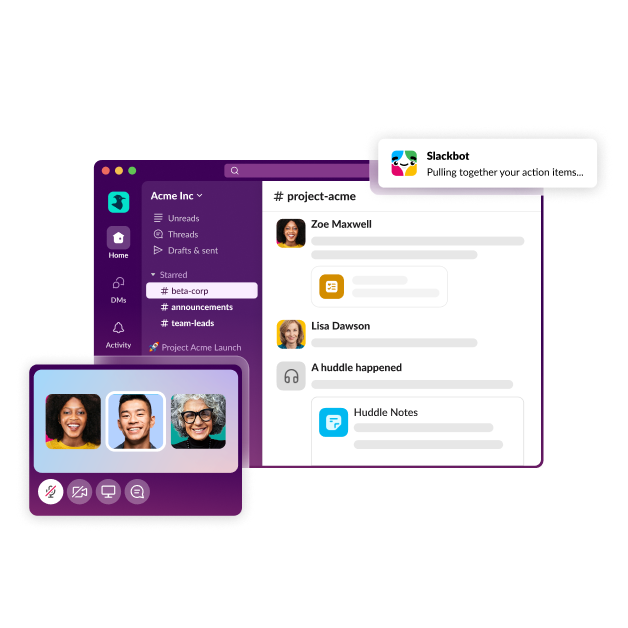
Slackbot helps your employees find information without sifting through countless messages and files. You can ask questions in natural language to surface relevant conversations, documents, updates, and connected data. AI-powered summaries and recaps help anyone on your team quickly catch up on activity, decisions, and action items, even when they join a conversation late.
People are messaging me saying, 'Slackbot is a genius. This is saving me time. This is brilliant.' I'm never going to get bored of people telling me that Slack's a game changer.
Benefits of using Slack for internal communication
Good communication is critical to productivity in any business. By bringing conversations, updates, and workflows into one place, Slack makes it easier to communicate clearly and stay aligned.
Some of the primary benefits of improving internal communication with Slack are:
- Improved transparency. Channels make it easier to share updates and announcements with the people who need them. Employees gain more visibility into what's happening across teams and departments. This helps everyone stay aligned around priorities.
- Faster decision-making. When conversations, files, and updates live in one place, teams can quickly gather information and move work forward. Employees spend less time searching for context and more time taking action. Our research shows that teams using Slack for project management report being 47 percent more productive.
- Reduced siloing. Shared channels help break down communication barriers between your teams. Instead of information living in separate inboxes or applications, Slack lets employees collaborate in the same space and stay connected to related work.
- Better cross-functional collaboration. Teams can coordinate projects, share updates, and solve problems together without constantly switching between tools. Keeping valuable knowledge in one location for everyone makes cross-collaboration simpler.
- Fewer unnecessary meetings. Use threaded conversations, recorded updates, and asynchronous communication to share information without pulling everyone into another meeting. Your employees can stay informed while protecting time for their focused work. According to Slack research, teams report needing 39 percent fewer meetings when project work takes place within Slack.
- More consistent updates. Workflow Builder helps automate reminders, notifications, and recurring updates. Important information reaches the right people at the right time without relying on manual follow-up.
- Improved remote and hybrid collaboration. Slack gives employees a shared place to communicate regardless of location. Teams can collaborate across offices (in-house and remote) and time zones while maintaining access to the same conversations and information.
- Centralized organizational knowledge. Conversations, files, decisions, and updates remain searchable in Slack. Employees can quickly find the information they need without digging through email threads or multiple applications.
Best practices for improving internal communication
The right tools help, but strong internal communication also depends on developing consistent habits. The following internal communication best practices can help your team reduce confusion and keep information flowing across the organization:
Centralize team communication
Keep conversations and updates in shared channels instead of scattered across email threads and private messages. For example, a product launch channel can house timelines, stakeholder updates, and key decisions in one place.
Encourage async collaboration
Give your employees the flexibility to contribute without needing to be online at the same time. Threaded conversations and recorded updates help teams collaborate across schedules, locations, and time zones, whether they're reviewing a proposal or sharing project feedback.
Standardize communication channels
Create a consistent structure for department, project, and company-wide channels. When your employees know exactly where to find HR announcements, IT updates, or project discussions, they spend less time searching and more time being productive at work.
Reduce unnecessary meetings
Share status updates and routine information in channels whenever possible. For example, a weekly team update can often replace a recurring status meeting while keeping everyone informed.
Automate routine updates
Use Workflow Builder to automate reminders and recurring communications. Your team can automatically receive project updates, approval requests, or onboarding checklists without relying on manual follow-up.
Improve leadership transparency
Share priorities, company updates, and decisions in your dedicated channels. For example, your leadership teams can post quarterly goals or announcements right where employees can easily access them.
Make information searchable and accessible
Another good internal communication strategy is to keep conversations and files in Slack, where employees can easily find them later. This can be especially helpful for onboarding. New hires can review past discussions, project decisions, and documentation instead of relying on teammates for context.
Improve internal communication across your organization with Slack
Strong internal communication helps your employees understand company and team priorities, stay informed about organizational changes, and work more effectively with colleagues across the business.
Slack is the tool that brings communication and work together in a single work operating system. With Slack, your team can use channels to organize conversations by department, project, or initiative, giving employees a clear place to find updates and participate in discussions. Integrations work well to bring information from other systems directly into Slack. And Workflow Builder helps automate routine communications such as reminders, approvals, and recurring updates.
Slackbot helps employees quickly find answers, catch up on conversations, and surface relevant information from messages and other connected tools. Together, these capabilities create a more transparent flow of information across your organization, making it easier for teams to stay informed and move work forward.


