About this use case
Team productivity can suffer when essential information is spread across disconnected tools. Time is wasted searching for conversations, tasks, documents, meetings, and workflows when each is in a different place. Often, it can be hard to know where to find the right information, and tracking down the right file wastes valuable time.
Slack brings teams together in a central workspace where they can communicate, organize work, automate routine tasks, and connect the apps they already use. The result? Time is used more efficiently as teams gain the visibility and collaboration that improves business output.
How to boost your team's productivity with Slack
Team productivity isn't simply about trying to do more work in less time. It means being smarter about your workload: reducing friction, making information easier to access, and spending less time on repetitive tasks. Teams can accomplish this by unifying productivity tools and integrations in Slack. The central hub helps to avoid time-consuming context switching and lets you keep all your work in a single space.
These are some of the Slack features that support team productivity:
Use Slackbot for routine questions and reminders
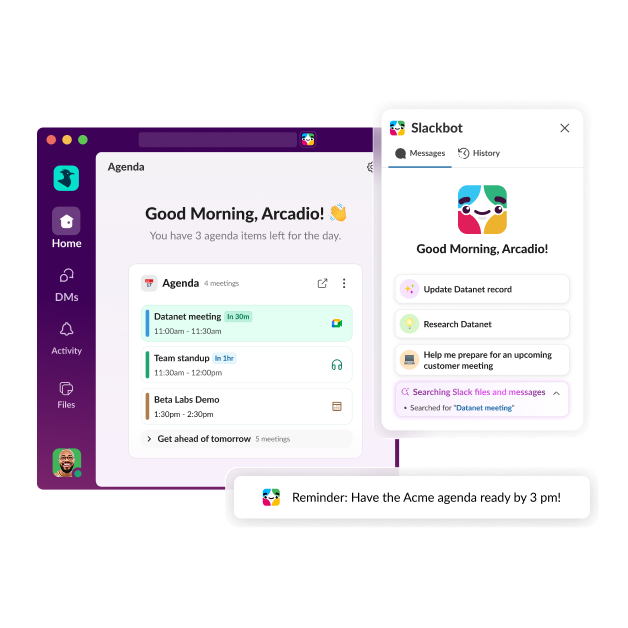
Built natively in Slack, Slackbot is your personal AI agent that adapts to your tasks and the context of your workspace. Use it to handle administrative busy work such as answering questions, sharing information, and supporting recurring tasks and workflows.
For example, use Slackbot to:
- Set custom automated responses for frequently asked channel questions like Wi-Fi codes or doc links.
- Configure personalized reminders with the /remind command shortcut.
- Draft meeting briefs based on existing Slack conversations and decisions.
- Analyze and summarize uploaded documents to determine key takeaways.
Organize work with Slack channels
Slack channels let you organize your communications by specific teams, projects, customers, or topics and can be public or private. Each channel keeps relevant conversations, decisions, files, and updates organized and accessible, no matter what a team member's function or business unit is.
By using channels, teams can replace the endless email chains and centralize context for everyone on a project. When a new team member joins, they can browse the channel history to get up to speed asynchronously, saving time from having to attend demanding catch-up meetings or getting forwarded a bunch of project emails.
Manage tasks with Slack Lists
Turn the conversations and ideas shared in your channels into actionable next steps and tasks with Slack lists. Teams can assign work, set deadlines, and track status directly in Slack. By keeping project execution and discussion in the same app, you eliminate app-switching and keep your tasks tied to the channel conversations where decisions are made.
To be the most productive managing projects with lists, add fields such as assignee, due date, status, and priority, and use sorting and filters to organize them. Explore switching views between the table and Kanban board layouts to group tasks by any field.
Centralize information with canvases
A Slack canvas is a living document built directly into a channel or direct message. Messages posted in a Slack conversation can quickly scroll out of view, but a canvas provides a permanent, customizable space that's pinned right alongside the conversation. Teams can use it to draft project briefs, list important resource links, document processes, log meeting notes, organize task lists, and embed media. Canvases give everyone on the team a single source of truth without having to jump across multiple documents and tools.
Automate repetitive work with Workflow Builder
Not everyone on your team knows how to code, and that's where Workflow Builder comes in. It turns processes into automated workflows without the need for technical skills. The no-code solution saves time by automating requests, approvals, notifications, recurring processes, and routine administrative tasks.
These are just a few examples of how you can use workflows to streamline repetitive processes:
- Standardize the intake forms for IT and design requests.
- Route help desk tickets to the right team member.
- Send scheduled reminders for your daily stand-ups.
- Post automatic welcome messages when someone joins a channel.
Use Slack AI to find information faster
Finding information shouldn't be a scavenger hunt across various apps and tools. Use Slack's enterprise search to spend less time finding the answers you need. From a single search bar in Slack, you can search across the conversations, business tools, data, and third-party apps you have access to. Use conversational language with Slack AI to help refine searches and get more specific, relevant results.
You can also use AI-generated channel recaps and thread summaries to catch up on long Slack discussions quickly. You'll see the highlights without having to read through a lengthy conversation for the details you need.
Talk it out live using huddles
Use Slack huddles for instantaneous alignment with your team members. Audio, video, and screen-sharing features let you start a conversation while inside a channel or direct message.
A five-minute huddle can easily replace a long, complicated message thread. You can also use huddles to work on a document together with multi-person screen sharing, using live drawing or cursors to highlight discussion points. After a huddle, you can get AI-generated meeting notes that include links, documents, and messages shared on the call.

Anything that can be done asynchronously is best done through Slack. You can easily add people onto threads or channels to give additional input.
Productivity apps to add to Slack
Stop spending your days switching between apps by adding them directly within Slack. Productivity capabilities can be extended through Slack integrations with more than 2,600 apps, meaning you can bring your current work processes directly into Slack.
Consider installing these third-party apps available in the Slack Marketplace:
- Project and task tracking apps help to plan and organize projects and assign tasks. Task management software like Asana turns Slack conversations and ideas into tasks and projects. With Trello, AI extracts information from Slack messages and automatically fills out a card on Trello with due dates, priorities, or action items.
- Time tracking and productivity apps log team members' hours and generate reports to gauge efficiency. Apps like TrackingTime and Tempo can help to measure productivity individually or as a team, track progress, and create timesheets.
- Calendar and scheduling apps eliminate the back-and-forth of finding availability by syncing calendars, setting up meetings, and automating reminders. Google Calendar and Outlook Calendar automatically sync your calendar to your Slack status to let team members know when you are in a meeting or out of the office.
- Documentation and knowledge apps store, organize, and control access to your files. The Notion template integrates with Slack Workflow Builder to create a page in Notion. Search directly within Google Drive for files shared in Slack and get updates on changes like comments or access requests.
- Communication and collaboration apps like Google Meet let you talk with your team via voice or video calls. With the Zoom app, you can schedule, start, join, and manage Zoom Meetings directly in the Slack workspace.
- Automation and workflow apps help to eliminate manual work by connecting different productivity apps to Slack in order to execute tasks using pre-set rules. For example, use Zapier to post details of new orders in your ecommerce app to a Slack channel or use Workato to route IT access requests into Slack so managers can approve or deny them with a single click.
Benefits of using Slack for team productivity
Slack connects your communication, information, tasks, and tools in a single workspace. Bringing everything into one place drives productivity by keeping resources accessible, simplifying team collaboration, and giving everyone clear next steps to move work forward.
Some of the benefits of using Slack for team productivity include:
- Less context-switching with a single sign-on and third-party apps integrated within Slack that are specific to productivity needs.
- Faster access to information with AI-powered search across your tech stack and AI-generated recaps summarizing channels and threads.
- Reduced repetitive work by transitioning from manual, administrative processes to workflow automation.
- Better task visibility with automated delegation, status tracking, and deadline notifications, so everyone knows what needs to be done by when.
- Improved team alignment with shared channels, asynchronous communication, and Huddles for quick, informal discussions.
- Faster decision-making because workflows in Slack involve quicker approvals and fewer handoffs among team members.
Making your team more productive with Slack
Productivity improves when people don't have to constantly jump from tool to tool. Efficiency accelerates when information becomes easily accessible and communication is in real time. Teams better manage their tasks and save time by automating routine processes.
Slack is the central workspace that connects a team's activities effectively. With Slack, work moves forward with channels for organization, AI to find answers, and the integration of the productivity apps you're already familiar with.


