About this use case
Lead management can start out simple until you find yourself using multiple tools to juggle a growing list of prospects. You might be logging conversation and deal details in a notes app, sending follow-ups over email, and tracking pipeline progress in spreadsheets.
Before you know it, the context you need for your next outreach call is scattered across five or six apps. The result is slow response times, lost productivity, and leads that go cold while you drown in admin work instead of selling.
Slack CRM helps sales reps at small- and medium-size businesses stay on top of leads and close those gaps. Built directly within Slack, it connects your conversations, documents, data, and workflow — and offers automation and AI assistance — so you and your team can manage leads easily in one place.
How to use Slack to manage leads
Effective lead management takes more than storing prospect information. Leads convert when the right person follows up quickly, ownership is clear, and the whole team can see what's happening with an account. Slack CRM supports each of those pieces by putting lead data, notifications, and collaboration in one workspace.
These are some of the ways Slack CRM works to help your team manage leads:
Bring customer data into the flow of work
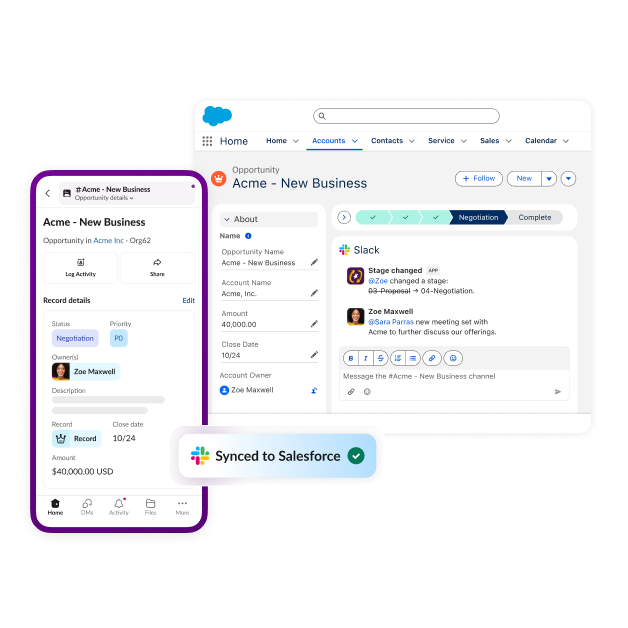
Salesforce in Slack is built-in, which means lead records, activity, and updates in your Salesforce CRM flow naturally without data migration or complicated setup. For small- to medium-size organizations, Slack CRM provides an easy way to capture and manage lead information. Reps can log leads directly within a channel or conversation using pop-up forms, slash commands, or prompts for Slack's AI assistant. Activity in Slack CRM syncs to Salesforce records behind the scenes, so if you need to scale up to an enterprise CRM suite later, your data is already in the Salesforce cloud.
Get notified when new leads come in
With Slack CRM integration and automated notifications, new leads trigger real-time alerts that route directly to the right channel or rep as soon as they're created. A demo request can post instantly to #inbound-leads with the prospect's details attached, so whoever is up next can claim it and reach out while interest is high. No one has to refresh a dashboard or discover a week-old lead by accident.
Collaborate around leads in dedicated channels
Channels give teams a dedicated space to organize information about a particular territory, campaign, or high-priority prospect. For example, a channel named #leads-enterprise-west could hold account research, proposal files, and strategy conversations about that specific set of leads so that nothing important is buried in someone's direct messages or inbox. For your most important opportunities, Salesforce channels combine live CRM data with the team conversation in one shared space, keeping everyone working from the same picture of the account.
Coordinate lead ownership and follow-ups
Every lead needs a clear owner and a visible status. Managing leads in shared channels makes these easy to find. When a rep claims a lead, logs a call, or schedules a demo, the whole team gets real-time context they can scan or search without having to hunt across other apps, documents, or emails. Lead history stays attached to the conversation, so a teammate covering for someone who's out of the office can pick up an account in minutes instead of starting cold.
Automate lead management workflows
Repetitive lead admin is exactly what workflow automation is built for. Use Workflow Builder to create no-code processes that automatically route new leads by territory, send follow-up reminders after a set number of days, or collect qualification details through a form before a lead reaches a rep. Sales automation like this cuts the tab-switching and manual updates that eat into selling time.
Use Slackbot as your personal assistant
Slackbot is your personal AI assistant inside Slack, and it responds to plain-language requests. Tell it "Slackbot, add Acme and log today's notes," and it creates the record and captures your notes. Ask it to update a deal stage, generate a meeting brief with deal status and recent activity, or draft a follow-up message based on the conversation. Because Slackbot already knows your channels and customers, records stay current as you work, with no data entry to catch up on later.
Consistently track lead activity and next steps
Reliable lead management comes down to knowing where every lead stands and what happens next. With the Slack sales tracker template, your pipeline lives on a dynamic Kanban board inside your collaborative workspace. Ask Slackbot to create a lead or update a record, and it updates the board automatically. Standardizing stages this way makes reviewing the sales pipeline take a few minutes instead of a half-hour meeting.
Having everything in one place is a game-changer — from prepping to navigating my day with the agenda view and Slackbot's suggested focus areas, I never have to leave Slack.
Benefits of using Slack CRM to manage leads
Managing leads with Slack CRM helps sales teams respond faster, stay aligned on ownership, and spend less time on administrative work. By connecting CRM data to the workspace where reps already communicate, Slack CRM shrinks that lag at every step, from first alert to closed deal. Teams that manage leads in Slack see:
- Faster response times. Automated alerts put new leads in front of the right rep immediately, so outreach starts while the prospect is still paying attention.
- Better visibility into lead activity. Records, updates, and conversations stay in shared channels, giving reps and managers a live view of the pipeline without pulling reports.
- Clearer ownership and follow-up. When claiming a lead happens in the open, everyone knows who owns what and which next steps are outstanding.
- Less manual administrative work. Slackbot and automated workflows handle record updates, reminders, and routing, so more of a rep's day goes to selling.
- Stronger collaboration across sales teams. Channels, huddles, and Slack integrations with the rest of your sales stack keep account context in one place, so handoffs and team selling run smoothly.
7 best practices for lead management with Slack CRM
Good lead management habits matter as much as good tools. The teams that convert consistently follow the same handful of practices, and each one gets easier when your CRM data and team communication live in the same workspace. Build these into your process:
- Centralize lead information. Keep records, notes, and account context in Slack CRM instead of scattered across spreadsheets and inboxes, so there's one source of truth.
- Respond to new leads quickly. Set up automated notifications so new leads reach the right rep while the inquiry is still fresh.
- Establish clear lead ownership. Claim leads in shared channels so ownership is visible and nothing sits unassigned.
- Standardize follow-up processes. Define your cadence and stages once, then use the sales tracker template so every rep works leads the same way.
- Automate repetitive notifications and tasks. Let Workflow Builder handle routing, reminders, and status requests so reps don't have to remember them.
- Keep sales conversations connected to CRM activity. Log calls and update records with Slackbot as you go, so the record always matches reality.
- Regularly review lead activity and follow-up performance. Use the sales tracker board in pipeline reviews so the whole team sees lead stages and outstanding next steps at a glance.
Bring every lead into focus with Slack CRM
Slack CRM gives teams a single place to capture, qualify, and accelerate every lead, without the scattered tools or slow handoffs that make opportunities slip away. When reps, managers, and systems all work from the same real-time workspace, follow-ups happen faster, ownership is clear, and promising prospects stay warm. With Slack CRM as the connective layer for your lead generation process, your team can move from reactive to reliably revenue-driving.


