
April showers bring May flowers — and this April, the Slack team showered you with new features to help your productivity bloom all year long.
Work is more complex than ever. You’re chasing down answers, coordinating across tools, fielding requests, and trying to stay on top of it all without losing the thread. The apps multiply. The tabs stack up. The context-switching never stops.
This April, we shipped updates designed to change that. Slackbot isn’t just answering questions anymore — it’s taking action, running automations, drafting your emails, and scheduling your meetings, all without you leaving Slack. And a brand-new Activity tab means there’s finally one place to see everything that needs your attention.
Slackbot Does the Work: Actions, Automations, and Awareness
This month’s biggest story is Slackbot growing from a smart assistant into a true AI teammate — one that doesn’t just answer questions, but actually gets things done. And not only does Slackbot do the work – it knows what to do, when to do it, and has the right context to do it correctly. You don’t have to ask it twice, remind it what you were working on, or repeat yourself. Slackbot is on it – so you get to stop and smell the flowers.
Build It Once, Run It Every Time: Slackbot Skills
This month, we’re introducing Slackbot Skills, a new way to turn your team’s best workflows into repeatable, shareable, ready-to-run actions. Instead of re-explaining the same task to Slackbot every time, Skills let you write it it once and reuse it whenever you need it — from meeting prep and pipeline reviews to goal setting and beyond.
You can start with a growing library of pre-built Skills designed for the work teams do every day, or create your own and share them across your team. And because Slackbot has full context across Slack, Salesforce, your connected apps, and your calendar, these aren’t generic templates — they’re workflows that understand your work and execute it consistently, every time.
- Daily Priorities — Every morning, Slackbot reviews your Slack activity, calendar, and Salesforce data and hands you a prioritized action plan. No more wondering where to start.
- Meeting Prep — Before any meeting, Slackbot pulls context from your calendar and searches Slack for related conversations, files, and decisions — so you walk in ready.
- Research Synthesis — Point Slackbot at a topic, a channel, or a set of files, and it surfaces key themes, patterns, and gaps across everything — turning scattered information into a clear, structured brief in seconds.
- Incident Management — When something goes wrong, Slackbot reads the incident channel history and produces a structured after-action review with timeline, root cause, and action items — automatically.
- Weekly Update — Slackbot reviews your week across Slack and your calendar and produces a crisp, shareable status update. Your manager will think you’ve been keeping notes all along.
- Project Kickoff — Drop in a brief or a reference channel, and Slackbot spins up a fully configured project: channel, canvases, milestone tracker, and suggested automations. From zero to organized in minutes.
Rolling out over the coming weeks to workspaces on Business+ V2, Business+ V1 (AI add-on), Enterprise+ V2, Enterprise Select (AI add-on) and Enterprise Grid (AI add-on) plans.
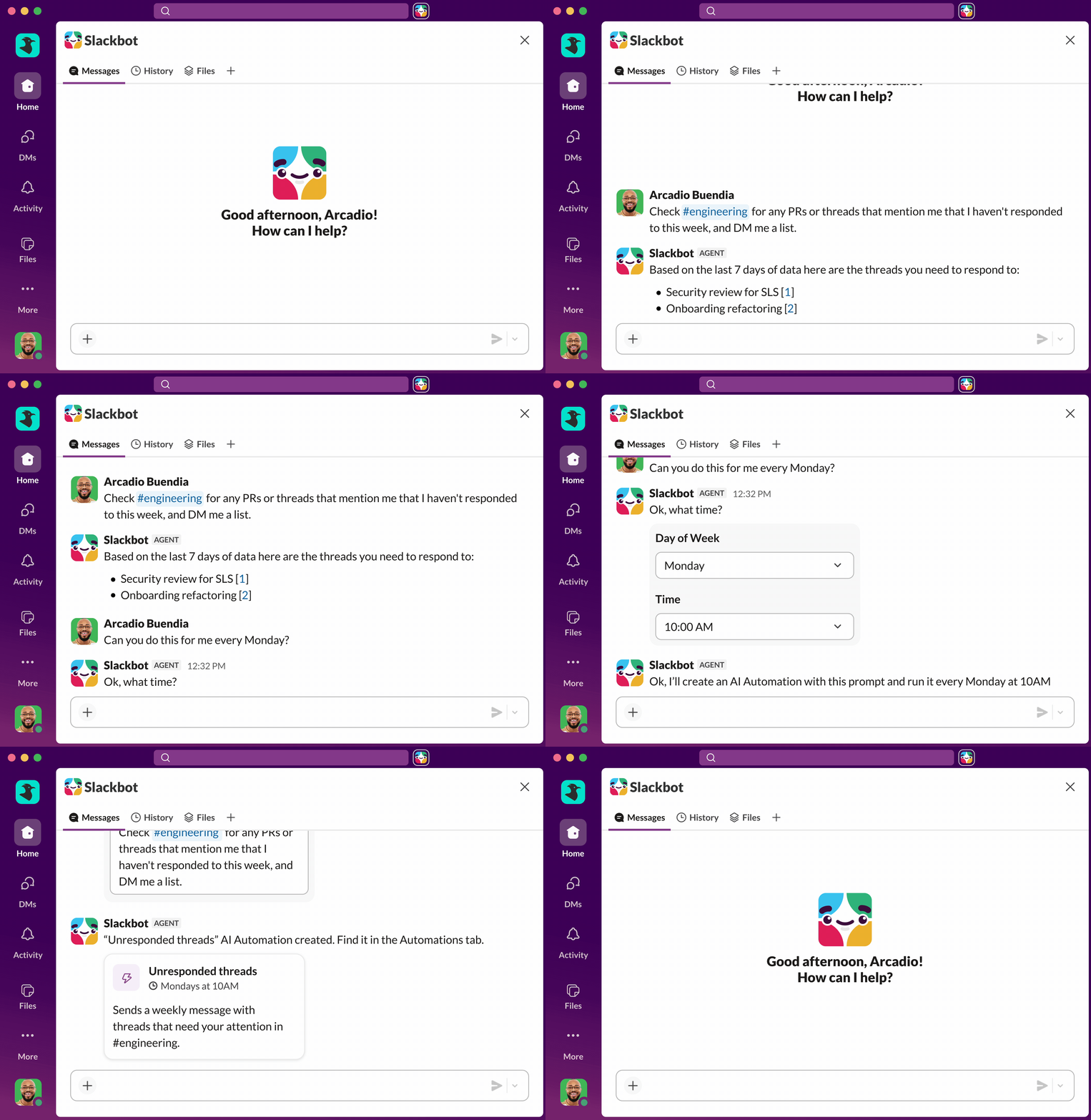
Slackbot Scheduled Tasks
Slackbot doesn’t stop there — it doesn’t even wait to be asked. You can now schedule recurring tasks and automations directly through Slackbot. Weekly digests, recurring check-ins, whatever you do on repeat — running automatically and on time without a nudge from you.
Rolling out over the coming weeks to workspaces on Business+ V2, Business+ V1 (AI add-on), Enterprise+ V2, Enterprise Select (AI add-on) and Enterprise Grid (AI add-on) plans.
Slackbot Slack Actions
Need to send a DM, spin up a channel, or invite a teammate? Slackbot can now take action inside Slack on your behalf — creating channels, sending messages, inviting people, even kicking off workflows. Describe what you need and move on. Slackbot will close the loop for you.
Rolling out over the coming weeks to workspaces on Business+ V2, Business+ V1 (AI add-on), Enterprise+ V2, Enterprise Select (AI add-on) and Enterprise Grid (AI add-on) plans.
Leave Slack Less: Slackbot Email and Calendar Actions
Slackbot’s reach now extends beyond Slack. You can ask Slackbot to draft an email or schedule a calendar event, and it’ll handle it directly in Google or Microsoft Office — without you switching tabs. Compose a follow-up, block time, confirm a meeting. All without leaving Slack.
Available now for Google Workspace and Microsoft 365 on Enterprise+ V2, Enterprise Select (AI add-on) and Enterprise Grid (AI add-on) plans.
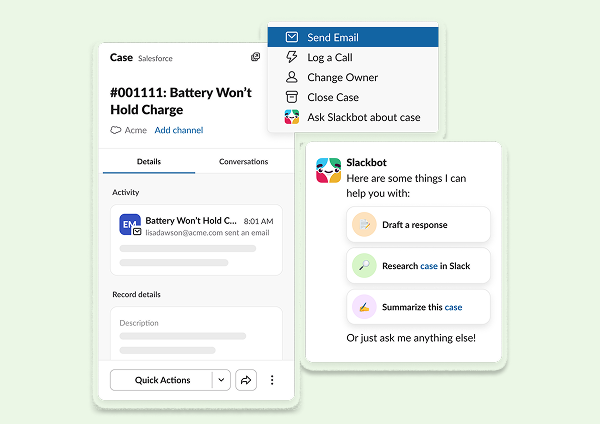
Slackbot In-Slack Awareness
This is what makes everything above work even better: Slackbot now picks up on what you have open in Slack — a Salesforce record, a List, a channel — and uses that context automatically, and responds accordingly. No starting over or needing to re-explain what you’re working on – Slackbot’s up to speed and ready to get work done. Rolling out over the coming weeks to workspaces on Business+ V2, Business+ V1 (AI add-on), Enterprise+ V2, Enterprise Select (AI add-on) and Enterprise Grid (AI add-on) plans.
Plus a few more tweaks to your ultimate AI teammate:
- Slackbot Mobile Enhancements: Real work doesn’t wait for a desk, and now Slackbot doesn’t either. Smoother navigation, easier access to recent chat history, and one-tap sharing of Slackbot’s responses make it easier than ever to get things done on the go.
Available now to workspaces on Business+ V2, Business+ V1 (AI add-on), Enterprise+ V2, Enterprise Select (AI add-on) and Enterprise Grid (AI add-on) plans. - Slackbot PDF Reader: Get the answers you need out of any file, no matter the size or format. Slackbot can now handle large and complex PDFs, including image-heavy files, CJK-language documents, and tables – and give you the answers, summaries and context you need.
Rolling out over the coming weeks to workspaces on Business+ V2, Business+ V1 (AI add-on), Enterprise+ V2, Enterprise Select (AI add-on) and Enterprise Grid (AI add-on) plans. - Redesigned Thinking Steps: Now you can see exactly how Slackbot got there. A new real-time timeline walks you through every step Slackbot took to arrive at its answer — expandable and transparent — so you always know what it found and why.
Rolling out over the coming weeks to workspaces on Business+ V2, Business+ V1 (AI add-on), Enterprise+ V2, Enterprise Select (AI add-on) and Enterprise Grid (AI add-on) plans. - Composer Redesign: Asking Slackbot a question just got a lot cleaner. A redesigned composer strips away the clutter and keeps the essentials front and center, so nothing gets in the way between you and the answer you need. Rolling out over the coming weeks to workspaces on Business+ V2, Business+ V1 (AI add-on), Enterprise+ V2, Enterprise Select (AI add-on) and Enterprise Grid (AI add-on) plans.
Smarter Workflows and a More Open Platform
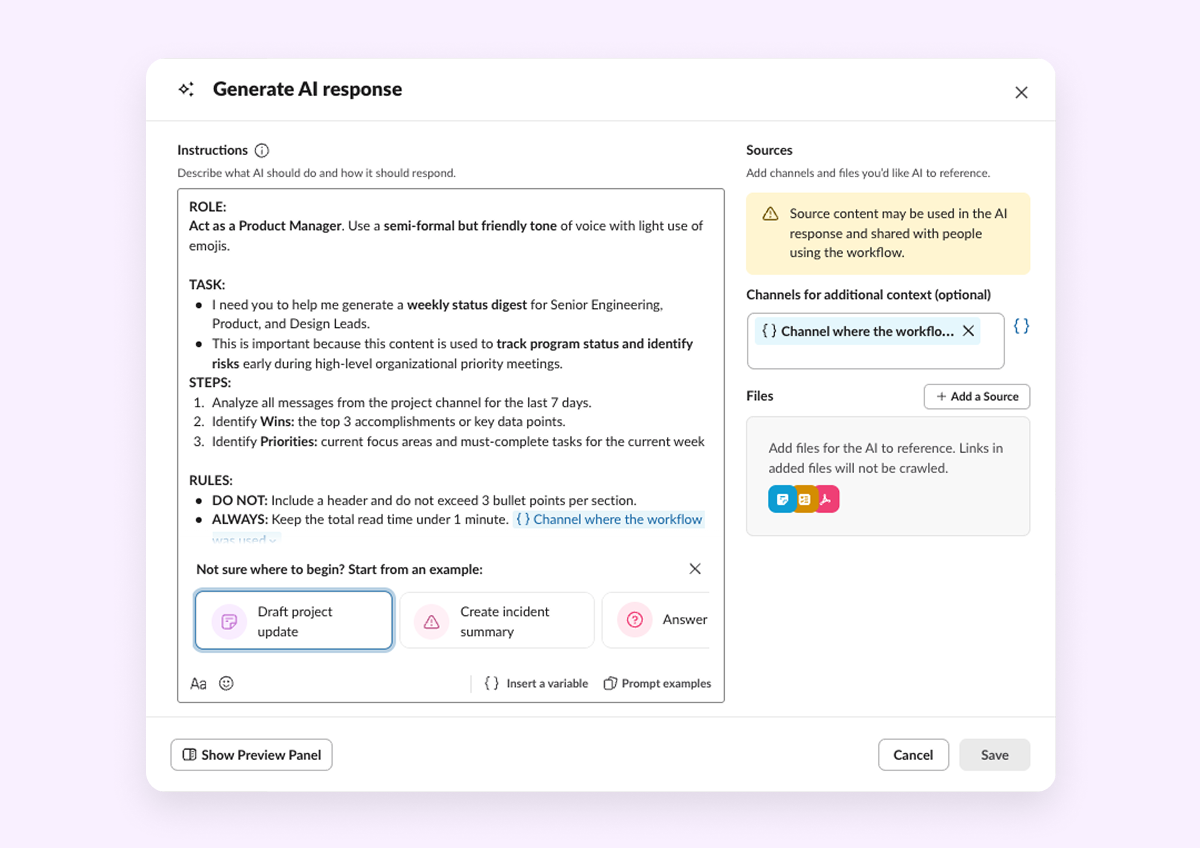
Generate AI Response Step in Workflow Builder
AI is now a native part of any workflow you build in Slack. Add a new Generate AI Response step to any automation, write a prompt, point it at your knowledge sources — channels, canvases, lists — and let an LLM do the work. Summarize a thread, translate a message, draft a reply. Your workflows just got a lot smarter. Rolling out April 21-30 to workspaces on Business+ v2 and Enterprise+ plans.
Slack Agent Developer Kit
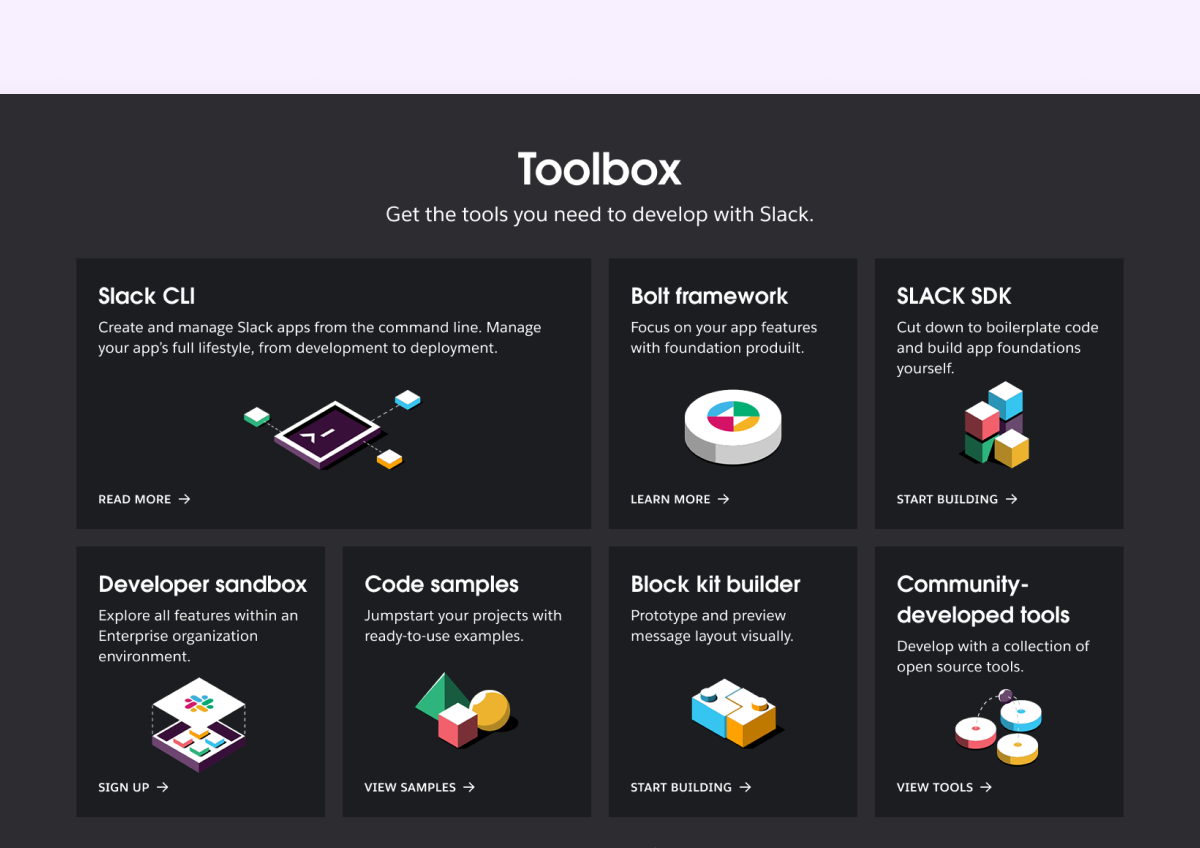
Building AI agents for Slack has never been faster. A new collection of developer tools — including a single slack create agent command, enhanced Bolt framework support, and bring-your-own-LLM flexibility — takes developers from zero to a production-ready agent in minutes. Two open-source sample apps (Starter Agent and Support Agent) give teams a running start, with support for Claude SDK, OpenAI SDK, and Pydantic AI. A fully revamped docs experience and new Agent Quickstart Guide round it out.
Available Now
Cut Through the Noise
One Place for Everything That Needs You: The New Activity Tab
Mentions, threads, DMs, channel notifications — it all adds up fast. The new Activity tab brings it all into a single, organized view so you can easily get a clear view of what’s in motion and what needs your attention. Filter down to what matters, clear out what doesn’t, and finally feel on top of it all.
Rolling out April 21–30 to workspaces on Pro, Business+, and Enterprise plans

That’s a wrap on April! Check out our Innovations webpage for previous releases.
Roadmap Preview: Coming Soon to Slackbot
In March, we shared the future vision for Slackbot and showed you the exciting ways Slackbot helps you get work done as your most powerful AI teammate. In addition to what’s available as of this month outlined above, here are the other enhancements rounding out our top 30 planned capabilities for Slackbot this year:
- Targeting general availability start date of May and June 2026
- Create and Update Salesforce Records with Slackbot — Allows users to create and update Salesforce records directly from a Slackbot conversation without leaving Slack.
- Action across any app with Slackbot MCP Client — Enables Slackbot to take actions across third-party apps using the Model Context Protocol (MCP).
- Slackbot Sampling for Free and Pro Teams — Extends Slackbot’s AI capabilities to Free and Pro tier teams through a usage-based sampling model (continued rollout).
- Event Triggered Automations — Automatically runs Slackbot actions in response to specific events happening in Slack or connected apps.
- Doc, Sheet and Slide Generation — Lets users generate documents, spreadsheets, and presentations directly through Slackbot.
- Voice Commands — Enables users to interact with Slackbot using spoken voice input instead of typing.
- Web Search — Gives Slackbot the ability to search the web and return real-time information in conversation.
- Deep Research — Allows Slackbot to conduct comprehensive, multi-step research on a topic by synthesizing information from multiple sources.
- Embedded AI Handoff — Enables seamless handoff between Slackbot and other AI agents or human agents within a conversation.
- Native Charts — Lets Slackbot generate and display data visualizations like charts and graphs directly in Slack.
- Memory — Gives Slackbot the ability to remember context and preferences across conversations over time.
- AI Explain Link to Slackbot — Lets users link an AI-generated explanation to a Slackbot thread for deeper follow-up.
- File Summaries Link to Slackbot — Connects file summary results to a Slackbot conversation for further exploration and Q&A.
- Targeting Q3 and Q4 general availability dates
- Slackbot for your Desktop — Brings a dedicated Slackbot experience to the desktop application for richer, more accessible AI interactions.
- Meeting Intelligence — Provides AI-powered insights, summaries, and action items from meetings.
- Image Generation — Enables Slackbot to create images from text prompts directly within a conversation.
- Agentforce Orchestration – Integrates Slackbot with Salesforce Agentforce to coordinate and run AI agents directly from Slack.
- 3P Agent Orchestration – Allows Slackbot to coordinate and delegate tasks to third-party AI agents
- Multi-Agent Orchestration — Enables Slackbot to coordinate multiple AI agents working together to complete complex tasks.
- Slackbot Custom Composer — Allows users or admins to customize how Slackbot composes and formats its responses.
Please note that some features may not be immediately available in your workspace depending on the rollout timeline, your Slack licensing plan, or additional license requirements. To learn more about feature availability, check with your admin on the licensing plans for your workspace.
Ready to learn more? Contact us.
 Awesome!
Thanks so much for your feedback!
Got it!
Thanks for your feedback.
Oops! We're having trouble. Please try again later!