Work evolves in real time, but most processes don’t. Requests change, priorities shift, and the right next step often depends on context. Yet the systems meant to support work often slow it down.
Nearly 4 in 5 employees (79%) say their company hasn’t taken meaningful steps to reduce tool fatigue or consolidate platforms. Almost 1 in 5 workers switch between apps more than 100 times a day. That friction adds up — more than 100 hours a year is lost to unnecessary context switching.
Automation today must be flexible, intelligent, and built into where work already happens.
With Slack’s Workflow Builder, teams can automate everything from daily requests to multi-step processes that adapt based on inputs, conditions, and outcomes. There’s no code required, but for teams that need deeper customization, Slack supports low-code and pro-code extensibility.
New innovations like conditional branching, AI-generated workflows, and expanded Salesforce actions make automation in Slack more powerful and accessible than ever. Teams can route work dynamically, summarize conversations automatically, update records across systems, and escalate decisions in real time without switching tools.
In this guide, you’ll see how organizations use Slack workflows to reduce friction, eliminate manual coordination, and turn everyday conversations into intelligent, end-to-end processes. Like Wayfair, for example, where Workflow Builder automations contribute 25,000 hours in savings per year. Across more than 550 connected tools, app integrations and automations save over 100,000 hours annually, keeping teams aligned and work moving forward.
80% of workflow builders are non-technical users
3 Million workflows run in Slack every day
35% time saved through automation1
Chapter 1: What is Workflow Builder?

Workflow Builder is Slack’s automation tool for turning everyday work into streamlined processes. From simple reminders to cross-functional approvals and system updates, workflows help teams move faster without leaving Slack.
At its core, every workflow has two parts:
- A trigger, which determines how the workflow starts
- Steps, which define what happens next
Triggers can begin from a form submission, a scheduled time, a button click, a webhook, or even a keyword in a channel. Steps can collect information, send messages, update records, notify teams, or take action in connected systems like Salesforce.
Workflows can be as simple or as sophisticated as your process requires. You can build them with clicks using Workflow Builder, extend them with custom steps, or connect them to the tools your teams already rely on.
Types of workflows you can create
Workflows are commonly used to:
- Collect information through structured forms
- Send reminders and recurring updates
- Manage requests and approvals
- Route issues to the right team
- Create support tickets
- Update Salesforce records
- Flag engineering bugs
- Summarize channel activity with AI
- And much more
How workflows have evolved

Workflow Builder now supports more powerful and flexible automation:
AI-powered workflow building
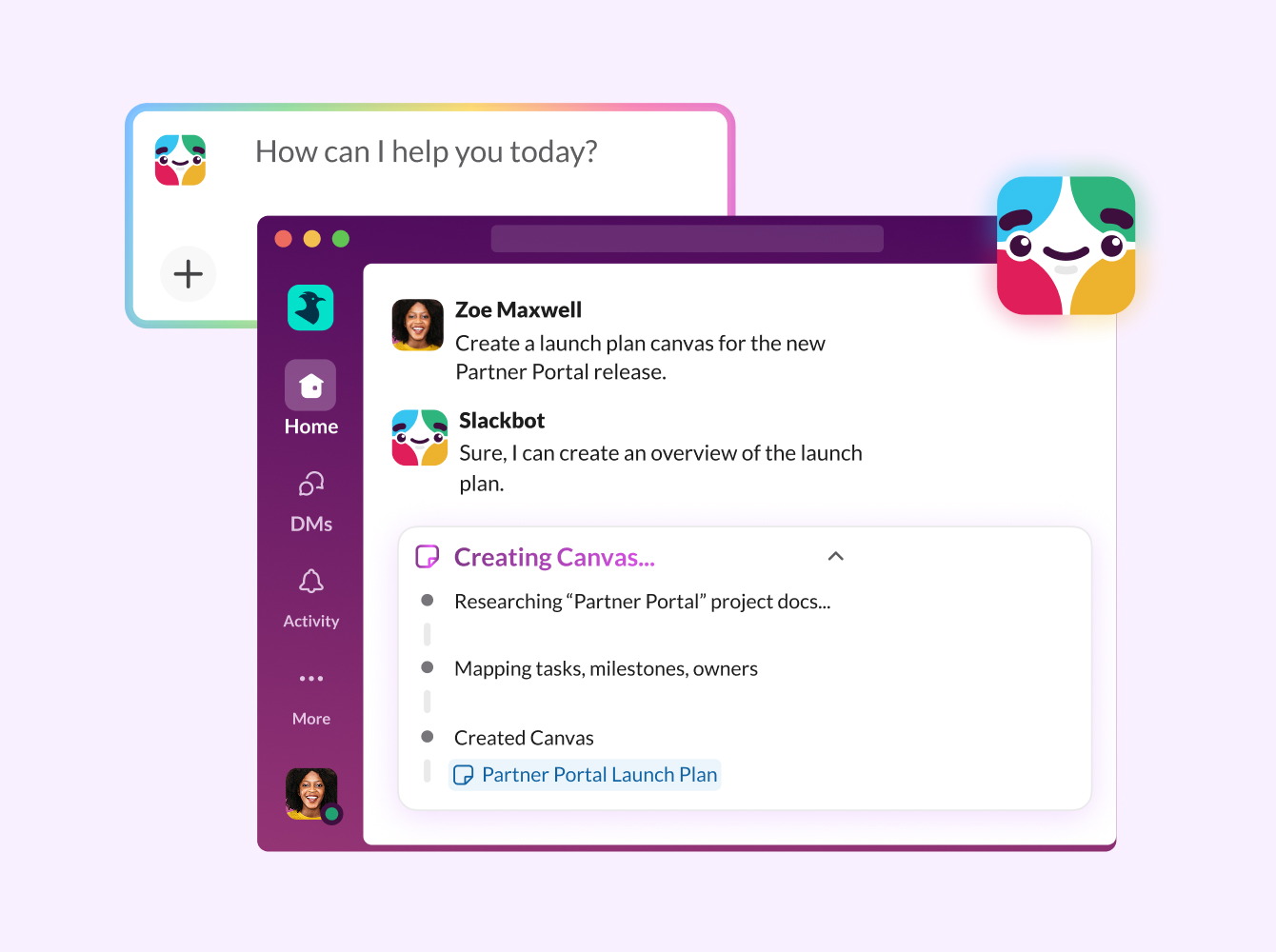
Use AI in Slack to generate a workflow from a simple prompt, then customize it in just a few clicks. Add AI summary steps to automatically summarize channel conversations and record them in a canvas or list
Conditional branching
With conditional branching, you can create workflows that adapt based on user input or data. Define multiple branches and route work to the appropriate next step without any code, ideal for approvals, triage, and multi-path processes.
Keyword triggers
To help teams respond quickly to recurring requests or incidents, you can start workflows automatically when specific keywords are used in a channel.
Salesforce-connected automation
Automation now runs seamlessly between Slack and Salesforce: Updates in Slack can trigger Salesforce Flows, which can then create channels, notify teams, and move work forward in Slack.
When a Slack channel is connected to a Salesforce record, that relationship is stored in Salesforce through channel–record mapping.
Admins can also use Slack-built actions within Salesforce’s Flow Builder to:
- Create a Salesforce channel in Slack
- Add users to a Salesforce channel
- Send messages to a Salesforce channel
- Send notifications to the Salesforce app
- Map Salesforce users to their corresponding Slack users
In addition, Slack workflows can send notifications directly to the Salesforce app using steps like “Send to Salesforce App” and “Send to My Salesforce App,” ensuring reps are notified wherever they work.
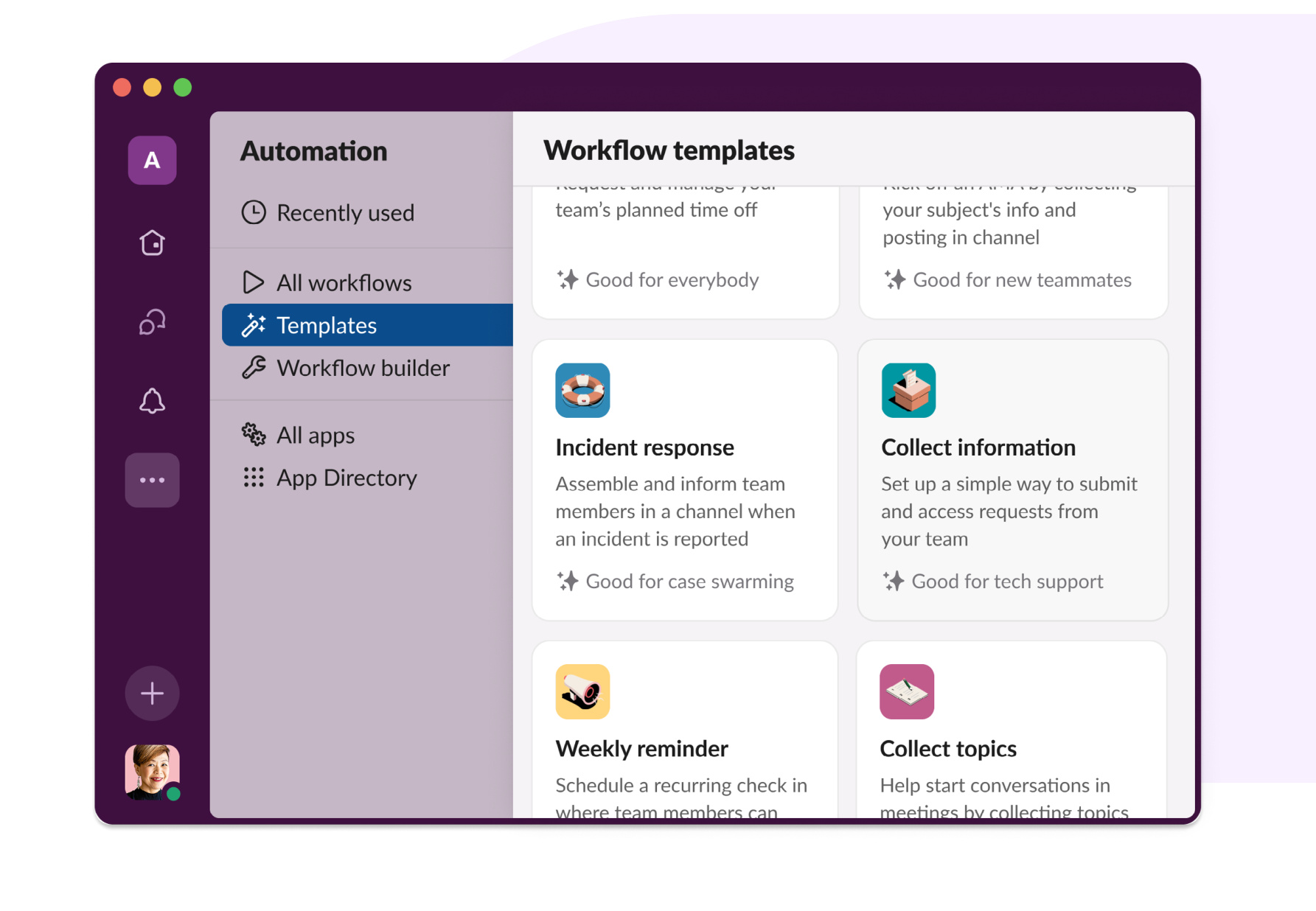
Where to find workflow templates
You can find all kinds of examples and suggestions in Workflow Builder. Follow these steps to get there:
- From your desktop, click the ellipsis (“…”) on your sidebar
- Click “Automations”
- Click “Templates”
Chapter 2: Workflows for Sales
Close deals faster with connected automation

Sellers, sales operations, product specialists, finance, and leadership all play a role in closing complex deals. But without the right systems in place, coordination can slow momentum and introduce risk.
Salesforce’s sales operations teams use Slack workflows to keep sellers informed about where each deal stands and ensure Salesforce stays up to date in real time. Collectively, they’re saving more than 800 hours a week by reducing manual reporting, eliminating duplicate entry, and automating routine coordination.
With Slack and Salesforce connected, sales teams can move deals forward automatically, from lead routing to pipeline updates to executive escalation, all within the flow of work.
Automate pipeline reminders and reporting
Pipeline hygiene is critical, but chasing updates isn’t scalable. Sales teams use workflows to automatically remind reps to share deal win reports, pipeline reports, and weekly status reports. They can also use them for monthly deal audits, weekly time card updates, and monthly expense report submissions.
Instead of simply sending a reminder, workflows can:
- Collect structured inputs through a Slack form
- Validate required fields
- Update the associated Salesforce opportunity record
- Send a confirmation notification to the rep in the Salesforce app
What used to be a reminder is now a reliable process. Data stays accurate, and reps stay focused on selling, not updating systems.
Automatically create and populate deal channels
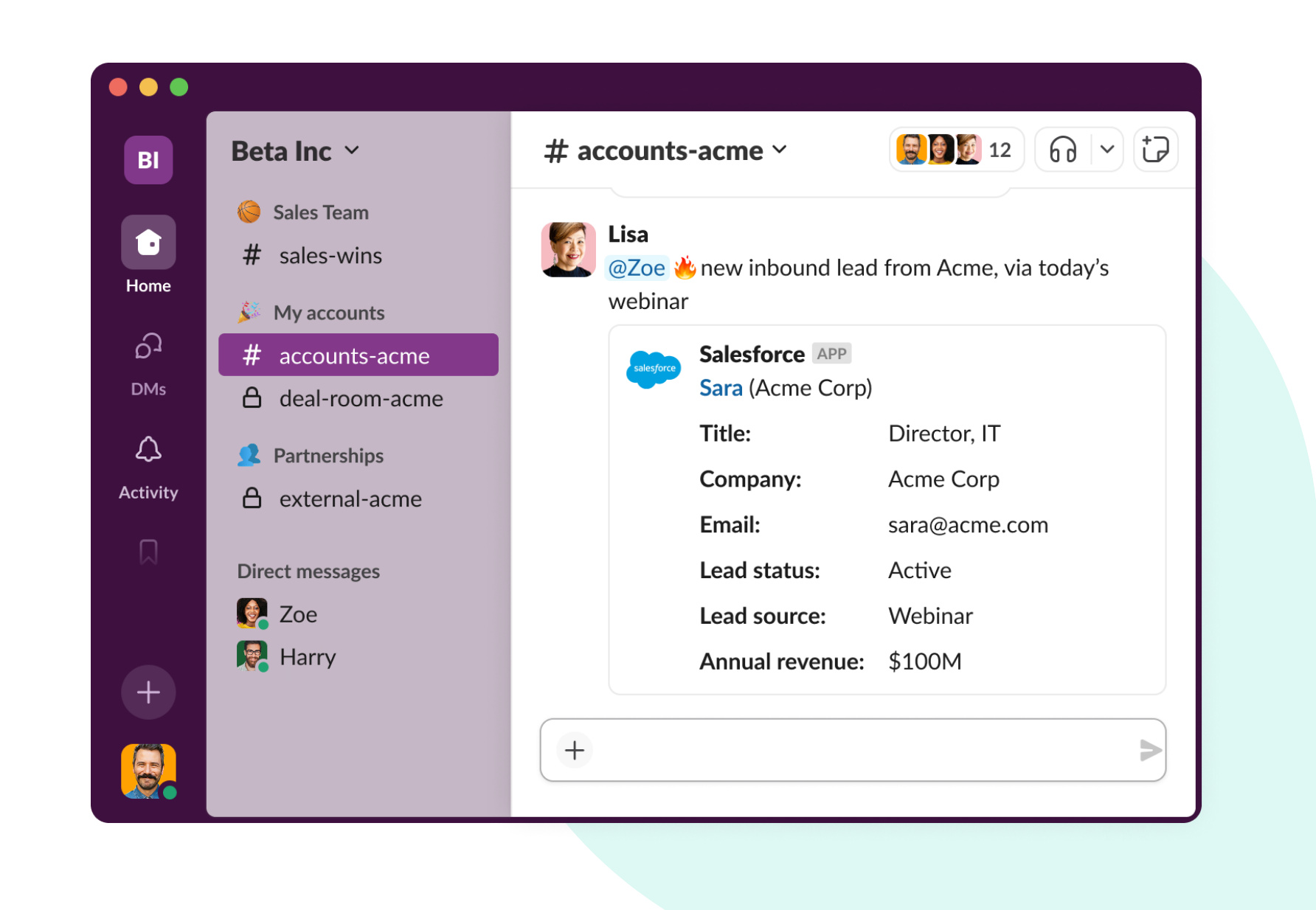
High-value opportunities require cross-functional coordination. Rather than manually creating channels and inviting stakeholders, Salesforce event triggers can start the process automatically. When an opportunity reaches a defined stage such as “Qualification” or “Negotiation,” a Salesforce-triggered workflow can:
- Automatically create a Salesforce channel in Slack
- Map the Salesforce record ID to the Slack channel ID
- Auto-populate the channel with relevant stakeholders
- Post an opportunity summary pulled from Salesforce
This ensures every strategic deal has a structured workspace from the moment it matters most.
Provide, a digital finance company, relies on Slack channels to manage its lending process, which involves multiple teams, documents, and tight deadlines. As deals move through funding stages, Slack channels keep contributors aligned with shared context and real-time updates.
“Whether you’re an underwriter, loan operations specialist, inside salesperson, closing officer, or any other operational contributor, you’re automatically added to the deal channels you’re supposed to be in, this allows us to make quick, accurate, well-documented decisions when issues inevitably come up in the course of a deal.”
ANDREW BENNETT
CEO, PROVIDE
Deal channels generate valuable insights: pricing discussions, competitive intelligence, risk signals, and stakeholder feedback. That context shouldn’t live only in chat.
When a Slack channel is connected to a Salesforce opportunity, Salesforce stores that relationship through channel–record mapping. From that point forward, the channel and the opportunity are formally linked. That connection enables powerful automation. Each deal channel is formally tied to its opportunity record, allowing the channel–record link to trigger Salesforce Flow automation whenever it’s created or updated.
Slack activity can update opportunity fields or initiate downstream processes automatically, while key messages and structured updates can be pushed back into Salesforce. Executives gain real-time visibility into active deals without relying on manual reporting.
You can also add an AI summary step to generate weekly recaps of deal activity in Slack. That summary can be attached to the Salesforce opportunity record or saved in a canvas for reference, ensuring that leadership stays aligned without chasing updates.
Route leads automatically using conditional branching
Before, inbound leads were manually reviewed, forwarded, and reassigned — slowing response time and introducing inconsistency. Now, workflows can leverage conditional branching to route leads automatically based on region, industry, company size, deal value, or product interest.
When a new lead is created in Salesforce (via event trigger), the workflow can evaluate its attributes and take action immediately. A lead from EMEA can notify the EMEA sales channel. An enterprise account can be assigned to the appropriate AE. A high-value opportunity can escalate to leadership.
Each branch can trigger follow-up actions in Slack and Salesforce, from notifying the right stakeholders to updating opportunity records automatically.
Update Salesforce records directly from Slack
Reps shouldn’t have to toggle between systems to log activity. Slack workflows can update Salesforce records directly, without leaving the deal channel. Using Salesforce-connected workflow steps and Slack-built Flow actions, teams can:
- Update opportunity fields
- Create follow-up tasks
- Send messages to a Salesforce channel
- Notify a rep in the Salesforce app
- Convert Salesforce user IDs to mapped Slack users
For example:
- A rep types a designated keyword in a deal channel to flag a stage change.
- A workflow launches a short form.
- The opportunity record updates instantly in Salesforce.
- The rep receives confirmation in the Salesforce app.
Every update is captured automatically and reflected in Salesforce immediately.
Escalate deal risk intelligently
Sales teams need visibility into risk early. Before, identifying and escalating deal risk depended on manual updates and meetings. Now, conditional branching allows a single workflow to respond dynamically the moment a rep flags a deal as “at risk.”
If the deal value falls below a defined threshold, the workflow can notify the manager. If it exceeds a higher threshold, it can escalate to a VP. If a competitive threat is detected, it can alert the product team automatically. From there, automation can send notifications to the Salesforce app, post updates in executive channels, or trigger follow-up processes in Salesforce.
The right response happens immediately, not after the next pipeline review.
Workflows for Marketing
Turn marketing activity into insight, not just output
Marketing teams move quickly to launch campaigns, review creative, support sales, and coordinate events across regions. But without structured processes, teams bury valuable feedback in threads, repeat decisions, and lose insights after launch.
With Slack workflows, marketing teams can turn conversations into structured intelligence, capturing decisions, summarizing feedback, and routing requests intelligently across the organization.

Modernize campaign planning approvals
Campaign approvals are rarely linear. Budget size, audience, regulatory considerations, and launch timing all influence who needs to review and sign off. With conditional branching, teams replace multiple scenario-specific workflows with a single campaign planning workflow that adapts automatically.
It evaluates budget thresholds, regulatory requirements, and media type, routing each request to the appropriate approver automatically. Approvers can select interactive buttons to approve, request revisions, or escalate — each decision triggering a different branch. Approvals stay fast and accountable, so momentum isn’t lost waiting for sign-off
Use AI to summarize campaign reviews and decisions
Campaign review threads can stretch across creative, product, legal, and leadership. Instead of relying on manual recap emails, workflows can include an AI summary step that:
- Generates a clean recap of stakeholder feedback
- Highlights key decisions
- Surfaces open questions
- Posts a summary directly in the channel
- Saves the recap in a canvas for documentation
This creates a documented decision trail automatically. Teams no longer need to reconstruct context later since it’s already structured and searchable. Institutional knowledge compounds over time.
I no longer get lost when looking for information, and approvals are no longer delayed. It’s much easier to be in one system. Summaries are clear, clean, actionable — and workflows allow me to be super-efficient whether I’m using Slack on my laptop or on my phone while on the road.
VIKRAM MEDIRATTA
SENIOR DIRECTOR OF GTM PRODUCT MARKETING FOR AGENTFORCE, SALESFORCE
Approve event requests and track impact
Mixology, a retail chain for women’s designer clothing, hosts fundraisers, popups, and trunk shows at its stores to bring in new customers and raise money for the charities and nonprofits it supports. Because there are so many events, the company needed a way to organize the process of managing the partners and logistics involved.
To solve this, Mixology’s executive team built an event request workflow. Store teams submit key details — location, event type, date, and time — through a structured form. Requests route to a private channel for review and approval, and an automated emoji signals the decision back to the store. Each submission is automatically logged in the company database, giving the team visibility into events and their impact throughout the year.
Route product marketing questions intelligently
Marketing teams field constant internal questions about positioning, messaging, and campaign assets. Salesforce uses a structured “help” workflow that allows employees to submit marketing requests through a designated channel. Each submission captures structured information and routes to the right subject-matter expert using conditional logic.

Because requests are centralized and searchable, teams can:
- Detect recurring themes
- Identify enablement gaps
- Prioritize high-demand content
- Spot emerging product trends
I appreciate how we can track questions and responses in channels to discover trends. That visibility shows us where there are opportunities for further enablement so that we’re focusing on the topic where our stakeholders need the most clarity.
AARON KELLEY
SENIOR DIRECTOR, PRODUCT AND PRICING OPERATIONS, SALESFORCE
Keep large-scale events aligned in real time
For major events like Dreamforce, coordination and rapid decision-making are essential. Erin Oles, Senior Vice President of Strategic Events at Salesforce, uses workflows to triage participant questions and organize cross-functional input

One of the best things you can do as a leader is enable your team to move fast. Slack helps remove barriers and boosts visibility across the organization.
ERIN OLES
SENIOR VICE PRESIDENT OF STRATEGIC EVENTS, SALESFORCE
Workflows for Customer Service
Resolve issues faster with intelligent routing and real-time context
For customer service teams, every request carries urgency, and every delay affects customer trust. Service teams respond faster by structuring intake, routing issues intelligently, and syncing case updates directly with Salesforce. Instead of manually triaging requests or duplicating notes across systems, teams can use workflows to automate the operational layer of support, all while keeping conversations collaborative.
Instantly route customer requests to the right specialist
Credit Union 1 in Alaska sets itself apart in a competitive banking market by providing better, faster service for its members. Tellers use a Slack workflow to send relationship managers leads and referrals as members visit branches and discuss their needs. Another workflow routes follow-ups to the appropriate specialists, whether for an auto loan, an authorized signer, or other requests. Employees capture key details like the member’s name, phone number, request type, and status, so specialists have the context they need to respond quickly and deliver timely support.
Workflows help standardize our communication. Imagine we have 150 employees in our branches: If they’re each making member appointments in their own way, it would take forever, and we would miss valuable information. With Workflow Builder, we’re able to automate this process, which has resulted in a 20% increase in time saved.
MARK BURGESS
CEO, CREDIT UNION20% increase in time saved
Swarm on complex issues automatically
Slack’s customer experience (CE) team helps thousands of users each day. For complex issues, that often means consulting subject-matter experts before devising a solution.
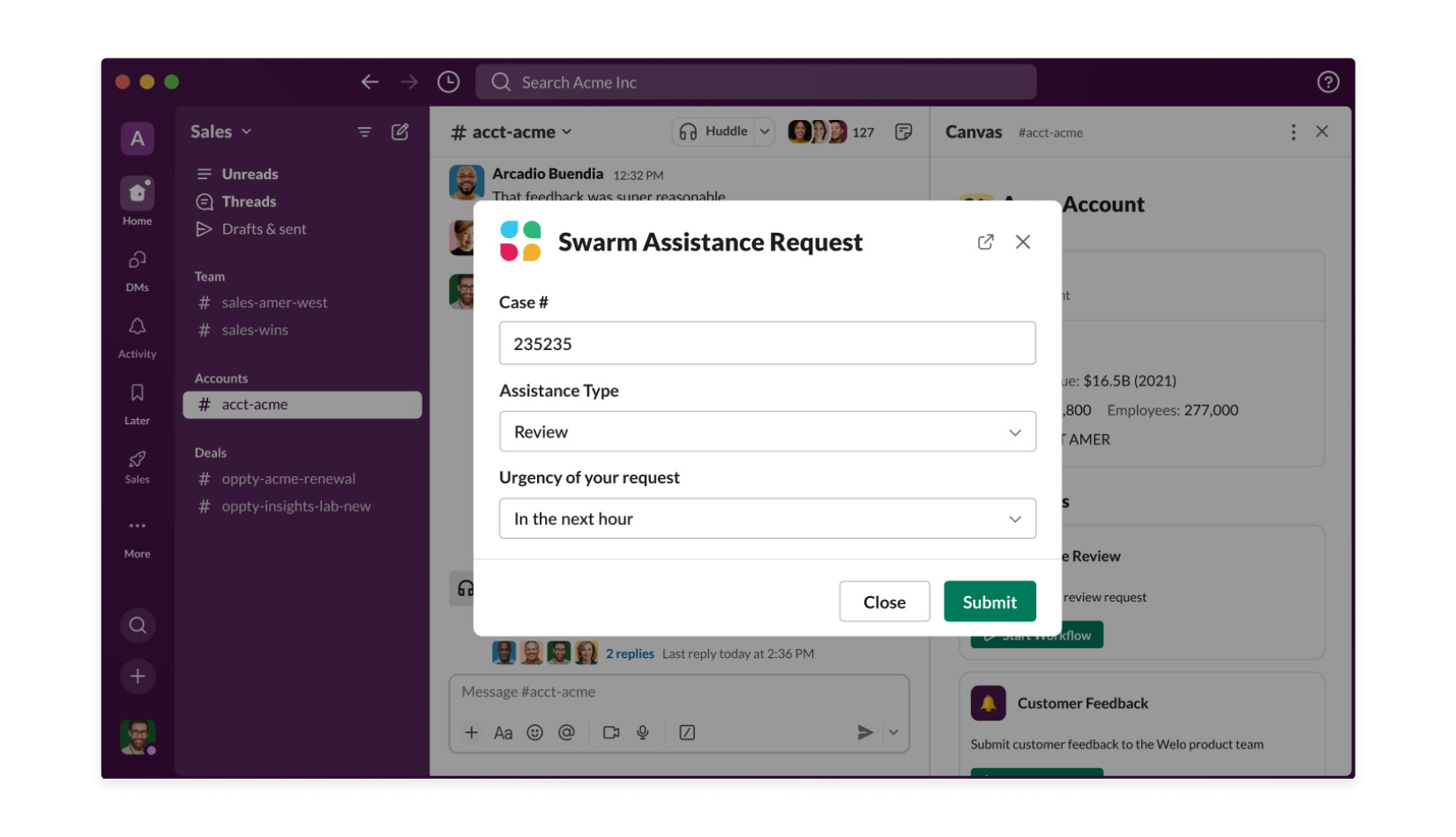
Customers need their problems resolved as soon as possible, so speed and agility in this space are paramount. Our CE team built a workflow that reroutes requests into dedicated channels filled with specialized engineers.
The properly formatted results post to channels for that group, and experts triage from there. When someone “claims” the issue by clicking a button, the CE agent who posted it gets a message telling them who is investigating the issue.
Classify and triage cases with conditional branching
Customer issues vary widely, from billing questions and product defects to account updates and security concerns. With conditional branching, a single intake workflow can adapt dynamically. For example:
- If severity = High → notify on-call support channel
- If enterprise customer → escalate to dedicated account pod
- If billing issue → route to finance queue
- If technical issue → trigger engineering swarm
- If regional request → route to appropriate geography
Cases reach the right team the first time, reducing handoffs and restoring customer trust faster.
Slack’s integration with Service Cloud reduces context switching between the two tools because conversations about the case can happen in the Service Cloud Console or Slack interchangeably. Users can quickly add information discussed in Slack to the case details in Salesforce so important context doesn’t get lost.
When a case is resolved, users can create a Salesforce knowledge article in Slack based on the swarm conversation so lessons from the case can be easily referenced when another person encounters a similar issue.
Connect Slack channels directly to Salesforce cases
Once connected, case updates, stakeholder notifications, and field changes stay synchronized automatically. This reduces context switching between Service Cloud and Slack. Conversations can happen in either interface without losing information. Key updates discussed in Slack can be pushed directly into the Salesforce case record.
Maintain visibility without manual reporting
Because channels and cases stay connected, leadership gains real-time visibility, SLA reminders trigger automatically, and resolution summaries are captured without manual reporting. Teams spend less time preparing status reports, and more time helping customers.
Find experts faster with Expert Finder
Slack enables support pods to resolve major issues quickly through the use of Salesforce’s Expert Finder tool in Service Cloud. Expert Finder is embedded in the Slack swarming workflow and helps connect service teams automatically to the right experts based on skills, availability, and capacity. And with the field service mobile app, field service technicians have all the information they need to deliver complete service from anywhere.
Here’s how it works:
- An engineer initiates a request in Service Cloud
- Expert Finder identifies the appropriate experts
- A Slack swarm channel is created
- The workflow automatically invites the right engineers and cross-functional contributors
Workflows for Engineering
Protect focus and automate the operational layer
Engineering teams thrive on deep work, but standups, bug triage, idea intake, and deployment coordination can interrupt momentum if they’re not structured properly. By automating the operational layer of development, engineers can reduce friction, protect focus, and move faster.
Run async standups without disrupting flow
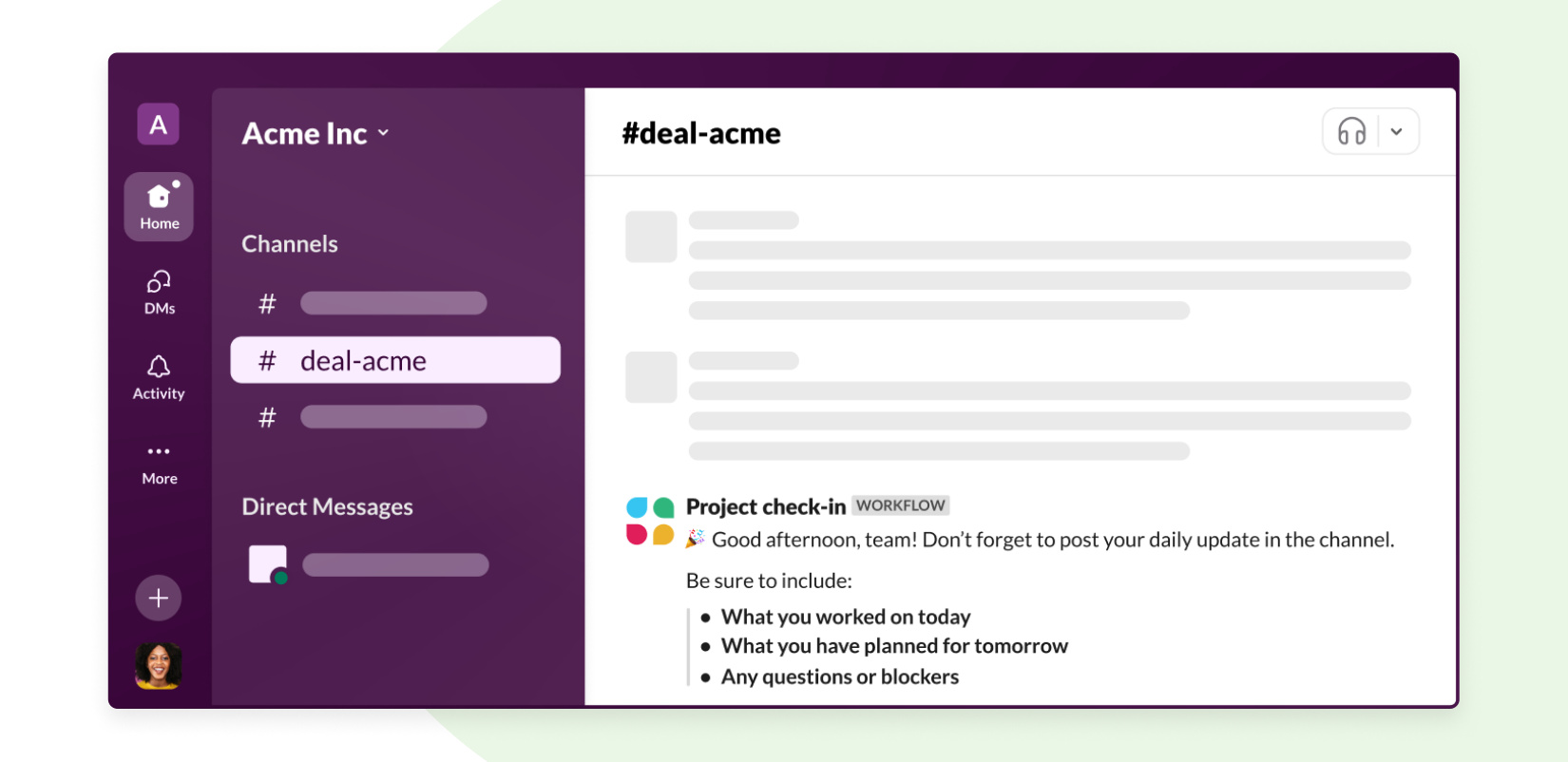
Daily standups are useful, but synchronous meetings aren’t always necessary. Instead, teams can automate async standups directly in Slack. A scheduled workflow posts prompts in a channel, and teammates respond in a thread or via a short structured form. Updates remain in one place, easy to find and reference later.
To go further, teams can add an AI summary step that compiles a concise recap. Blockers and themes are surfaced automatically, and sprint documentation stays up to date without anyone drafting a summary manually. Alignment improves without interrupting deep work.
Turn ideas and bugs into structured work
Bright ideas and potential issues often emerge organically in conversation. Rather than relying on someone to copy and paste details into a ticketing system, engineering teams publish lightweight intake workflows in relevant channels.

A short form captures essential context, and the workflow can automatically create a Jira issue or task in another tracking tool. With conditional logic, you can escalate high-severity issues immediately and route lower-priority to the appropriate backlog.
Not a Jira user? No problem. Workflow Builder integrates with many popular bug-tracking tools, or you can simply keep track of issues in your Slack channel.
Make bug reporting consistent and visible
Like a novel feature idea, new bugs can be spotted by customers and coworkers alike. This is why we empower everyone at Slack to create new issues and track resolutions. First, the engineering team sets up a dedicated channel, like #iosbugs. Then they publish a standardized bug reporting workflow for the channel. From there, they’re able to add “Create Jira issue” as an automated step in the bug reporting process.

Gather votes from your team (for example, for a hackathon)
One customer used Workflow Builder to run an internal hackathon and collect votes in Slack. The voting process starts with the hackathon organizer posting instructions in the developer channel, letting members know to use a specific emoji to start the voting workflow. Those who react with the emoji automatically receive a voting form through a Slack message. Results are then downloaded as a CSV file to quickly tally up votes.
Use simple triggers to power complex workflows
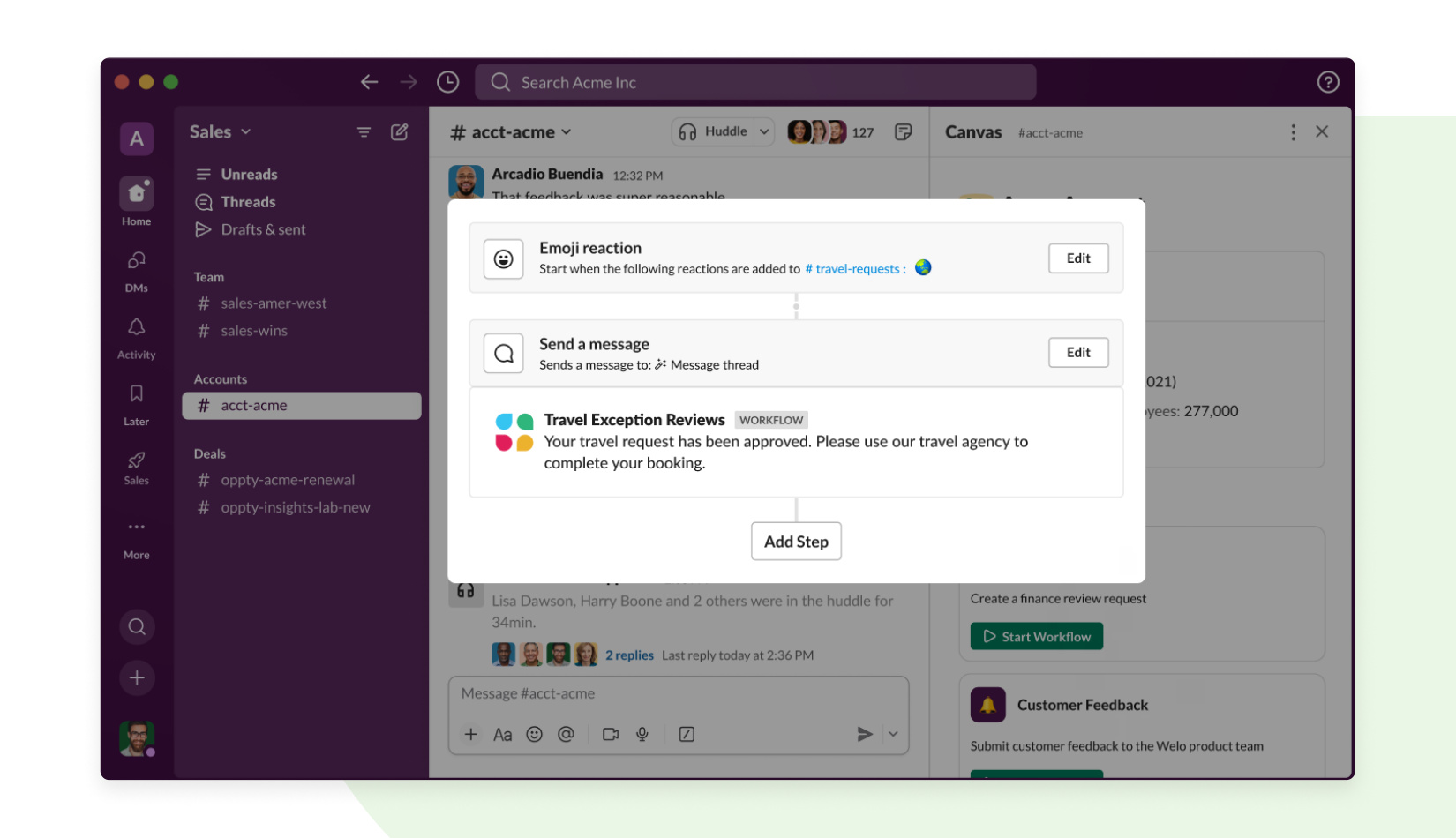
A teammate reacting to a message can automatically claim a task and receive a follow-up form. Typing a designated keyword can open a structured intake flow. Small triggers make automation feel natural inside everyday conversations. Over time, these building blocks can be combined into surprisingly powerful internal tools built in minutes, not weeks.
Stringing these triggers together means you can build some pretty complex apps for your team in just a few minutes in Workflow Builder.
Here’s an example for a travel request:
Coordinate deployments and system alerts
We’ve heard from several software teams using cloud services to manage their work that they’ve chosen a vendor that doesn’t yet have an easy way to send updates into Slack. But those services often have webhooks, and when they do, you can use a workflow to manage incoming messages from your servers, systems, and hosts. Use it to get alerts when a service goes down, or for updates when a status changes in another system.
Workflows for IT
Automate operations without slowing the business down
IT teams operate at the center of the organization. They manage onboarding, incidents, system health, and global infrastructure, often under tight time pressure. Teams can use Slack workflows to standardize processes, reduce manual coordination, and respond faster to issues without sacrificing control.
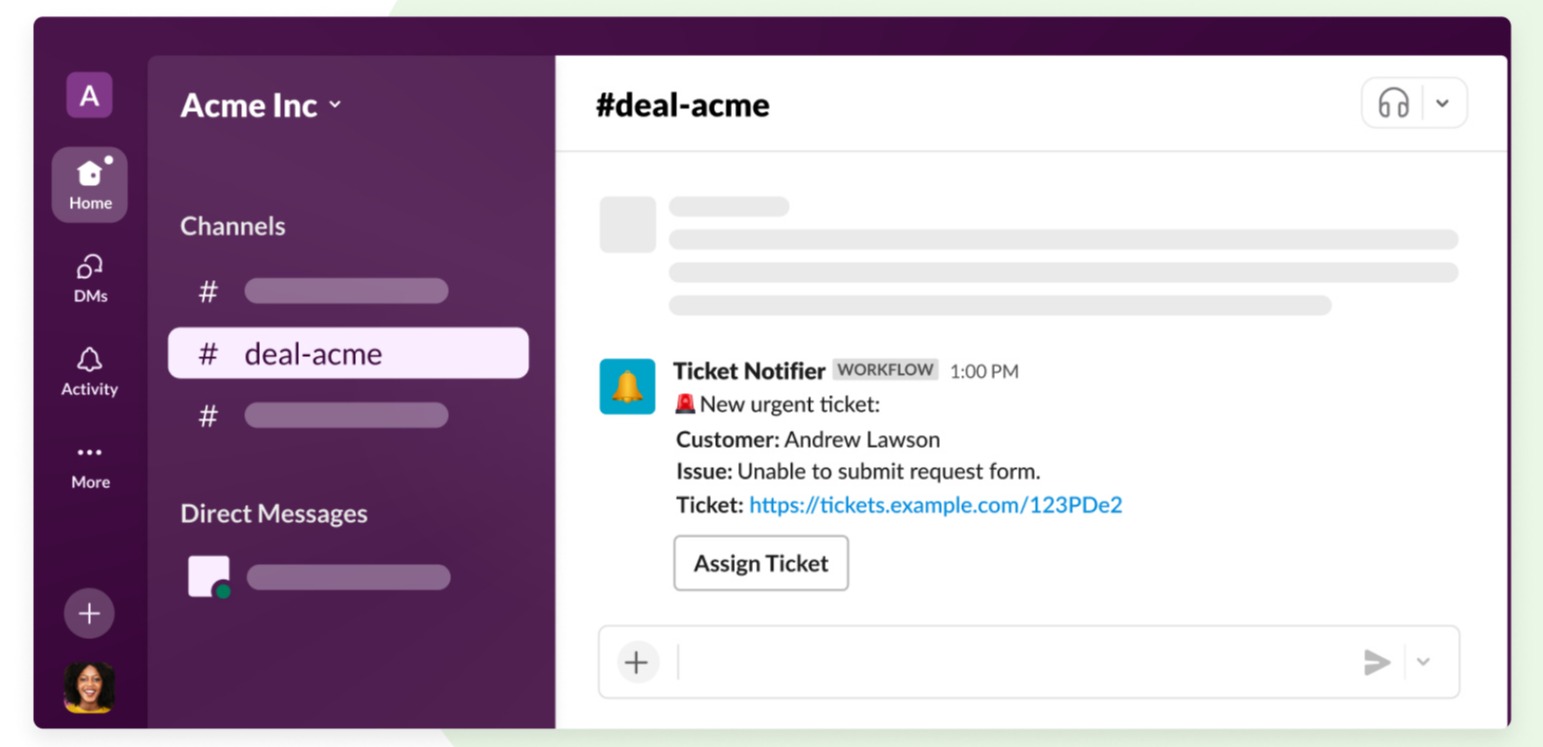
I have a Roku television, and if I have an error with it, I can report it by opening up Slack on my phone and hitting ‘Submit a bug.’ The workflow will trigger a ticket that alerts our engineers to look at the bug and see what’s going on.
TRISTAN CARY
ENTERPRISE APPLICATIONS MANAGER, ROKU
Search and destroy bugs
Roku uses no-code workflows to automate everything from requesting maintenance to onboarding. When a new hire joins the team, an orientation workflow cycles that person through steps on how to get started and provides them with critical resources and information about their job.
Workflows are also used to report technical bugs to engineers automatically
Standardize incident intake and escalation
Incident resolution depends on speed and clarity. Any inefficiency — incomplete details, unclear ownership, scattered context — slows the response.
Wayfair manages inventory issues through structured workflows in Slack. Stakeholders submit incidents through a form that captures key details, and the submission posts directly into a dedicated channel, instantly notifying the IT team on call. From there, automation takes over.
Responding with a specific emoji can trigger follow-up workflows that:
- Update a connected tracking system
- Compile structured data
- Preserve direct links to the Slack discussion
Instead of scrolling through messages to reconstruct context, IT gains a centralized, searchable source of truth. These automations save the team time every week, all while improving reporting consistency.
Escalate critical issues with conditional logic
With conditional branching, IT workflows adjust automatically based on severity, impact, and SLA thresholds. A critical incident can immediately alert leadership and the response team. A regional outage can notify only the affected teams. Approaching SLA deadlines can trigger proactive reminders before escalation becomes necessary.
Escalation rules are defined once and applied consistently, so routing decisions happen instantly instead of relying on manual judgment in the moment.
Maintain 24/7 global operations
Speed is of the essence when you’re maintaining network operations for a global gaming platform, and any little bit that can be automated helps. That’s why Sony Interactive Entertainment has built 650 workflows to help manage a Slack channel supporting over 2,000 PlayStation engineers around the world.
Slack plays a pivotal role in driving our efficiencies for how our team can better work to support our engineers and run our network operations digitally. It helps us maintain PlayStation network performance 24/7, which translates to better player experiences. In our field, every second counts, and being able to easily automate so many of our processes with Slack has saved us at least, on average, 400 hours a year.
NICK GRATTON
SENIOR MANAGER, THE NETWORK OPERATIONS CENTER
400 Hours saved
A year with Slack Automation
For example, the company’s Network Operations Center team created a workflow that triggers an automated response to frequently asked questions, shaving a critical minute off requests. Another automated workflow sends network status reports to the channel every three hours, around the clock, keeping executive stakeholders informed of network status without having to leave Slack.
Workflows for All
Align your team across time zones and schedules
Work doesn’t always happen at the same time or in the same place. As teams grow across regions and time zones, coordination becomes harder, meetings multiply, and context gets lost. Teams can use Slack workflows to stay aligned asynchronously so collaboration doesn’t depend on being online at the same moment.
Align your team regardless of time zones or work hours
Canva, the online graphic design platform, relies on workflows to cut down on meetings by sharing status updates asynchronously. Before integrating Workflow Builder, the finance team spent an average of 1.5 hours per week in standups, adding up to 67.5 hours per week across the team.
For a rapidly growing team juggling multiple priorities and time zones, they needed a way to have more asynchronous conversations and decision-making while spending more of their time reaching their “crazy big goals.” Canva’s solution? Pre-built workflows in Slack.

With Workflow Builder, the Finance team now spends five minutes per week updating their status, the total time savings per week is 63.75 hours across the team, which we’re able to spend focusing on the impactful projects that add value for our team and community around the globe
CHANTAL PLAN
FORMER PROCUREMENT OPERATIONS, CANVA
Run Q&As with employees
At Slack, one of the things we’re proudest of is the engagement and enthusiasm at our monthly all-hands meetings. We support this participation by making it as easy as possible for employees to get involved and ask questions. With offices around the world and many employees working remotely, opening the floor to questions is a little more complicated than simply passing a microphone around.
Instead, we ask curious crowd members to join the #all-handsand-events channel, where they can click the workflow button at the top of the channel to trigger the “I have a question” workflow.
This pops up the question submission form:

These submissions go into a private channel where our internal communications team prioritizes them and assigns a teammate to ask them live on the person’s behalf. The result is an open forum inclusive of remote offices, remote team members and in-person introverts alike.
Streamline legal reviews
Before we publish any marketing materials or other communications (like this e-book!), Slack’s legal team likes to catch potential legal issues. With Workflow Builder, the legal team created a simple review process that collects and standardizes requests and also circulates key reminders and speeds up approvals.
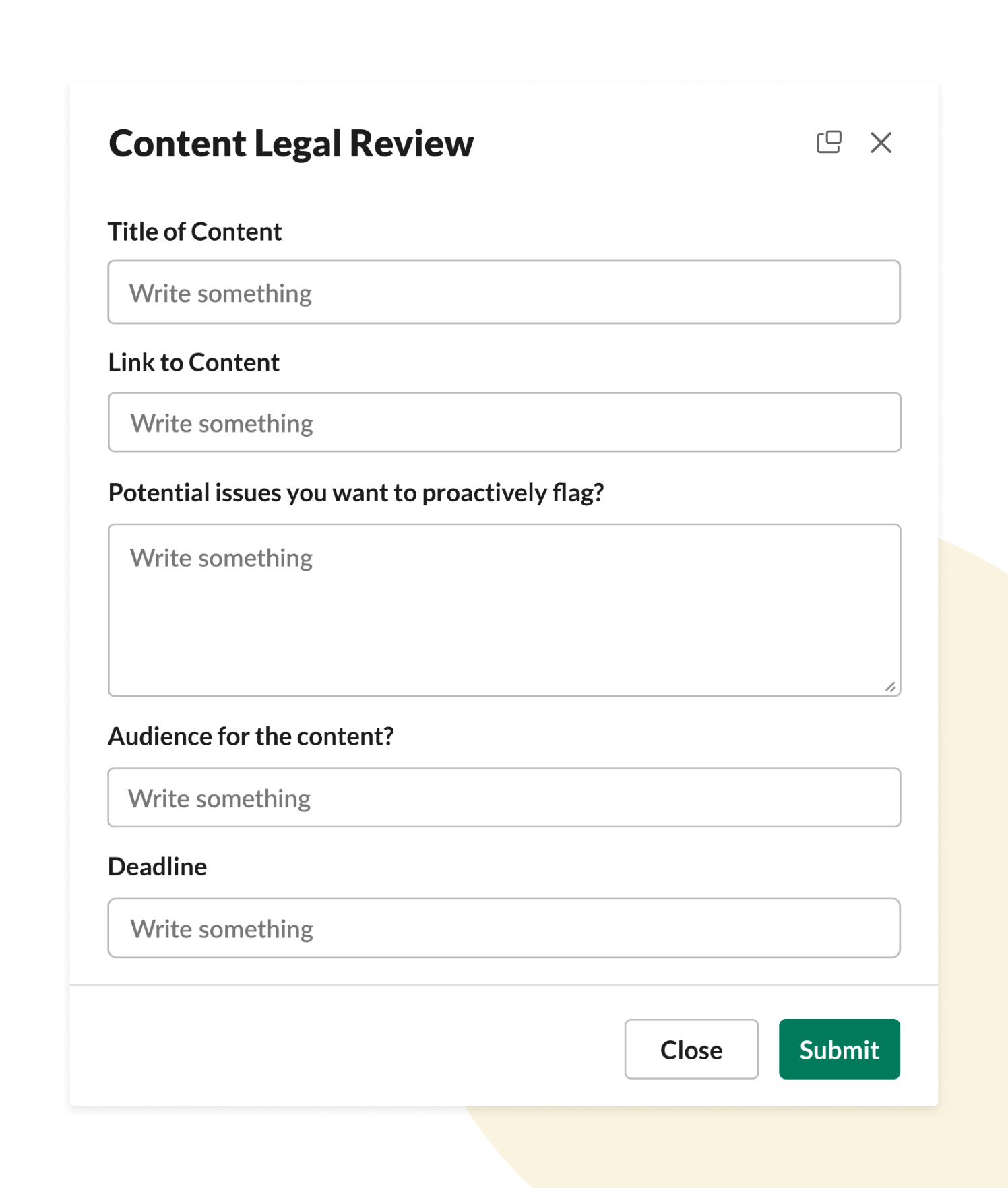
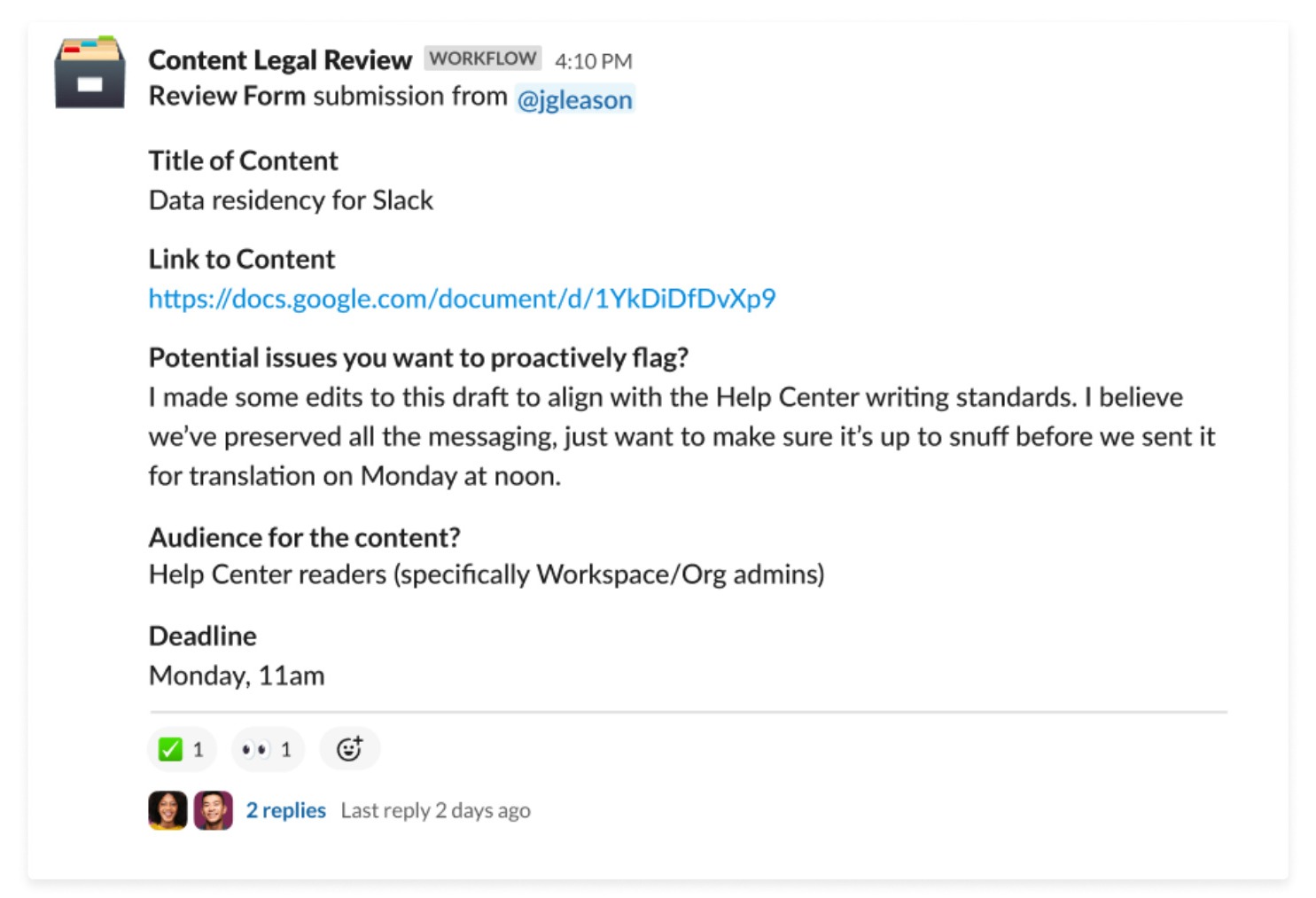
The form launches from a dedicated #content-legal-review channel, with the results automatically posted in the channel for wider visibility.
Simultaneously, the requester receives an important direct message that reminds them of some commonly flagged issues, so they can proactively make a first attempt at necessary edits before the legal team reviews.
From there, a member of the legal team will put an emoji on the message to “claim it” and let the requester know a review is in progress. When the review is complete, the approver adds a emoji.
Meanwhile, any questions or necessary changes are communicated in a thread.
Many other teams at Slack rely on similar request workflows. For example, our social media team uses a workflow for content requests, as does our design team for briefs.
Teach new employees your own Slack culture
Slack product training is a core part of our onboarding experience. We’ve developed custom documentation so every new hire knows how to download, launch and log in to Slack, as well as optimize their workspaces.
We’ve automated this process with an onboarding canvas that includes resources that all workers need to best serve their customers and teams. In the canvas, a manager can include a checklist of items to complete in the first week: multiple channels to join with the click of a button, training videos to view, and files to read. Managers can also embed workflows to complete tasks, like requesting a corporate phone or setting up video chats with other people in the department, without ever leaving Slack.
Make automation part of everyday work
When automation is built into the same place where conversations happen, it feels natural. Teams don’t need to switch tools or rely on manual follow-ups. Processes run in the background, coordination stays visible, and people spend more time on meaningful work.
Slack workflows make it possible for everyone, not just technical teams, to build smarter processes in the flow of work.

📌 30-ways-to-automate-work-in-slack_image19.jpg — upload to Media Library → copy attachment ID from URL → replace ATTACHMENT_ID_19
Get Started Today
Automation works best when it meets teams where they are. Some people want to build workflows with clicks. Others want to extend them with code. IT teams need governance and visibility. Developers need flexibility. Business teams need speed. Slack supports all of it.
Workflow Builder for everyone
Workflow Builder makes automation accessible to anyone. Business users can create structured forms, automate approvals, route requests with conditional logic, and connect tools — all without writing a single line of code.
Templates provide starting points. AI Builder can generate workflows from simple prompts. And reusable building blocks allow teams to standardize processes across departments.
Automation scales because it’s approachable.
Extend with code when you need it
For teams that want deeper customization, Slack provides developer tools including APIs, a CLI, and an SDK. Developers can:
- Build custom workflow steps
- Create internal apps
- Integrate proprietary systems
- Host applications directly in Slack
This allows organizations to combine no-code workflows with fully custom logic without sacrificing speed. Low-code and pro-code can coexist.
Connect systems for hybrid processes
Most business processes span multiple systems. Slack workflows can connect with Salesforce, Jira, ServiceNow, Google Workspace, and thousands of other tools. Connectors allow workflows to update records, create tickets, send notifications, and synchronize data across platforms.
Hybrid processes — part Slack, part trusted source of truth — are seamless.
Scale automation with clarity and governance
As workflows grow across teams, consistency matters.
Best practices for scaling automation include:
- Standardizing intake forms
- Using conditional branching to reduce workflow sprawl
- Connecting Slack channels to systems of record
- Documenting workflows in Canvas
- Leveraging AI summaries to preserve context
When automation is visible and structured, it strengthens governance rather than complicating it.
Start small. Scale naturally.
Every workflow in this guide began with a simple goal: remove friction from everyday work. Whether you’re automating standups, routing customer cases, accelerating deal approvals, or onboarding new employees, Slack gives you the tools to build the way you want — with clicks, code, or a combination of both.
Explore templates, experiment with AI Builder, or extend workflows with custom apps. However you build, automation is more powerful when it’s part of how your team already works.
Sources
- Source: Salesforce, FY24 Customer Success Metrics Report, 2023
 Super!
Vielen Dank für dein Feedback!
Okay!
Vielen Dank für dein Feedback.
Hoppla! Wir haben gerade Schwierigkeiten. Bitte versuche es später noch einmal!