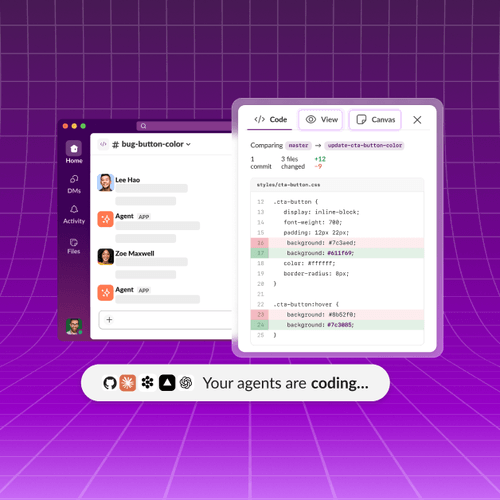
Coding agents have made writing software fast. The work around it hasn’t kept up: deciding what to build, agreeing on an approach, catching a wrong turn, and keeping everyone aligned. Most agent work happens away from the team, with a developer and an agent working in a terminal that nobody else sees until the work lands. Engineering leaders kept telling us the same thing: individually their people had never shipped faster, and collectively they had never been more out of sync.
Code channels are our answer. A coding agent, like GitHub Copilot, Claude Tag, or one your team built, comes into Slack as a Slack app. Your administrators install and approve it, and it has a bot user and an explicit set of scopes. When the agent takes on a task that needs more than a quick reply, it opens a dedicated channel where the agent and the team work together. Teammates can read the plan, redirect the agent, or spot duplicate requests. When the task is done, the channel is archived with a summary and stays searchable.
This paper explains how code channels work and who owns what. Slack provides the channel and the app model. It does not provide the agent or its runtime, and it does not decide who may talk to the agent. The agent is a third-party app that comes in through the same door as any other app, and it follows the same approval, scope, and membership rules once inside.
A code channel is a channel
The most important design decision we made was also the least dramatic. A code channel is an ordinary Slack channel. It is created by the same code path as every other channel, lives in the same tables, and can be public or private. There is no new conversation type.
What makes it a code channel is a small set of properties attached to the channel object. The first marks it as an agent channel and gives it a stable record identifier. The second describes the agent session: which agent is assigned, whether it is active or waiting or finished, who started it, and optionally which message it was opened from. The third carries the working context the agent chooses to publish — the repository, the branch, the pull request and its CI state, a handful of links for the context bar, and the list of artifact tabs.
We considered building something more purpose-built, and we decided against it for a reason that will come up repeatedly in this post. Every control our customers already run against Slack channels — retention, legal hold, export, eDiscovery, encryption key management, audit logging, data loss prevention — works by operating on channels, messages, and files. If a code channel is a channel, those controls apply to it without anyone having to do anything. If it were something new, every one of them would have to be extended, tested, and documented separately. Our customers told us they wanted agents in Slack because they had already vetted the compliance, learned the controls, and customized it to them, so we stuck to the key component already in place: the channel.
What the agent can do in a code channel
An agent assigned to a code channel has a number of abilities that user members do not. Through a dedicated API, it can publish the bookmarks above the composer, post artifacts as tabs (a code diff, an HTML preview, a Block Kit view, a canvas, etc), register slash commands scoped to that channel, set the session status that drives the working/waiting/done indicators in the client, and archive the channel with a summary.
These write operations are restricted to the agent bot assigned to the channel. Because the APIs work only in code channels, agents can do real work alongside your team without gaining control over other regular channels. A user member cannot rewrite the context bar, and an agent cannot touch a channel it is not a member of. Agents cannot add these bookmarks or artifacts to normal channels. The API is gated behind a bot-token scope, code_channels:manage, which administrators approve the same way they approve any other scope for any other app.
Agent artifacts are ordinary Slack files, so they follow the workspace’s file retention policy. A diff is saved as changes.diff and shared into the channel, where it shows up in the file list like any file a member posts. HTML previews and Block Kit views are files owned by the agent’s bot user. They appear as tabs rather than being shared into the channel. Canvas tabs are regular Slack canvases, with their usual version history.
Slack does not decide who can prompt the agent
Slack adds no permission layer between a developer and an agent. Anyone who is a member of a code channel can post in it, and the agent receives those messages the same way any app receives messages in a channel it belongs to: through the Events API, using the standard history scopes. Whether the agent acts on a message is up to the agent — governed by the agent provider’s own authorization model, by the permissions the developer holds in the source control system, and by the provider’s terms of service.
Put differently: Slack does not know, and does not need to know, whether a given engineer is allowed to merge to main. The agent knows and controls that. What Slack enforces is the room. Two existing controls shape it.
The first is app approval. An agent can only participate in a workspace if its app has been installed and approved there, and the agent in a code channel is the same app the administrator already reviewed. The second is channel membership and privacy. A code channel inherits its privacy from the channel it was opened from — public from public, private from private — unless the agent or the user explicitly chooses otherwise, and membership works exactly as it does in any channel.
The lifecycle of a code channel
A code channel can be opened by the agent, typically after a developer mentions it with a task that warrants more than a reply, or by a person: from the “New code channel” button, from a prompt in a direct message with the agent or from a Workflow Builder step. Every one of these paths runs through the same creation logic on the server. Creating a channel twice with the same agent session identifier returns the existing channel, so a retried request never produces a duplicate. The session identifier has the additional benefit of mapping to outside agent sessions; for apps that have an additional external UI, users can easily track sessions in both places.
During the work, the agent posts its responses as messages, publishes its context, and posts artifacts as tabs. The humans in the channel reply, redirect, and review in the same place. When the task is done, the agent can choose to archive the channel and attach a summary. Archived code channels are not deleted. They remain searchable, they can be reopened, and the agent can attach a summary linked back to the message where the work began.
How compliance controls apply
Because a code channel is a channel, everything the agent produces is a message or a file in that channel, so your existing controls work out-of-the-box.
- Search: Code channels, their messages, and artifacts are all indexed and searchable through Slack’s global search bar. Archived channels remain searchable.
- Retention: Messages follow the workspace’s public- or private-channel retention policy. Diffs, previews, and views are files and follow file retention.
- Legal hold: Applies as it does to any channel. There are no code-channel-specific exceptions.
- File editing controls: If your workspace has Disable File Editing turned on, agents can’t create or update diff, HTML, or Block Kit tabs. Canvas tabs still work because canvases keep a version history.
- eDiscovery and the Discovery API: Code channel messages are available through the Discovery API, and the files agents create are returned by Discovery’s file listing.
- Compliance exports: Code channel messages are included in standard exports, like messages in any other channel.
- Enterprise Key Management (EKM): Messages and files in code channels live in the same EKM-managed stores as the rest of your content provided you have EKM for your Slack org. Your keys cover the agent’s conversation and the artifacts it posts.
- Native DLP: Messages in code channels pass through the normal message path, and DLP applies.
- Audit Logs API: Creating a code channel emits the standard channel-created event, with the agent app in the event context and the agent-channel record identifier in the details, so code channels are distinguishable in a SIEM. Archiving emits an archive event. App installation, approval, and scope changes are audited as they are for any app.
- AI in Slack settings: Slack may supplement code channels with native summaries. Any summary honors existing settings and AI opt-outs. You do not need to enable Slack’s native AI features to use code channels. Slack does not train models on customer data.
- Slack Connect: Code channels cannot be opened from an externally shared channel.
Where Slack’s boundary ends
Slack’s controls govern everything inside the channel. The agent, however, is a third-party application. Whatever is posted in a code channel is delivered to that agent, and from that point it is processed under the agent provider’s terms, on the agent provider’s infrastructure. Slack’s commitments on EKM, retention, residency, and HIPAA cover the Slack side of that line; the agent provider’s commitments cover theirs.
Code channels don’t introduce a new boundary. They adhere to existing boundaries that already apply to every installed app in your workspace. Slack enforces the visibility of the agent conversation, and the controls of how that app behaves stay with the app — meaning admins don’t have duplicate access controls to juggle.
Note that audit coverage is at the channel level. Creation, archival, and membership changes are audited. Individual agent actions inside the channel, such as updating the context bar or posting a diff, are not separately audited; they are visible as channel content.
Bringing your own agent
Code channels are an open surface. Any Slack app can declare code channel support in its manifest, request the code_channels:manage scope, and use the same API that our launch partners use. Our own internal coding agent, Speck, is built on that public API with no privileged access: the same methods, the same scopes, the same channel semantics. The official SDKs for Python, Node, and Java include the methods, and a reference implementation, slack-samples/bolt-python-coding-agent, shows the full lifecycle end to end.
Developer documentation is at docs.slack.dev/ai/slack-code.
The channel you already trust
We built code channels on top of the channel rather than beside it because the channel is the thing our customers already trust and govern. The agent brings its own rules about what it will do and for whom. Slack makes sure that whatever it does happens somewhere the team can see it, search it, retain it, export it, encrypt it, and audit it — the same way they can with everything else that happens in Slack.
 ¡Genial!
¡Muchísimas gracias por tus comentarios!
¡Entendido!
Gracias por tus comentarios.
¡Uy! Estamos teniendo dificultades. Por favor, inténtalo de nuevo más tarde.