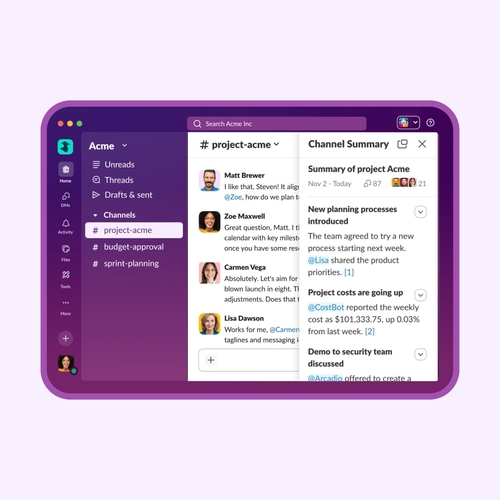
Messaging platforms have become essential infrastructure for modern work. Today’s teams rely on them to keep communication moving, collaborate across departments, connect with external partners, and increasingly automate routine tasks with AI. For decision-makers, the question is no longer whether to use a messaging platform: it’s which one will best support the way their organization works.
With so many strong options on the market, choosing the right platform comes down to fit. Some businesses prioritize deep integrations, others need enterprise-grade security, workflow automation, or seamless collaboration across distributed teams.
In this guide, we’ll break down the five best messaging platforms for businesses in 2026 so you can choose the one that will help your team communicate more effectively.
What are messaging platforms?
Messaging platforms are digital tools that allow individuals and teams to communicate in real time through chat, file sharing, and collaboration features — all within a shared workspace. Messaging platforms represent a major shift in how work gets done, moving conversations out of cluttered inboxes and into organized, transparent channels where teams can stay aligned.
Unlike traditional email, modern messaging tools make it easy to ask questions, share updates, and collaborate instantly. This speed and visibility are what make messaging platforms so powerful. For teams looking to improve business messaging, these platforms create a central hub where communication flows naturally, enabling more effective communication in the workplace.
Another key advantage is how business messaging platforms centralize work. Instead of jumping between apps, teams can use one space for project management, video meetings, quick check-ins, and even workflow automation.
Why businesses use messaging platforms
Messaging platforms have quickly become the backbone of most modern work, especially for remote or hybrid companies. Instead of juggling long email threads and scattered updates, teams can communicate in real time, stay organized, and move work forward without unnecessary friction. These are four of the main reasons why so many organizations are relying on messaging platforms.
Faster team communication
One of the biggest advantages of messaging platforms is speed. Teams can ask questions, share updates, and make decisions instantly without waiting hours (or days) for email replies. This kind of real-time interaction helps reduce bottlenecks and keeps projects moving forward. It also reinforces habits found in any strong guide to communication skills — clear, timely communication that keeps everyone aligned.
Organized conversations
Unlike email inboxes that quickly become cluttered, messaging platforms organize conversations into channels, threads, or groups based on topics, teams, or projects. This structure makes it easy to find information, revisit decisions, and keep discussions focused. Instead of digging through endless email chains, you can jump directly into the conversations that matter.
Collaboration across teams
Messaging platforms break down silos by making it easier for different departments — and even external partners — to collaborate. Whether it’s marketing working with sales or product teams coordinating with customer support, shared channels create visibility and alignment across the organization. Strong cross-functional communication is a key part of any guide to leadership communication, and messaging platforms make it easier to put that into practice every day.
Integration with workplace tools
Modern messaging platforms go far beyond chat. They integrate with project management software, calendars, CRMs, and other tools in your tech stack. Teams can assign tasks, track progress, and trigger automated updates — all without leaving the platform. This creates a centralized workspace where communication and execution happen side by side.
The five best messaging platforms for businesses
There’s no shortage of messaging platforms on the market, but a handful consistently stand out for how well they support modern work. The right choice is going to depend on what your team needs and prioritizes.
Below are five of the best messaging platforms for businesses in 2026, each with its own strengths depending on your tools, team structure, and communication style.
1. Slack
Slack is widely considered a leader in business messaging platforms — and for good reason. It was built from the ground up for team collaboration, with a channel-based structure that keeps conversations organized by project, topic, or team.
Slack’s real strength lies in how it blends communication with execution. Teams can automate workflows, trigger alerts, and streamline approvals directly within conversations. Features like Slackbot and built-in AI help surface information, answer questions, and reduce repetitive work. Add in thousands of app integrations — from CRMs to project management tools — and Slack becomes a central hub for getting work done.
It also scales easily from small teams to global enterprises, with strong security, compliance, and admin controls. Whether you’re trying to use Slack collaboration tools to connect with external partners, manage projects in Slack, or run effective meetings with Slack, the platform is designed to keep communication structured and actionable.
2. Microsoft Teams
Microsoft Teams is a natural choice for organizations already embedded in the Microsoft 365 ecosystem. It combines chat, video meetings, and file collaboration into a single interface that works with tools like Word, Excel, Outlook, and SharePoint.
Teams excels in enterprise environments where document collaboration and structured communication are critical. Users can chat in channels or direct messages, co-edit files in real time, and jump into video meetings without leaving the platform. Its deep integration with Microsoft products makes it especially efficient for companies that rely heavily on Office apps.
For large organizations, Teams also offers strong security, compliance features, and centralized administration.
3. Zoom Team Chat
Zoom Team Chat extends beyond video conferencing to offer a full messaging experience within the broader Zoom Workplace ecosystem. It’s designed for teams that already rely on Zoom for meetings and want a way to continue conversations before, during, and after calls.
One of its key advantages is how tightly messaging is integrated with video. Teams can move from chat to a meeting instantly, share files during discussions, and keep conversations tied to specific calls or projects. This makes it especially useful for remote and hybrid teams that depend on frequent video collaboration.
While it may not have the same depth of integrations as some competitors, Zoom Team Chat is an option for organizations that prioritize video-first communication with built-in messaging support.
4. Google Chat
Google Chat is Google’s answer to workplace messaging, built directly into Google Workspace. It integrates well with Gmail, Google Drive, and Google Meet, making it a convenient choice for teams already working in Google’s ecosystem.
The platform uses spaces and threaded conversations to keep discussions organized, while allowing teams to collaborate on documents, share files, and schedule meetings without switching tools. Its simplicity and familiarity make it easy to adopt, especially for smaller teams or organizations that prefer a lightweight, intuitive interface.
Google Chat shines in environments where collaboration around documents and real-time editing is central to daily work.
5. Cisco Webex
Cisco Webex combines messaging, meetings, and calling into a unified communication platform built with enterprise needs in mind. Known for its reliability and security, Webex is often used by large organizations and industries with strict compliance requirements.
Its messaging capabilities support team spaces, file sharing, and persistent conversations, while its video conferencing tools are among the most robust in the market. Webex also emphasizes end-to-end security and IT control, making it a strong fit for regulated industries like finance, healthcare, and government.
For businesses that prioritize security, scalability, and a tightly integrated communication stack, Webex is a trusted option.
How business chats in Slack work
With Slack, conversations stay on track, and you can find what you need quickly. Let’s take a deeper look at how business chats in Slack work.
Channels keep conversations organized
At the heart of Slack are channels: dedicated spaces for specific teams, projects, or topics. Instead of piling everything into one inbox, conversations are grouped where they belong. Marketing has its channel, product has theirs, and cross-functional projects get their own shared space.
This structure makes it easy to jump into the right conversation instantly and keeps everyone aligned without constant updates. It’s also where features like Slack channels and AI features come into play, helping surface relevant information and context so teams can move faster with less back-and-forth.
Threads keep discussions focused
Ever seen a conversation go completely off the rails in a group chat? Slack solves that with threads. Instead of cluttering the main channel, replies can branch off into focused sub-conversations tied to a specific message.
That means you can dive deep into a topic without derailing the broader discussion. You get cleaner channels, better context, and fewer “wait, what are we talking about?” moments.
Slackbot and AI assist with workflows
Slack is about getting things done. That’s where Slackbot and AI come in. The Slackbot AI assistant can answer questions, automate reminders, and help teams stay on top of tasks without manual follow-ups.
Want to see it in action? The Slackbot demo shows how teams can automate everyday workflows, from onboarding to approvals. And with more advanced capabilities like the Slackbot AI agent for teams, Slack is evolving into a true AI-powered workspace.
If you’re just getting started, learning how to use Slackbot can unlock a whole new level of productivity. Instead of chasing updates or repeating tasks, teams can rely on automation and AI to handle the busywork, so they can focus on the work that actually matters.
Security and privacy in messaging platforms
Business conversations often include customer data, financial details, product plans, and the kind of information you really don’t want floating around unprotected. That’s why security and privacy are non-negotiable.
Modern messaging tools are built with layers of protection to keep conversations safe without slowing teams down. Beyond encryption, secure data handling plays a huge role. This includes how messages are stored, who can access them, and how long they’re retained. Strong platforms give organizations control over permissions, data storage policies, and access levels — so sensitive information stays in the right hands.
Then there are enterprise security policies, which are especially important for larger organizations. Think single sign-on (SSO), multi-factor authentication (MFA), and admin controls that help IT teams manage users, monitor activity, and prevent unauthorized access. These features make it possible to scale communication safely across entire companies.
Finally, there’s compliance and governance. Industries like healthcare, finance, and government have strict regulations around how data is handled. Messaging platforms need to support audit logs, legal holds, and compliance standards (like HIPAA or GDPR) to meet those requirements.
So how do businesses evaluate messaging platforms? It usually comes down to a few key questions:
- Is communication encrypted and secure?
- Can we control who sees what?
- Does it meet our industry’s compliance requirements?
- Will it scale safely as we grow?
The best messaging platforms strike a balance: they protect your data in the background while keeping communication fast.
Trends shaping messaging platforms in 2026
What used to be “just chat” is now a smart, connected workspace where conversations turn into action almost instantly. In 2026, a few key trends are pushing messaging platforms into their next phase.
AI-powered workplace assistants
AI is no longer a bonus feature. It’s becoming your built-in teammate. Messaging platforms are now using AI to summarize long threads, pull out action items, answer questions, and even draft responses. Instead of scrolling through dozens of messages, you can get a quick recap and move on.
These assistants also help automate routine work, like setting reminders, updating statuses, or surfacing the right documents at the right time. That means you deal with less busywork, miss fewer details, and get to focus on meaningful work.
Unified workspaces
The days of juggling five different tools to get one project done are fading fast. Messaging platforms are turning into unified workspaces — bringing chat, video meetings, file sharing, task management, and automation into one place.
You can start a conversation, turn it into a meeting, assign tasks, and track progress without ever leaving the platform. This all-in-one approach reduces friction and keeps everything connected, so teams spend less time switching tabs and more time getting things done.
Cross-platform communication
More tools now support seamless collaboration across teams, companies, and even different platforms.
Whether you’re working with clients, vendors, or external partners, messaging platforms are making it easier to communicate. Integrations are also getting smarter, pulling in data from CRMs, project tools, and other systems so conversations always have the right context.
Choosing the right messaging platform for your business
Picking a messaging platform involves asking yourself, “How does our team actually work?” The right tool should feel less like another app to manage and more like a natural extension of your workflow. Here are some factors to consider.
Team size and structure. A small, fast-moving team might thrive with a lightweight, flexible tool, while larger organizations often need more structure, permissions, and admin controls to keep everything running smoothly. If your team spans multiple departments (or time zones), you’ll want a platform that keeps communication organized without slowing people down.
Integrations with your existing tools. Your messaging platform shouldn’t live in isolation. It should connect with your CRM, project management software, calendar, and file storage. The goal is simple: fewer tabs, less context switching, and more getting things done in one place.
Security and compliance. If you’re handling sensitive data (or operating in a regulated industry) this becomes a big deal. Make sure the platform supports things like encryption, access controls, and any compliance standards your business needs. It’s not the flashiest feature, but it’s one of the most important.
Communication workflows. Do you rely on quick, real-time updates? Structured project discussions? Cross-team collaboration? The best messaging platforms match how your team naturally communicates, instead of forcing everyone to adapt to a rigid system.
Automation and AI capabilities. The best platforms help you work. From automating routine tasks to summarizing conversations and surfacing insights, these features can save your team serious time (and a lot of mental energy).
At the end of the day, don’t just choose what’s easiest to set up this week. Choose the platform that will still support your team six months — and six years — from now.
Improve team communication with slack
Slack takes everything we’ve talked about — faster communication, better organization, smarter workflows — and brings it together into one easy-to-use workspace.
Channels keep conversations neatly grouped by team, project, or topic, while threads make sure discussions stay focused instead of spiraling into chaos. Meanwhile, Slack’s built-in AI tools help you work smarter. From summarizing conversations to automating routine tasks, built-in AI and tools like Slackbot reduce busywork and keep your team moving without constant check-ins. Finally, with thousands of integrations, Slack will connect to the tools your team already uses.
If you’re looking for a smarter, more organized way to communicate, the Slack platform for business communication delivers on every front.
This article is for informational purposes only and features products from Slack, which we own. We have a financial interest in their success, but all recommendations are based on our genuine belief in their value.
Messaging platforms FAQs
 |
Try Slack for free todayWhatever work you do, you can do it in Slack. Get the power and alignment you need to do your best work. |
 太棒了!
太棒了!
非常感谢你提供反馈!
收到!
感谢你提供反馈。
糟糕!我们遇到问题了。请稍后重试!