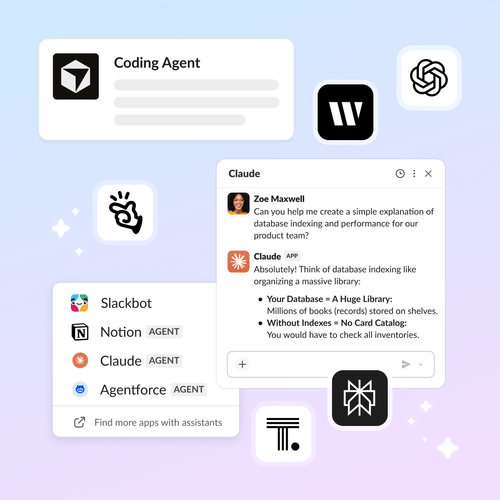
Imaginez un monde où chaque tâche, de la programmation informatique à la recherche en passant par la création, est prise en charge par un agent qui comprend votre activité et vous accompagne directement dans votre espace de travail. Avec Slack, ce rêve devient réalité. Tous vos agents contextuels sont réunis au même endroit, pour une collaboration plus simple et plus productive. Plus besoin de jongler d’une application ou d’un onglet à l’autre : place à une collaboration fluide entre humains et agents.
Lors du Dreamforce, nous avons dévoilé la plateforme Slack repensée qui permet aux partenaires et aux développeurs de créer des applications et des agents IA puissants et contextuels dans Slack, créant ainsi une plateforme riche en contexte dédié à la collaboration humain-agent.
Nous sommes ravis d’annoncer aujourd’hui la disponibilité générale de l’API de recherche en temps réel (RTS) et du serveur MCP (Model Context Protocol) de Slack. Grâce à cette mise à jour, chaque client et partenaire peut désormais intégrer ses agents IA en toute sécurité dans le contexte des données conversationnelles en temps réel de Slack (une mine d’or de conversations autour des projets, de connaissances d’équipe, de décisions commerciales et bien plus encore), tout en respectant scrupuleusement les normes de sécurité et de contrôle d’accès aux données les plus exigeantes.
Depuis la sortie limitée de l’API RTS et du serveur MCP en octobre, la réaction du secteur a été tout simplement fantastique.
- Dynamisme de l’écosystème : plus de 50 partenaires leaders du secteur, dont Anthropic, Google, OpenAI, Perplexity et bien d’autres, développent déjà des agents sensibles au contexte sur la plateforme.
- Adoption accrue : nous avons constaté une croissance de l’activité des agents sur Slack, notamment une multiplication par 25 des requêtes RTS et des appels à l’outil MCP, ce qui fait de Slack la couche d’exécution des agents IA d’entreprise de nos clients.
Que vous soyez développeur utilisant des outils comme Claude Code ou Cursor, ou spécialiste du marketing menant des recherches avec ChatGPT ou Perplexity, vos agents disposent désormais du contexte nécessaire pour vous aider à travailler plus rapidement, à éliminer les tâches répétitives et à améliorer votre productivité et votre créativité.
« Nous continuons d’approfondir notre intégration dans Slack grâce à notre extension MCP Apps et en ajoutant la puissance de Claude Code. Nos clients constatent de plus en plus la valeur de cette intégration bidirectionnelle, et son utilisation s’accélère en conséquence : des réponses plus rapides, ancrées dans le contexte réel de l’équipe, des flux de travail améliorés et des informations directement accessibles dans Slack, au sein de leur environnement de travail. Cette intégration donne accès à des informations fiables et exploitables, en phase avec le mode de fonctionnement réel de votre équipe. »
Le pouvoir du contexte conversationnel
Le succès de l’IA et des agents de votre entreprise repose sur l’accessibilité à un contexte métier pertinent et sur la capacité d’agir efficacement au sein de votre flux de travail. Grâce à l’API RTS et au serveur MCP, vous bénéficiez d’un accès sécurisé et flexible à vos données Slack, à tout moment. Vous pouvez ainsi avoir des conversations contextuelles et personnalisées rendant votre IA plus pertinente, précise et performante. Vous pouvez utiliser ces agents directement dans Slack ou via une interface dédiée. Quel que soit l’endroit où vous les utilisez, vous accédez à vos données en toute sécurité grâce à des mécanismes intégrés de sécurité, de gestion des autorisations et de récupération. Vous gardez le contrôle.
- Le serveur Slack MCP simplifie l’accès aux données Slack pour les grands modèles de langage et les agents IA, en fournissant un contexte conversationnel pour étayer les réponses et les actions des agents. Il sert de couche de communication unifiée et bidirectionnelle respectueuse des autorisations des utilisateurs, réduisant ainsi le besoin d’intégrations complexes et spécifiques à chaque service.
- L’API RTS offre aux applications un accès sécurisé et basé sur des requêtes sur les données Slack, leur permettant ainsi de récupérer uniquement les informations nécessaires, sans stocker les données client sur des serveurs externes. Utilisée comme contexte pour les agents, cette approche contribue à fournir des réponses plus pertinentes, précises et ancrées dans la réalité du travail.
« Nous avons testé la plateforme MCP de Slack avec Trivago Copilot, notre solution d’IA interne, et les premiers retours sont très positifs. La possibilité d’intégrer le contexte Slack en temps réel directement dans nos flux de travail d’IA permet à nos équipes de rechercher plus efficacement les connaissances de l’entreprise et à nos agents de publier des mises à jour sur Slack sans changer de contexte. Ce type d’intégration transforme les outils d’IA, qui deviennent une composante essentielle de notre flux de travail plutôt qu’un élément distinct. »
L’essor d’un Marketplace d’agents sensibles au contexte
Ce lancement introduit également une nouvelle génération d’agents partenaires dans Slack Marketplace, qui permettent aux équipes de collaborer plus efficacement au sein de différents services et pour divers cas d’utilisation. Que vous ayez besoin d’agents pour des tâches générales comme le développement, la rédaction et la recherche, ou pour des services spécifiques tels que l’ingénierie, le juridique, le marketing, etc., vous trouverez dans Slack les agents les plus adaptés à vos besoins.
Voici quelques-uns des agents les plus récents, conçus avec l’API RTS et le serveur MCP, et désormais disponibles sur Slack :
Recherche agentique
La recherche agentique utilise les agents pour parcourir et exploiter les conversations Slack, les documents et les sources externes, et adapter les résultats à l’utilisateur, au contexte et au canal, tout en respectant le modèle d’autorisations de Slack. Ces agents de recherche connaissent votre contexte Slack et peuvent être lancés directement depuis Slack pour une collaboration d’équipe efficace.
- Claude est un assistant IA d’Anthropic qui permet de collaborer facilement avec votre équipe via message direct, un panneau d’assistance IA ou les @mentions dans les fils de discussion. Cet outil polyvalent peut effectuer des recherches Web, se connecter à des sources de données et analyser des documents. En intégrant les données Slack à l’application Claude, vous pouvez effectuer des recherches dans les canaux, les messages et les fichiers de l’espace de travail, pour une expérience IA fluide et adaptée aux besoins de votre équipe.
- Guru fournit une couche de connaissances fiable pour alimenter les agents contextuels dans Slack. En combinant le contexte Slack en temps réel avec les connaissances de l’entreprise vérifiées en continu, Guru garantit aux agents et aux équipes des réponses précises et respectueuses des autorisations.
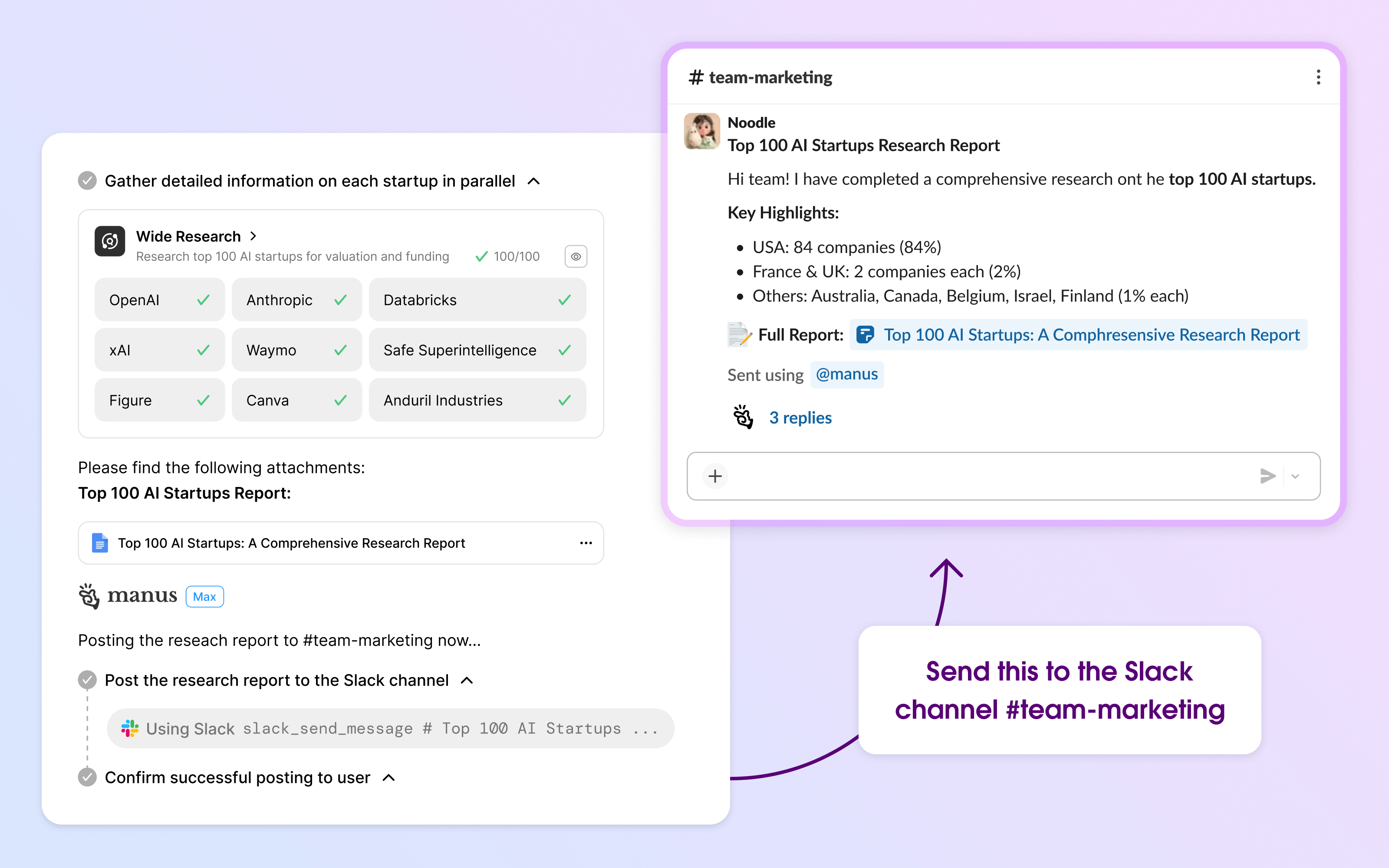
- Manus est un agent d’IA généraliste autonome conçu pour accomplir des tâches et fournir des résultats. Grâce au connecteur Slack intégré, Manus peut analyser vos canaux, extraire les informations clés, transformer les discussions en actions concrètes et partager les résultats avec votre équipe, le tout via de simples commandes en langage naturel. Il agit comme un assistant personnel qui connaît votre équipe sur le bout des doigts.
- Perplexity est un agent qui excelle dans l’analyse et la synthèse de grands volumes de textes et de documents. Il fournit des résumés et des informations rapides, facilitant ainsi la gestion et la compréhension d’informations complexes par votre équipe, le tout au sein de Slack.
« Grâce à la recherche en temps réel et aux fonctionnalités MCP de Slack, les équipes peuvent plus facilement extraire et exploiter en toute sécurité les informations contenues dans Slack. En nous appuyant sur cette base, nous souhaitons aider les agents à transformer le contexte auquel ils ont accès en temps réel en résultats concrets pour faciliter leur travail quotidien, tout en respectant la propriété des données, la sécurité et les limites de l’entreprise. »
Agents de productivité et de gestion des tâches
Vos assistants de productivité préférés vous aident à rester productifs grâce à des tâches telles que la planification de rendez-vous, l’enregistrement de rappels, la création et la mise à jour automatiques d’informations et la gestion de vos activités quotidiennes.
- Ari est un assistant virtuel qui aide les responsables et les équipes à optimiser leurs performances en transformant les communications en actions claires et en proposant des séances de coaching personnalisées. Grâce à l’API de recherche en temps réel de Slack, Ari permet aux utilisateurs de rester organisés et de se remémorer et synthétiser instantanément le contexte de chaque conversation. Il peut ainsi répondre aux questions « Que s’est-il passé ? » et « Comment dois-je aborder ce problème ? » avec pertinence et empathie, directement dans le flux de travail.
- Read AI pour Slack permet aux utilisateurs de publier directement leurs notes de réunion dans Slack, intégrant ainsi l’expérience Read AI à leur flux de travail quotidien. Grâce à la recherche en temps réel, ils peuvent désormais accéder à toutes leurs données connectées et effectuer des recherches instantanées et conformes dans toutes leurs réunions et sur toutes les plateformes connectées.
- Tembo est un agent d’ingénierie d’arrière-plan pour Slack. Il gère les tâches issues des conversations, des problèmes et des alertes, ainsi que les automatisations planifiées ou d’événements, en produisant des pull requests ou des mises à jour structurées pouvant être examinées dans Slack.
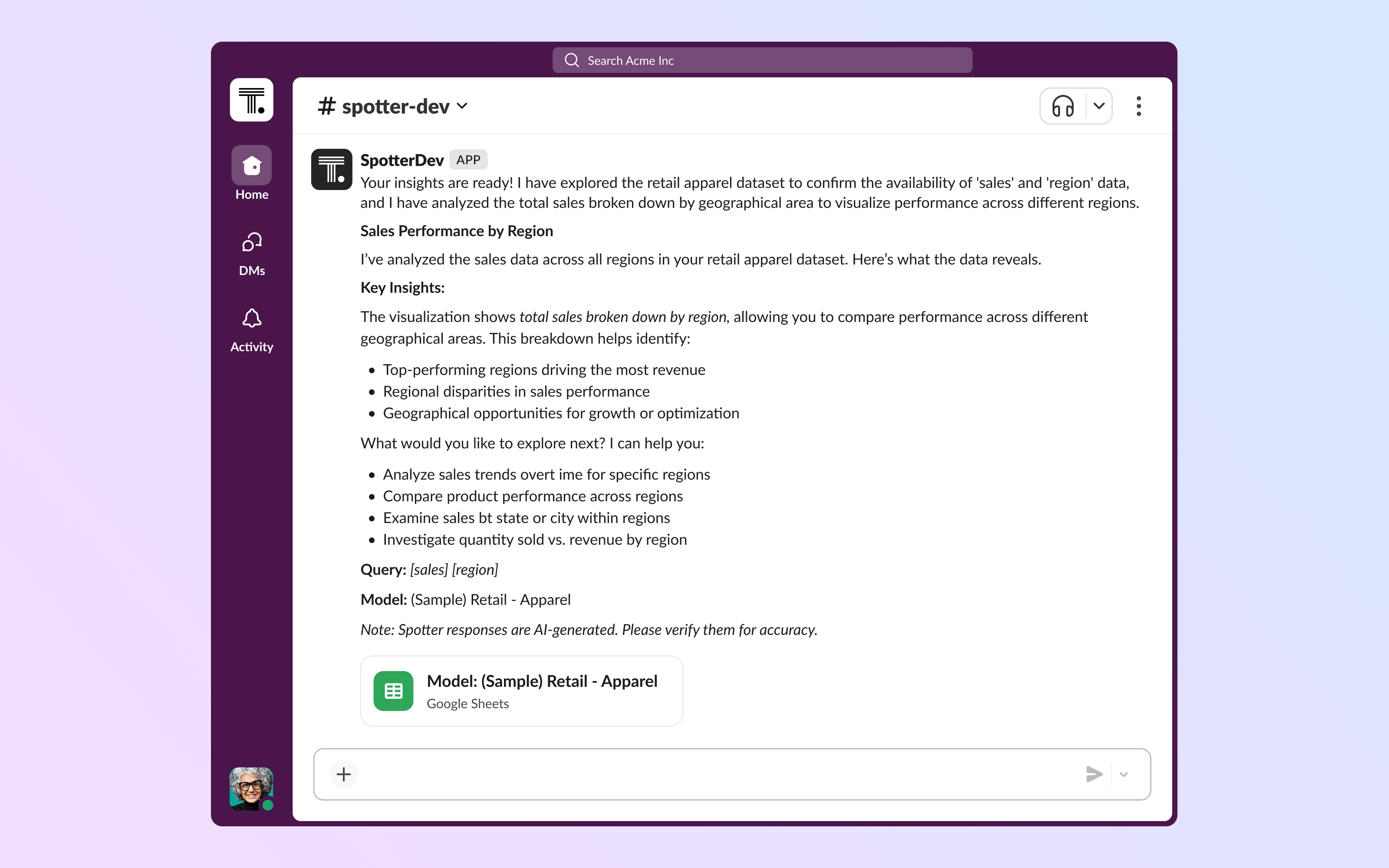
- Spotter est un agent de veille stratégique de ThoughtSpot qui utilise le serveur MCP de Slack pour connecter en toute sécurité les données d’entreprise en temps réel aux conversations Slack, transformant ainsi les discussions quotidiennes en informations exploitables. Les équipes peuvent interroger Spotter en langage naturel et analyser des données telles que les niveaux de stock de la chaîne d’approvisionnement, les performances des produits et bien plus encore, puis partager les résultats d’analyse directement dans les canaux Slack afin que les décisions soient toujours basées sur les informations les plus récentes.
Agents dédiés à l’automatisation des flux de travail et au contenu
Collaborez avec les agents pour créer, gérer et optimiser automatiquement les flux de travail et le contenu directement dans Slack. Grâce au contexte en temps réel et aux besoins de l’entreprise, les agents fluidifient les opérations d’équipe, automatisent l’assistance et produisent du contenu personnalisé en quelques secondes.
- Alysio GTM AI possède un espace de travail désormais connecté au serveur Slack MCP. Les équipes peuvent ainsi poser des questions, obtenir des informations en temps réel et agir directement dans leurs outils GTM, sans quitter Slack. Alysio permet également d’analyser et d’agir dans l’ensemble des canaux, fils de discussion et messages Slack, transformant ainsi Slack en une interface en temps réel pour l’analyse des données commerciales.
- Credal AI permet de créer, déployer et gérer des agents IA sécurisés capables de synthétiser les données d’entreprise, de générer du contenu et d’agir. L’API RTS de Slack permet à ces agents de parcourir rapidement et en toute sécurité l’historique des conversations de l’entreprise, afin de recueillir le contexte le plus précis et pertinent pour répondre aux demandes des utilisateurs.
- Moveworks est une plateforme d’assistance IA permettant à l’ensemble de vos collaborateurs de rechercher et d’agir au sein des systèmes d’entreprise, en unifiant les informations et les contenus provenant de nombreux outils en une expérience de recherche unique. Grâce à l’API RTS de Slack pour la recherche par mots-clés et sémantique, Moveworks améliore la qualité des recherches en extrayant les canaux, messages et fichiers pertinents de Slack afin de fournir des résultats plus précis et contextuels.
- WRITER est une plateforme d’agents IA d’entreprise conçue pour exécuter et déployer à grande échelle des tâches conformes à l’image de marque et aux réglementations en vigueur dans les domaines du marketing et des ventes. Elle permet aux équipes de déléguer des flux de travail complexes à des agents qui interagissent de manière sécurisée avec leurs données et outils. Le serveur Slack MCP permet à WRITER d’effectuer des recherches dans les messages, les fichiers, les utilisateurs et les canaux, ainsi que de consulter l’activité récente des canaux et l’intégralité des conversations des fils de discussion. Il permet également à WRITER d’interagir directement dans Slack, notamment en envoyant des messages et en générant de nouveaux canevas Slack avec du contenu structuré à partager et à élaborer en collaboration. WRITER peut ainsi interpréter, analyser et exploiter l’activité dans Slack au sein même de la plateforme.
Agents fonctionnels et spécifiques aux cas d’utilisation
Faites appel à des agents spécialisés de haut niveau, conçus pour des rôles spécifiques tels que le rédactionnel, la programmation informatique, le juridique et les RH, afin de créer du contenu de qualité, de déployer du code et d’accélérer votre travail comme jamais. En intégrant ces experts à votre espace de travail Slack, vos équipes pourront collaborer efficacement et ainsi améliorer leurs performances globales.
- Claude Code est un agent IA de codage qui aide les développeurs à comprendre, rédiger et refactoriser le code grâce à des interactions en langage naturel ancrées dans leurs projets réels. Les utilisateurs peuvent poser des questions sur le code, examiner les modifications et coordonner les corrections directement dans les canaux d’équipe, transformant ainsi les conversations quotidiennes en flux de travail de développement plus rapides et plus collaboratifs.
- Cursor pour Slack permet aux équipes de déléguer des tâches à des développeurs directement dans Slack afin de transformer rapidement une idée en pull request. La connexion aux données Slack permet à Cursor de rechercher et d’exploiter tout le contexte des canaux, messages et fichiers de l’espace de travail pour compiler et déployer du code plus rapidement.
- Learn Place Assistant est un assistant d’apprentissage basé sur l’IA qui aide les utilisateurs à maîtriser les sujets grâce à des parcours d’étude personnalisés, des explications adaptées et un suivi des progrès, rendant ainsi l’apprentissage plus efficace et adaptable aux objectifs individuels. Grâce à l’API RTS de Slack, les équipes peuvent accéder à une assistance pédagogique personnalisée et à des conseils thématiques directement dans leurs conversations et leurs flux de travail, ce qui favorise le partage des connaissances et le développement des compétences sans interrompre leur activité.
- Nalvin aide les équipes produit modernes à optimiser leur travail tout au long des phases de découverte, de planification et de livraison. Grâce à l’API RTS de Slack, Nalvin peut désormais comprendre les conversations en temps réel et les relier automatiquement aux tickets, à la documentation et aux données clients, garantissant ainsi que les informations essentielles sur le produit ne soient jamais perdues.
- L’intégration Slack de Wordsmith apporte des connaissances juridiques et une assistance documentaire basées sur l’IA directement dans l’espace de travail de votre équipe. Vos collaborateurs peuvent consulter des conseils sur les politiques de l’entreprise, créer de nouveaux contrats et examiner des documents juridiques, ce qui réduit instantanément les blocages juridiques et fournit des réponses rapides, cohérentes et contextuelles. Grâce à cette intégration, vous disposez d’un expert juridique disponible 24 h/24 et 7 j/7.
- Workleap AI est une application qui intègre la plateforme de gestion des ressources humaines Workleap à Slack, offrant ainsi aux responsables un accès instantané aux conversations, décisions et fichiers les plus récents. Elle unifie les données d’engagement et de performance en les contextualisant, ce qui enrichit les retours d’information, ancre les objectifs et les évaluations dans le réel et centralise les données issues d’outils comme Jira et Notion, pour une prise de décision plus éclairée et plus rapide.
« Slack regorge d’informations techniques essentielles : décisions de conception, discussions sur les incidents, justifications des compromis… Cursor peut exploiter ces données pour implémenter une nouvelle fonctionnalité, corriger un bug ou refactoriser du code directement dans Slack. L’agent génère ensuite une pull request que vous pouvez examiner et déployer en quelques minutes. Nous sommes impatients de découvrir les créations des équipes utilisant Cursor pour Slack ! »
Le travail de demain sera collaboratif
Le véritable potentiel de l’IA se révèle lorsque vos agents opèrent là où vos équipes travaillent déjà. Grâce au lancement général de l’API RTS et du serveur MCP de Slack, vous pouvez désormais intégrer des agents IA puissants et contextuels directement dans votre espace de travail Slack. Ces agents optimisent votre productivité et votre créativité en exploitant les données conversationnelles en temps réel, rendant ainsi chaque tâche – du développement à la création de contenu – plus efficace.
Prêt à vous lancer dans l’aventure avec des agents ? Découvrez la plateforme Slack, visitez Slack Marketplace pour explorer les dernières applications et agents IA, ou apprenez à créer vos propres agents contextuels sur Slack.dev.
 Parfait !
Merci beaucoup pour votre feedback !
Bien compris !
Merci pour vos commentaires.
Oups ! Nous rencontrons quelques difficultés. Veuillez réessayer plus tard.