Smarter Workflows, No Code Required: Introducing New AI Steps in Workflow Builder

Now your workflows don't just move data — they can summarize, translate and draft on your behalf, all with AI.

Slack 팀이 작성2026년 5월 21일

We’ve all been there. You’re in the middle of your most important work when a notification pulls you out of your flow. A project lead needs a status update. A client is asking about a ticket. Finding the information in Slack is easy — but pulling it together and drafting a clear response takes time you don’t have.

At Slack, we believe that making automation workflows accessible to everyone is the key to unlocking true organizational productivity. We’ve spent years making Workflow Builder the easiest way for anyone to automate the routine parts of their work.But even the most advanced automations still needed a human to make sense of the data: summarizing updates, spotting patterns, or deciding what to do next. Until now.

Today, we’re expanding Workflow Builder’s  AI capabilities with the new Generate AI response Step. Now, you can build workflows with an AI-generated step that can summarize, translate, and draft on your behalf from a single prompt.  It’s automation for everyone — not just the people who know how to code.

What is the Generate AI response step?

Workflow Builder has always been Slack’s no-code automation hub, helping teams build workflows that cut repetitive work without writing a single line of code. With built-in AI, you can create automated workflows in just a few clicks — simply describe what you need, and AI builds it for you. Now, the new Generate AI response step takes this even further. Simply add the step to your workflow, write a prompt, choose your knowledge sources (channels, canvases, lists, and files), and AI can generate summaries, pull out key decisions and action items, classify unstructured text, transform data into a standard format, and more.

  • Add the Generate AI response step to any workflow: One-off prompts don’t scale. Workflows do. When AI lives inside a workflow, the output is consistent and automatic.
  • Ground AI in your knowledge: AI is only as good as the context it’s given. This step draws from real Slack content in channels and documents — the places where your team actually works.
  • Stay in control with Enterprise-grade governance: Admins can restrict who builds with the step and control what data it touches, all backed by Slack’s AI guardrails.

How it works: clicks, not code

The Generate AI response step is simple by design, because you shouldn’t always need an engineer to make your tools smarter:

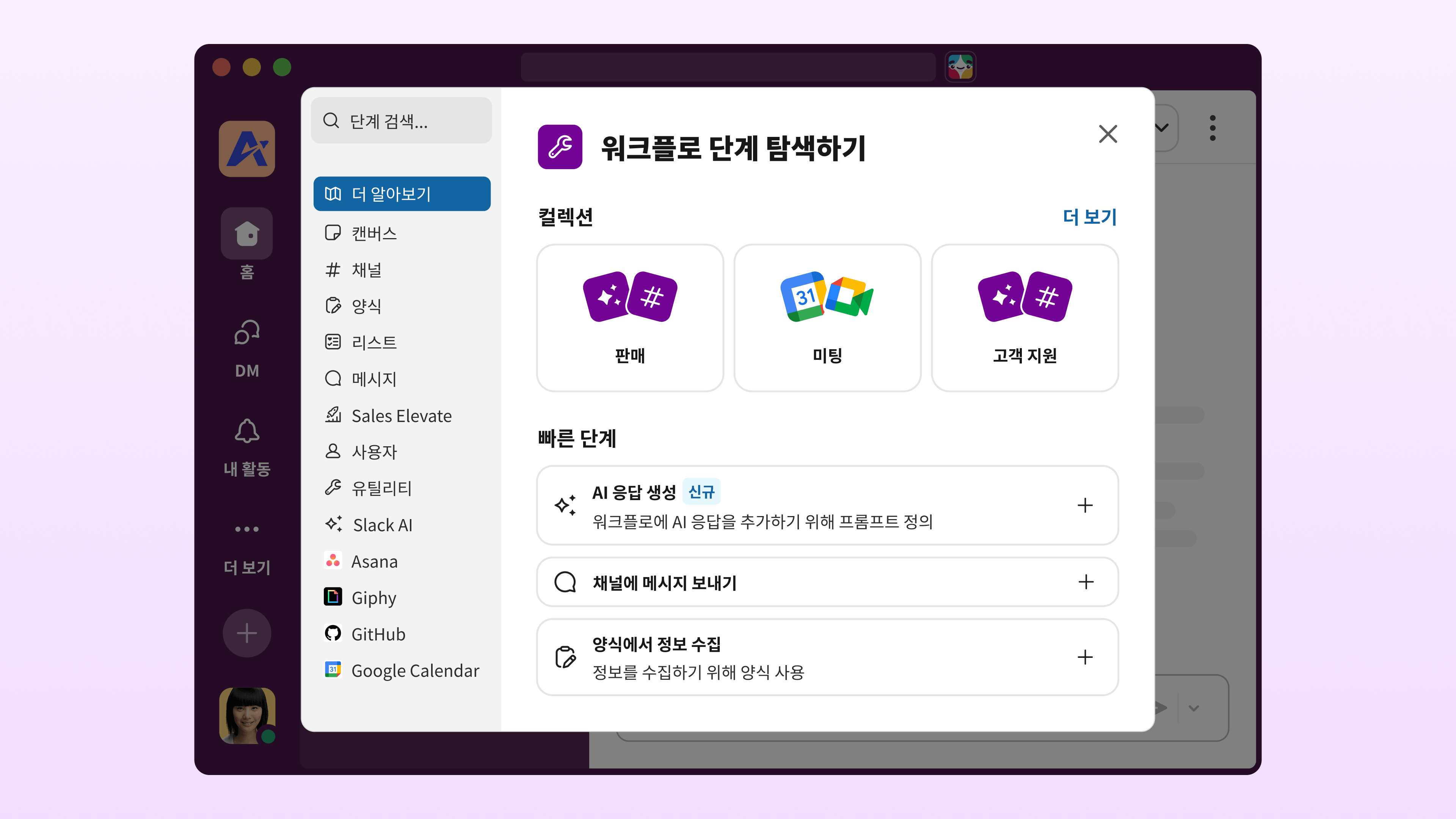
  • Select the step: Look for “Generate AI response” in the step library — it snaps into place in your workflow just like any other step.
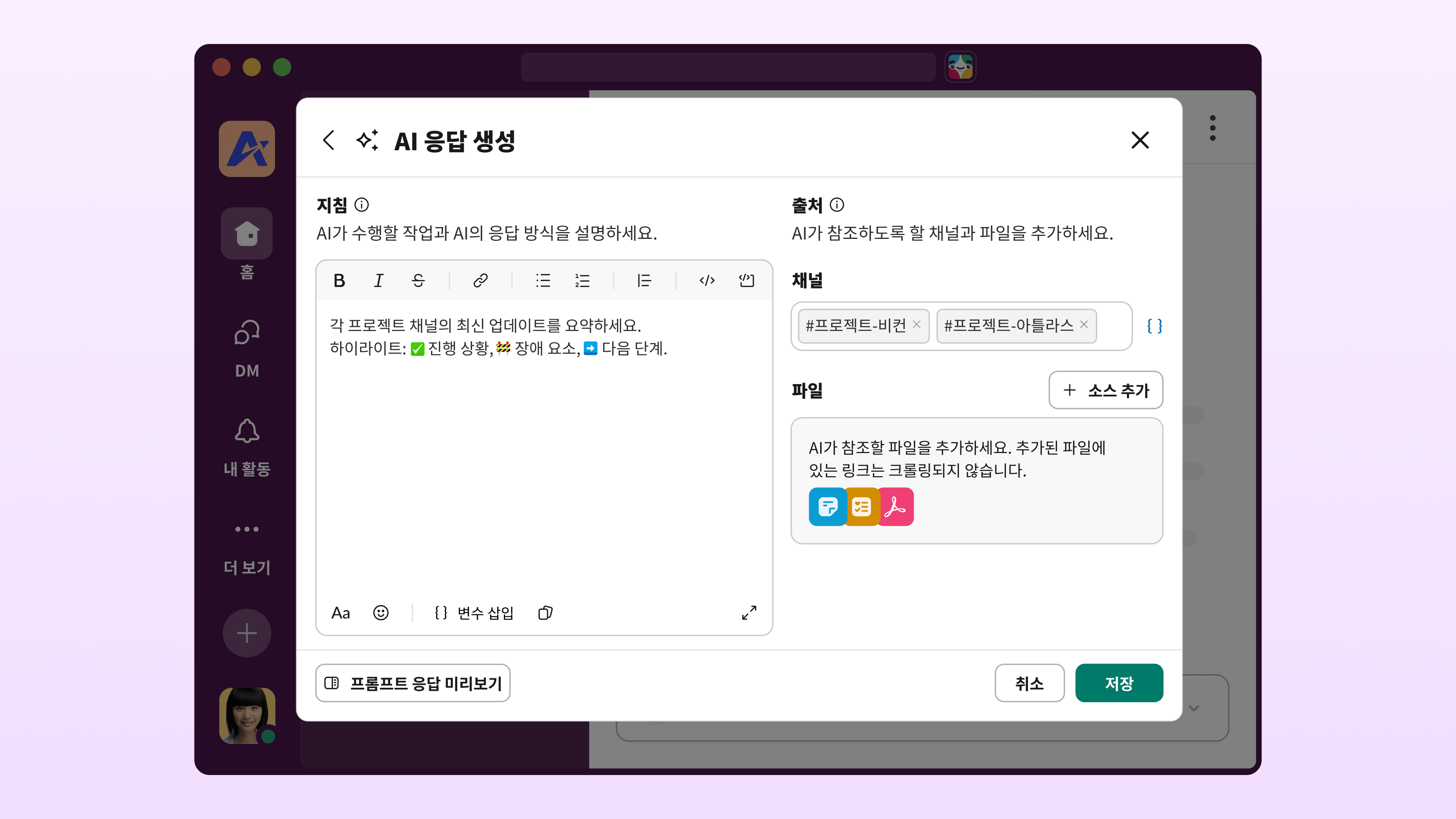
  • Write a prompt: Describe what the AI should do in plain language. 
  • Attach knowledge: Point it at Slack content or variables from earlier steps. It can handle multiple sources at once, even long documents or busy channels.
  • Test before you publish: Test your prompt with interactive preview mode before going live.
  • Let it run: Whether triggered on a schedule or an event, the step returns a grounded response every time.

This entire process unlocks the full power of AI within your workflow, capable of:

  • Summarizing complex threads or long documents to keep everyone aligned.
  • Translating messages automatically so your global teams stay in sync.
  • Drafting responses grounded in your knowledge sources, turning raw data into actionable conversation.

Simply set your prompt, connect your steps, and let your workflow handle the rest.

See it in action

Imagine a project manager who spends an hour every Friday pulling updates from five channels to draft an executive summary. With the Generate AI response step, that’s a workflow:

  • The trigger: A scheduled workflow is set to run every Friday morning at 8:00 AM.
  • The AI logic: The core of the automation is the AI step, configured with a prompt like: “Summarize the latest updates from each project channel. Highlight: Progress,  any Blockers, and Next Steps,” and linked to the five designated project channels as knowledge sources.
  • The outcome: The workflow automatically executes this instruction, generating a crisp, clean summary grounded in real-time channel data, which is then posted directly to the #exec-updates channel. That’s an hour of repetitive work, handled automatically every week.

More ways to use it

The Generate AI response step works across any team and any process. A few more examples:

  • Customer support: Triage incoming tickets by summarizing thread history and suggesting a response before an agent ever opens the case.
  • Incident response: When an alert fires, the workflow pulls in relevant context and drafts an initial status update — so your team starts with a draft, not a blank page.
  • Sales (coming soon): Auto-generate deal summaries from CRM data and channel activity so reps walk into every call prepared.

Build your first AI workflow

With the Generate AI response step, Workflow Builder gives you the easiest way to bring the power of AI into your daily work. Automate the time-consuming parts of your process and reclaim your focus for the work only you can do.

Ready to build? Head to Workflow Builder and add the Generate AI response step to your next workflow.

Learn more about Workflow Builder.

이 포스트가 유용했나요?

0/600

훌륭해요!

피드백을 주셔서 감사합니다.

알겠습니다!

피드백을 주셔서 감사합니다.

죄송합니다. 문제가 발생했습니다. 나중에 다시 시도해주세요.

계속 읽기

생산성

Slack 캔버스로 더욱 앞서가는 Digital HQ

Slack 및 Salesforce 360의 가치를 강화하여 팀 생산성을 향상하는 기능을 소개합니다.

생산성

평정심을 유지하고 자동화하기: 팀에서 바로 사용할 수 있는 3가지 Slack 워크플로

Slack에서 업무를 자동화하는 도구인 워크플로 빌더를 사용해 동료가 지원을 받고 요청을 제출할 수 있도록 더 나은 업무 방식을 제공하세요.

새 소식

Slack을 통해 영업의 수준을 한 차원 높이세요

Slack Sales Elevate를 통해 리더가 더 나은 의사 결정을 내리고 더 많은 성공을 이끌어내는 방법을 알아보세요

새 소식

Slack과 Salesforce의 새로운 통합으로 영업 팀의 역량을 강화하세요

Slack Sales Elevate로 고객 레코드, 계정, 기회, 주요 지표를 중앙 집중화하여 영업 프로세스의 모든 단계 혁신