
Modern software development often requires large teams of people interacting over a single codebase, using code tracking systems that can manage incoming and outgoing changes while avoiding conflicts. While every engineering team might use a different service to manage their code, they can all use Slack as the central place for testing and review.
Using a combination of channels, threads and apps, engineering teams can save a lot of time by not needing to wade through email inboxes and app alerts, or jump between browser tabs. And that means their code gets into customers’ hands that much faster.
Let’s look at a basic approach.
Start by creating a code review channel
Depending on the size of your codebase or team, you can create a code review channel for each branch or repo, or for a particular feature. For small teams, a single #code-review channel might suffice.
Create the channel and post a message laying out expectations and common behaviors. For example, ask people to post when they need something reviewed, then describe the process for what happens after approval. Pin that message to the channel so that at any time developers joining your team and channels can see a clear explanation of the code review process.
Use mentions, emoji and threads to interact with each other
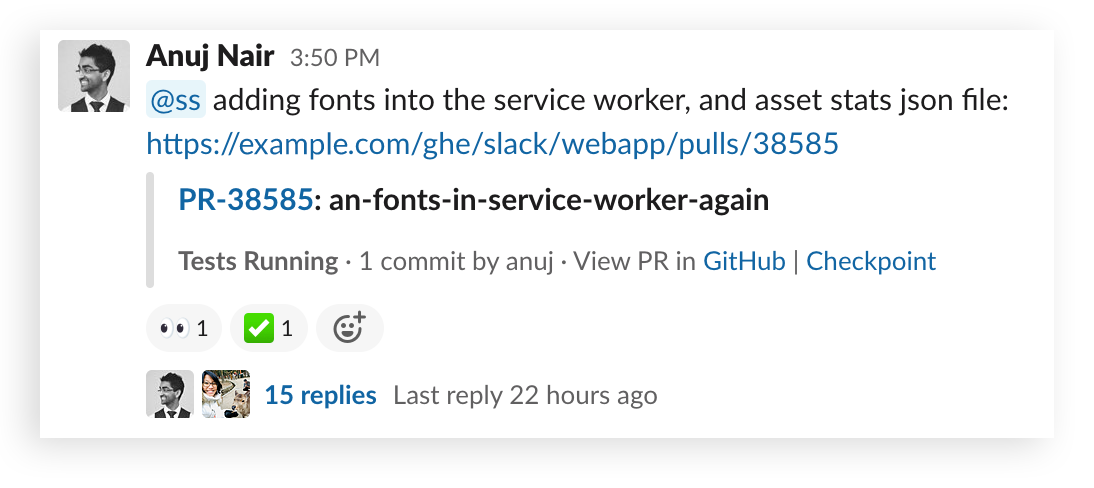
In Slack’s own internal code review channel for frontend development, people begin their review request with an “@mention,” either calling out a member of their team by name, or mentioning a user group that pings multiple people at once, like @android-eng. We also have a custom “EZ” emoji to let others know when a review is short and simple.
Developers on the team step up by reacting with the 👀 eyes emoji when they plan to conduct the review. For user group mentions, this comes in handy because once you see the eyes emoji, it means someone has claimed it. When a review is complete, we use a ✅ check mark emoji to let the person know their code is ready for next steps.
Threads on each request are a great place to discuss specifics, and thanks to automatic previews from GitHub as well as Slack’s built-in snippets, you can easily quote sections of code for the purpose of discussion.

This informal system works well, and people can track every code review they did by searching from:me has::eyes: in:#code-review in the channel. Any result without a check mark means there’s still work to do. If a request falls through the cracks, people can post the word “bump” to their thread, which informs everyone that the task is still open.
Keep everyone updated with automated alerts
At Slack, we also have channels dedicated to output from GitHub. When pull requests are integrated into the master branch, an automated message posts in the channel, with contributors mentioned by name.
This keeps everyone informed about when deploys take place and which changes were rolled up into a release. It also subtly reminds people working in branches that they can minimize conflicts by updating with the latest changes before submitting their own pull requests.
Bigger codebase? Larger teams? More complex needs?
Our codebase at Slack is split into many branches and repos, with teams focused on each aspect of the software. We use separate channels for code reviews and deploys so a mobile developer doesn’t need to be bothered with infrastructure backend code and vice versa. Coordinating everything in Slack gives developers a space to interact, review and help one another.
Over the years, we’ve also built lots of custom internal software to expand on our basic use in Slack to fit our specific needs, but GitHub’s Slack app (as well as Bitbucket, GitLab, etc.) can be configured to post pull requests and update a channel on changes to any branch.
Coordinating teams that work on a large codebase is no easy feat. But giving developers a place to interact, review and deploy in Slack can be an efficient solution for thorny problems. For anyone considering adopting this approach for their software development teams, our Help Center offers a broad overview of all our offerings.
 훌륭해요!
훌륭해요!
피드백을 주셔서 감사합니다.
알겠습니다!
피드백을 주셔서 감사합니다.
죄송합니다. 문제가 발생했습니다. 나중에 다시 시도해주세요.