
Jeder Arbeitstag beginnt gleich. Du öffnest Slack und wirst sofort von einer Flut an Informationen überwältigt: ungelesene Channels, Thread-Antworten, Benachrichtigungen von jeder verknüpften App. Dich überkomt ein Gefühl der Dringlichkeit, aber alles sieht gleich aus. Du fängst an zu scrollen, und 20 Minuten später hast du zwar viel angesehen, weißt aber immer noch nicht, was du zuerst angehen sollst. Wir haben Heute entwickelt, damit du sofort weißt, was du priorisieren musst.
Eines der häufigsten Probleme, von dem uns Slack-Benutzer:innen berichten, ist nicht, dass es in Slack zu viele Nachrichten gibt, sondern dass es schwer ist zu erkennen, was wichtig ist, was ihre Aufmerksamkeit erfordert und was als nächstes ansteht. Von einer frühen Gruppe von Pilot-Kund:innen haben wir erfahren, dass die meisten Personen an einem gewöhnlichen Morgen weniger als 10 Aktivitäts-Benachrichtigungen haben. Die Überforderung kommt also nicht von der Menge, sondern von der Ungewissheit. Eine Nachricht zu lesen ist nicht dasselbe wie sie zu verstehen und zu bearbeiten, und genau hier kann KI wirklich helfen, indem sie dir hilft, Prioritäten zu erkennen.
Slack war schon immer dein Arbeitsort, und jetzt ist es auch der Ort, an dem KI arbeitet. Mitarbeitende möchten, dass KI sie produktiver macht, ohne dass sie groß darüber nachdenken müssen. Deshalb haben wir KI direkt in Slack integriert. Die neue Heute-Funktion generiert mithilfe von Signalen ein tägliches Briefing deiner Prioritäten, deines Kalenders und deiner Aufgaben aus allen verknüpften Apps direkt in Slack. Kein Tab-Wechsel, kein mühsames Zusammensuchen, stattdessen eine klare Gesamtübersicht über das Wesentliche, bevor der Tag richtig losgeht.
Stell dir Slack als die 2 % deiner KI-Investition vor, die den Wert der anderen 98 % erst nutzbar machen: In Slack finden nicht nur Unterhaltungen statt;, dort kommen Mitarbeitende, Agenten, Apps und Daten zusammen, damit du deine Arbeit erledigen kannst. Die Heute-Ansicht bündelt diese Arbeit aus all deinen Salesforce-Apps und -Daten, deine Agenten, deine ungelesenen Channels und Threads sowie deinen verknüpften Apps, damit du deinen Tag mit Klarheit beginnen kannst.
Heute beantwortet eine andere Frage
Als wir Heute entwickelt haben, sind wir davon ausgegangen, dass das Problem die Informationsflut ist. Nach 50 Interviews mit Slack-Benutzer:innen und mehr als 450 eingereichten Feedbacks haben wir etwas Aufschlussreiches erfahren: Mitarbeitende öffnen Heute nicht, um zu arbeiten. Sie öffnen es, um sich zu orientieren.
Die Frage, die Benutzer:innen sich wirklich stellen, lautet nicht „Was soll ich als Nächstes tun?“, sondern: „Habe ich etwas verpasst? Kann ich weiterarbeiten?“
Ohne Heute musstest du selbst Prioritäten setzen und herausfinden, was du als erstes angehen musstest, indem du Direktnachrichten überflogen, Threads gecheckt und Channels durchgescrollt hast. Das Ganze war ein aufwendiger, nervenaufreibender Prozess, der selten zu einem guten Gesamtüberblick geführt hat. Heute verschafft dir diesen Überblick in wenigen Sekunden. Es zeigt dir Accounts, die deine Aufmerksamkeit brauchen, Meetings, auf die du dich vorbereiten musst und die Arbeit, die an dem jeweiligen Tag wirklich wichtig ist.
Heute hat meinen Arbeitstag von Grund auf verändert. Es reduziert meinen morgendlichen Aufholbedarf und hilft mir, mich auf das zu konzentrieren, was wirklich zählt, statt mich ablenken zu lassen.
Starte jeden Morgen mit einem intelligenten täglichen Briefing
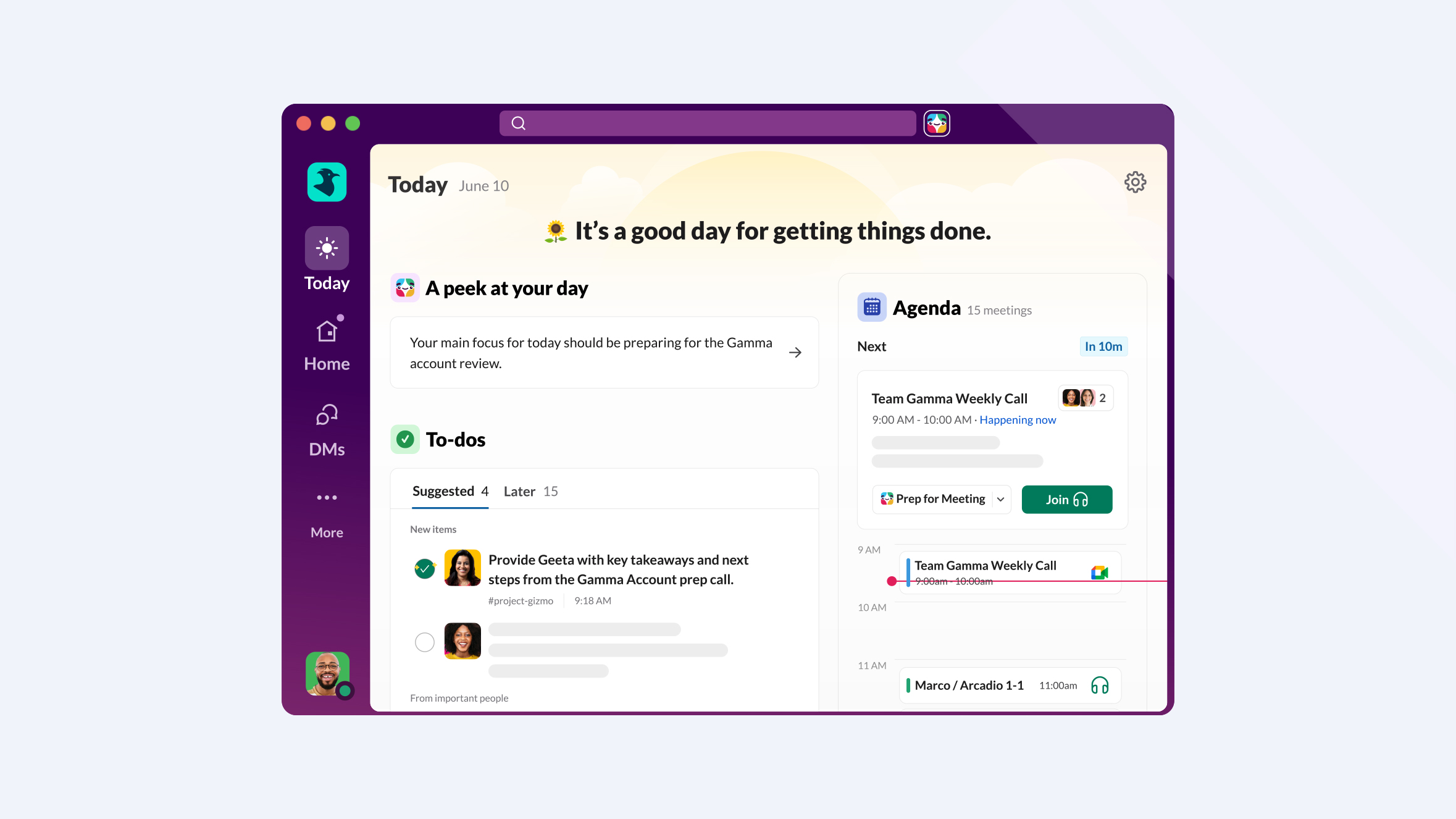
Heute bietet dir eine einheitliche Ansicht deiner Prioritäten, deines Kalenders und deiner dringendsten Aufgaben – aus allen Apps, die du mit Slack verknüpft hast. Heute setzt sich folgendermaßen zusammen:
Vorgeschlagene Fokusbereiche
Starte mit einer Übersicht KI-generierter Prioritäten, die auf deiner persönlichen Slack-Aktivität aus deinem gesamten vernetzten Ökosystem basieren. Diese Themen, Unterhaltungen und Projekte erfordern sofort deine Aufmerksamkeit. Und wenn du bereit bist zu handeln, bitte einfach Slackbot, tiefer einzutauchen.
Deine Agenda
Dein täglicher Google- oder Outlook-Kalender ist direkt in Slack integriert. Mit einem Klick kannst du Slackbot bitten, dich auf jedes Meeting vorzubereiten, indem er Kontext aus deinen Slack-Unterhaltungen zusammenführt, damit du bestens informiert am Meeting teilnehmen kannst. Benutzer:innen mit Zusammenfassungen verbringen 33 % weniger Zeit in Meetings.
Highlights
Wichtige Nachrichten aus all deinen Systemen werden hervorgehoben, damit sie nicht unter neueren Aktivitäten untergehen. Genau zwischen „Das habe ich gelesen“ und „Darauf habe ich geantwortet“ gehen Folgeaufgaben verloren. Highlights behebt dieses Problem.
To-dos
Deine To-dos werden neben deinen Meetings und priorisierten Unterhaltungen angezeigt, damit du keine wichtige Aufgabe aus den Augen verlierst. Du kannst Aufgaben manuell hinzufügen oder sie von der KI hinzufügen lassen, sie nach und nach abhaken und immer genau dort weitermachen, wo du aufgehört hast – ganz ohne zusätzliche Tabs oder Kontextwechsel. Die To-dos in Heute basieren auf einer neu gestalteten Ansicht im „Später“-Tab, die klar zwischen als Referenz gespeicherten Inhalten und tatsächlich zu erledigenden Aufgaben unterscheidet. Damit wird das Gesamtbild komplett: deine Unterhaltungen, dein Kalender und deine Aufgaben sind an einem Ort.
Eine produktivere Art zu arbeiten
Produktives Arbeiten bedeutet oft, mehr als 10-mal täglich zwischen Apps zu wechseln, und dabei gehen oft fast zwei Stunden für das erneute Konzentrieren verloren. Slack schließt die Lücke zwischen Orientierung und konkreter Handlung, damit du konzentriert bleiben kannst. Das bedeutet: Heute funktioniert nicht allein. Es ist Teil eines Trios von Funktionen, die gemeinsam eine kohärente Schaltzentrale für deinen Arbeitstag bilden:
- Heute ist dein intelligentes tägliches Briefing, in dem dein Tag visualisiert und deine Prioritäten hervorgehoben werden.
- Slackbot ist dein Produktivitätsassistent, der dir hilft, auf diese Prioritäten zu reagieren: durch das Verfassen von Follow-ups, die Vorbereitung auf Meetings und die Recherche in Tools wie Salesforce und Google Drive.
- Aktivität ist dein Triage-Hub: ein einheitlicher, anpassbarer Posteingang für Benachrichtigungen, damit deine Heute-Ansicht für die Arbeit frei bleibt, die wirklich zählt.
Mit Heute verschaffst du dir in Sekunden einen Überblick. Mit Aktivität behältst du den Überblick, indem du Benachrichtigungen nach Priorität sortierst. Und mit Slackbot gehst du deine Aufgaben an. Informiere dich zunächst darüber, was wichtig ist und fange dann mit der Arbeit an. Frühe Pilot-Kund:innen von Heute geben an, dass sie sich mit diesem Ablauf 72 % produktiver fühlen. Wenn du konzentrierter arbeiten möchtest, kannst du die neue Fokusmodus-Einstellung nutzen, um Badges und Benachrichtigungen zu reduzieren. Der Fokusmodus ermöglicht es dir, Ablenkungen auszublenden, während du in Slack bleibst, damit dich eine Erwähnung oder Nachricht nicht aus deiner Arbeit reißt. Wenn du fertig bist, kehrst du einfach zur Heute-Ansicht zurück und verpasst so nichts.
Nimm an der Open Beta teil
„Heute“ ist als Opt-in-Funktion für alle Slack-Kund:innen mit Enterprise-Plänen verfügbar. Administrator:innen können den Zugriff auf „Heute“ für ihre Organisation über ihre:n Account-Beauftragte:n beantragen. Nach der Aktivierung findest du die Funktion als eigenen Tab in deiner Slack-Seitenleiste.
Wichtige Hinweise zur Beta:
- Enterprise-Pläne mit KI-Zugriff: Jetzt verfügbar. Administrator:innen können die Funktion für ihre Organisation aktivieren.
- Business+ und Pro-Pläne mit KI-Zugriff: Ab diesem Sommer.
- Kalenderverbindung: Um das Tagesplan-Modul nutzen zu können, musst du deinen Kalender verknüpfen.
Wir haben es uns zur Aufgabe gemacht, Slack von einer Kommunikationsplattform zu einem Betriebssystem für die Arbeit zu machen. Slack ist die einheitliche Benutzeroberfläche, auf der Mitarbeitende, Agenten, Apps und Daten zusammenkommen. Wenn du dir schon immer einen zentralen Ort gewünscht hast, an dem du deinen Tag in Slack beginnen kannst und der deine Arbeit, deine Prioritäten und das widerspiegelt, was wirklich zählt, dann ist die Heute-Ansicht genau das.
Nimm an der offenen Beta-Phase der „Heute“-Ansicht teil und starte gut vorbereitet in deinen Tag. Du bringst den Kaffee mit – wir sorgen für Klarheit.
 Super!
Vielen Dank für dein Feedback!
Okay!
Vielen Dank für dein Feedback.
Hoppla! Wir haben gerade Schwierigkeiten. Bitte versuche es später noch einmal!